EasyManua.ls Logo

Fostex B-16 - Page 49

Fostex B-16
118 pages
Print Icon
To Next Page IconTo Next Page
To Previous Page IconTo Previous Page
Loading...
j.
7
CAPSTAN
MOTOR
ASSEMBLY
(Fig.
6.6)
*
Remove
the
three
(B)
screws
and
the
capstan
motor
assembly
can
be
taken
out.
*
Unsolder
the
motor
lead
wires
at
the
terminating
PCB.
6-9REPLACING
THE
CAPSTAN
BELT
(Fig.
6.6)
*
Remove
the
two
(C)
screws
and
take
off
the
bracket
to
replace
the
capstan
belt.
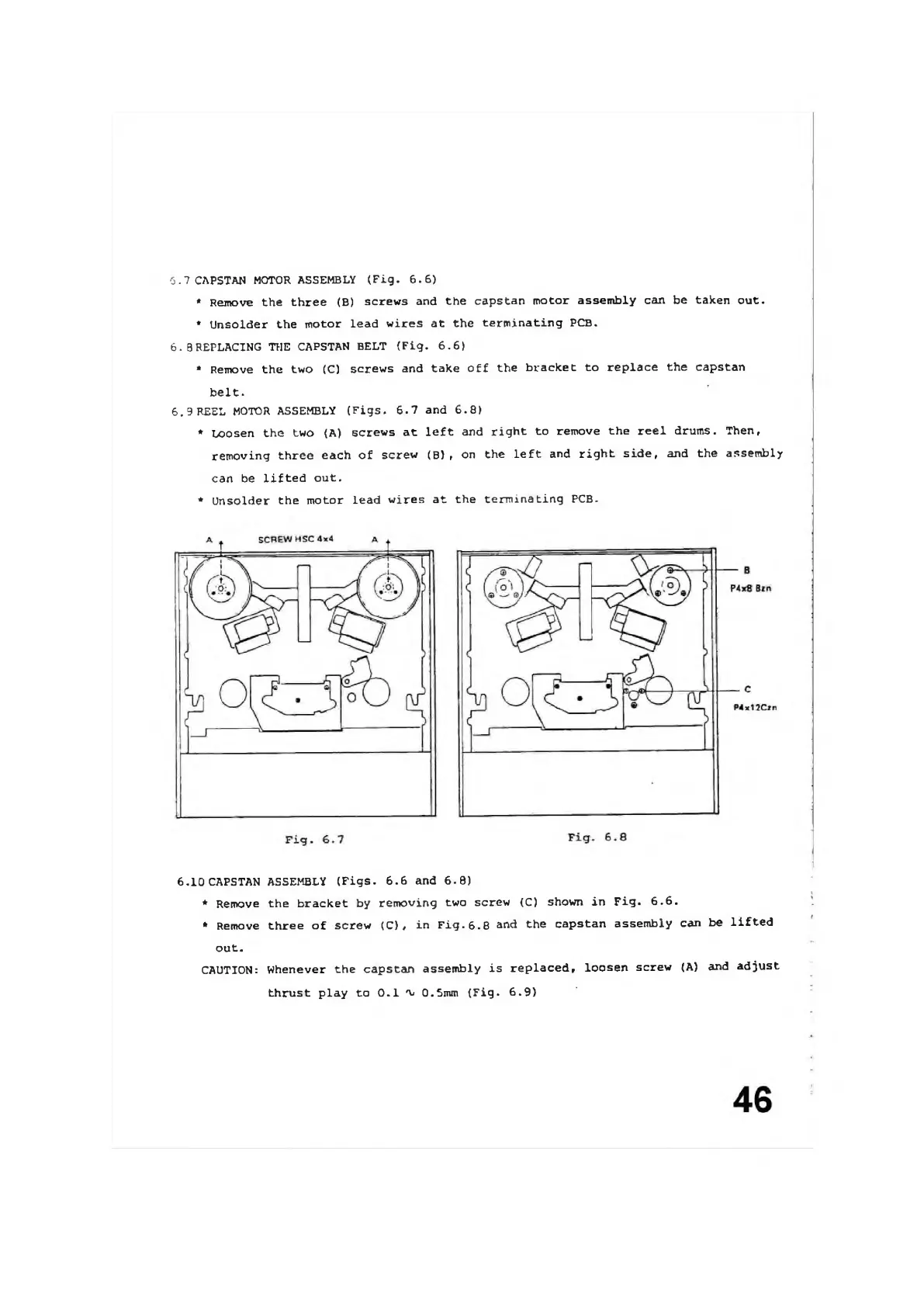
6,9
REEL
MOTOR
ASSEMBLY
(Figs.
6.7
and
6.8)
*
Loosen
the
two
(A)
screws
at
left
and
right
to
remove
the
reel
drums.
Then,
removing
three
each
of
screw
(B)
,
on
the
left
and
right
side,
and
the
assembly
can
be
lifted
out.
*
Unsolder
the
motor
Lead
wires
at
the
terminating
PCB.
6.10
CAPSTAN
ASSEMBLY
(Figs.
6.6
and
6.8)
*
Remove
the
bracket
by
removing
two
screw
(C)
shown
in
Fig.
6.6.
*
Remove
three
of
screw
(C),
in
Fig.
6.8
and
the
capstan
assembly
can
be
lifted
out.
CAUTION:
Whenever
the
capstan
assembly
is
replaced,
loosen
screw
(A)
and
adjust
thrust
play
to
0.1
n,
0.5mm
(Fig.
6.9)

Other manuals for Fostex B-16