EasyManua.ls Logo

Fostex MN-50 - Page 2

Fostex MN-50
2 pages
Print Icon
To Previous Page IconTo Previous Page
Loading...
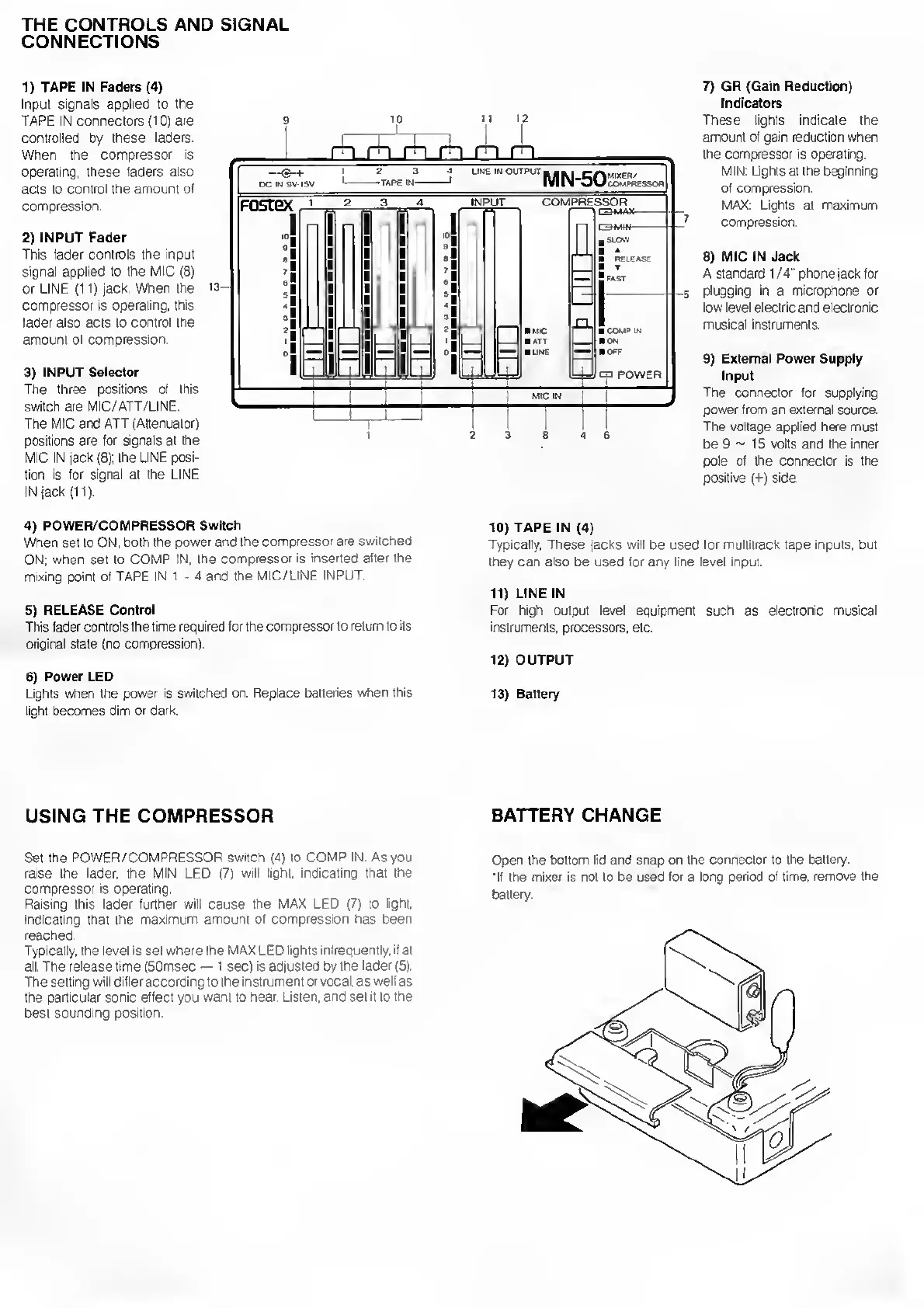
THE
CONTROLS
AND
SIGNAL
CONNECTIONS
1)
TAPE
IN
Faders
(4)
Input
signals
applied
to
the
TAPE
IN
connectors
(10)
are
controlled
by
these
faders.
When
the
compressor
is
operating,
these
faders
also
acts
to
control
the
amount
of
compression.
2)
INPUT
Fader
This
fader
controls
the
input
signal
applied
to
the
MIC
(8)
or
LINE
(11)
jack.
When
the
compressor
is
operating,
this
fader
also
acts
to
control
the
amount
of
compression.
3)
INPUT
Selector
The
three
positions
of
this
switch
are
MIC/ATT/LINE.
The
MIC
and
ATT
(Attenuator)
positions
are
for
signals
at
the
MIC
IN
jack
(8);
the
LINE
posi¬
tion
is
for
signal
at
the
LINE
IN
jack
(11).
7)
GR
(Gain
Reduction)
Indicators
These
lights
indicate
the
amount
of
gain
reduction
when
the
compressor
is
operating.
MIN:
Lights
at
the
beginning
of
compression.
MAX:
Lights
at
maximum
compression.
8)
MIC
IN
Jack
A
standard
1
/4"
phone
jack
for
plugging
in
a
microphone
or
low
level
electric
and
electronic
musical
instruments.
9)
External
Power
Supply
Input
The
connector
for
supplying
power
from
an
external
source.
The
voltage
applied
here
must
be
9
~
15
volts
and
the
inner
pole
of
the
connector
is
the
positive
(+)
side.
4)
POWER/COMPRESSOR
Switch
When
set
to
ON,
both
the
power
and
the
compressor
are
switched
ON:
when
set
to
COMP
IN,
the
compressor
is
inserted
after
the
mixing
point
of
TAPE
IN
1
-
4
and
the
MIC/LINE
INPUT.
5)
RELEASE
Control
This
fader
controls
the
time
required
for
the
compressor
to
return
to
its
original
state
(no
compression).
6)
Power
LED
Lights
when
the
power
is
switched
on.
Replace
batteries
when
this
light
becomes
dim
or
dark.
10)
TAPE
IN
(4)
Typically,
These
jacks
will
be
used
for
multitrack
tape
inputs,
but
they
can
also
be
used
for
any
line
level
input.
11)
LINE
IN
For
high
output
level
equipment
such
as
electronic
musical
instruments,
processors,
etc.
12)
OUTPUT
13)
Battery
USING
THE
COMPRESSOR
BATTERY
CHANGE
Set
the
POWER/COMPRESSOR
switch
(4)
to
COMP
IN.
As
you
raise
the
fader,
the
MIN
LED
(7)
will
light,
indicating
that
the
compressor
is
operating.
Raising
this
fader
further
will
cause
the
MAX
LED
(7)
to
light,
indicating
that
the
maximum
amount
of
compression
has
been
reached.
Typically,
Ihe
level
is
sel
where
the
MAX
LED
lights
infrequently,
if
at
all.
The
release
time
(50msec
1
sec)
is
adjusted
by
the
fader
(5).
The
setting
will
differ
according
to
Ihe
instrument
or
vocal,
as
well
as
the
particular
sonic
effect
you
want
to
hear.
Listen,
and
set
it
to
the
best
sounding
position,
Open
the
bottom
lid
and
snap
on
the
connector
to
the
battery.
’If
the
mixer
is
not
to
be
used
for
a
long
period
of
time,
remove
the
battery.

Related product manuals