Need help?
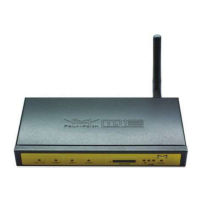
Do you have a question about the Four-Faith F3134 and is the answer not in the manual?
Describes the F3X34 series router's function and applications.
Details industrial design, stability, convenience, and performance features.
Explains the basic operational chart of the router.
Lists technical specifications for various models and components.
Provides initial instructions and warnings for router installation.
Lists all items included in the router package.
Guides on physical installation and connecting cables.
Explains how to connect the PC to the router for configuration.
Details how to access and navigate the router's web interface.
Covers basic network settings like WAN connection types.
Configures WAN connection types: Disabled, Static IP, DHCP, PPPOE, PPTP, L2TP, 3G/4G.
Explains how to use dynamic DNS services for remote access.
Allows cloning MAC addresses for ISP registration.
Configures operating mode and dynamic routing settings.
Explains virtual LAN configuration for network segmentation.
Covers bridging and network configuration.
Manages wireless network settings.
Configures SSID, mode, channel, and broadcast settings.
Sets up encryption and authentication for wireless networks.
Controls wireless access based on MAC addresses.
Customizes advanced wireless transmission parameters.
Configures Wireless Distribution System for bridging.
Manages network services like DHCP and PPPoE.
Configures DHCP client and server settings.
Sets up and manages the PPPoE server.
Configures various VPN client and server types.
Configures PPTP server and client settings.
Configures L2TP server and client settings.
Configures OpenVPN server and client.
Configures IPsec connections and security.
Configures GRE tunnels for network encapsulation.
Manages firewall and security settings.
Configures SPI firewall, filters, and WAN requests.
Allows VPN traffic to pass through the router.
Controls internet access policies.
Sets up PC-based internet access policies.
Configures rules to block specific network packets.
Configures Network Address Translation features.
Sets up public services on the network.
Forwards a range of ports to a specific PC.
Allows inbound traffic based on outbound traffic.
Exposes a PC to the internet for specific services.
Manages Quality of Service for network traffic.
Basic bandwidth management and traffic prioritization.
Assigns priority levels to IP addresses or ranges.
Configures application-specific settings.
Configures serial port for data transmission.
Manages router settings and system operations.
Changes router settings like password and web access.
Schedules automatic reboots for the router.
Runs command lines via the web interface.
Resets the router to its default settings.
Updates the router's firmware.
Backs up and restores router configuration.
Displays current router status and information.
Shows general router status information.
Displays WAN connection status and information.
Shows LAN status, active clients, and DHCP info.
Displays wireless status and client information.
Monitors LAN, WAN, and Wireless bandwidth usage.
Provides system information like MAC addresses and IP addresses.
Guides on setting up Hyper Terminal for serial port communication.
 General
| Model | F3134 |
|---|---|
| Category | Network Router |
| Cellular Network | 4G LTE |
| Wireless Standards | IEEE 802.11b/g/n |
| Max Data Rate | 150 Mbps (DL) / 50 Mbps (UL) |
| Serial Port | RS232 |
| Storage Temperature | -40°C to 85°C |
| Humidity | 95% RH (non-condensing) |

 To Next Page