EasyManua.ls Logo

Fox 55WOS640E - Page 42

Fox 55WOS640E
56 pages
Print Icon
To Next Page IconTo Next Page
To Previous Page IconTo Previous Page
Loading...
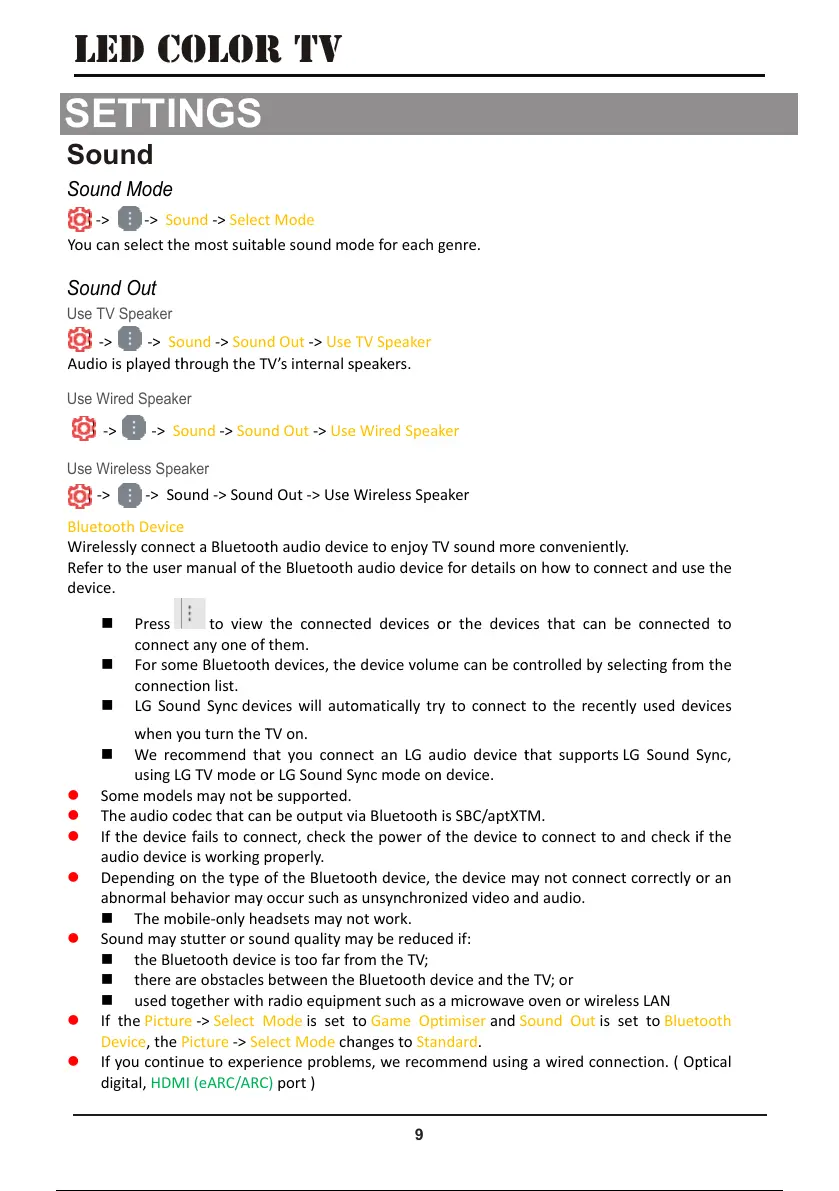
Use Wireless Speaker
Use TV Speaker
Sound
9
SETTINGS
SETTINGS
LED COLOR TV
You
-> -> S
o
can select th
o
und -> Sele
c
e most suita
b
c
t Mode
b
le sound m
o
o
de for each
g
g
enre.
Aud
-> ->
S
io is played t
h
-> -> S
o
S
ound -> Sou
h
rough the T
o
und -> Sou
n
nd Out -> Us
e
V’s internal
s
n
d Out -> Us
e
e
TV Speaker
s
peakers.
e
Wireless Sp
e
e
aker
Blu
e
Wir
e
Ref
e
devi
e
tooth Devic
e
e
lessly conn
e
e
r to the use
r
ce.
Press
conne
c
For so
m
conne
c
LG So
u
e
e
ct a Bluetoo
t
r
manual of t
h
to view
c
t any one of
m
e Bluetoot
h
c
tion list.
u
nd Sync dev
t
h audio devi
h
e Bluetooth
the connec
t
them.
h
devices, th
e
ices will aut
o
ce to enjoy
T
audio devic
e
t
ed devices
o
e
device volu
m
o
matically tr
y
T
V sound mo
r
e
for details
o
o
r the devic
m
e can be c
o
y
to connec
t
r
e convenien
t
o
n how to co
n
es that can
o
ntrolled by
s
t
to the rece
t
ly.
n
nect and us
be connect
e
s
electing fro
m
ntly used d
e
e the
e
d to
m
the
e
vices
when
y
We re
c
using L
Some mod
e
The audio c
o
If the devic
e
audio devic
e
Depending
o
abnormal b
e
The m
o
Sound may
s
the Bl
u
there
a
used t
o
If the Pictu
r
Device, the
If you conti
n
digital, HD
M
y
ou turn the
T
c
ommend th
G TV mode
o
e
ls may not b
e
o
dec that ca
n
e
fails to con
e
is working
p
o
n the type
o
e
havior may
o
bile-only he
a
s
tutter or so
u
u
etooth devi
c
a
re obstacles
o
gether with
r
e -> Select
M
Picture -> Se
n
ue to exper
M
I (eARC/AR
C
T
V on.
at you conn
o
r LG Sound
S
e
supported.
n
be output
v
nect, check
t
p
roperly.
o
f the Bluet
o
occur such a
s
a
dsets may
n
u
nd quality
m
c
e is too far f
r
between th
e
radio equip
m
M
ode is set
t
lect Mode c
h
ience proble
m
C
) port )
ect an LG a
u
S
ync mode o
n
v
ia Bluetooth
t
he power o
f
o
oth device,
t
s
unsynchro
n
n
ot work.
m
ay be reduc
e
r
om the TV;
e
Bluetooth d
m
ent such as
t
o Game Op
t
h
anges to Sta
n
m
s, we reco
m
u
dio device
t
n
device.
is SBC/aptX
T
f
the device
t
t
he device m
a
n
ized video a
n
e
d if:
evice and th
e
a microwave
t
imiser and
S
n
dard.
m
mend usin
g
t
hat suppor
t
T
M.
t
o connect t
o
a
y not conn
e
n
d audio.
e
TV; or
oven or wir
e
S
ound Out is
g
a wired co
n
t
s LG Sound
S
o
and check
i
e
ct correctly
o
e
less LAN
set to Blue
t
n
nection. ( O
p
S
ync,
i
f the
o
r an
t
ooth
p
tical
Use Wired Speaker
-> -> S
o
o
und -> Sou
n
n
d Out -> Us
e
e
Wired Spea
k
k
er
Sound Out
Sound Mode
42 / 56 41 / 54 42 / 56 41 / 54 42 / 56

Related product manuals