6 SRD991 QG EVE0105 B-(en)
... and LCD:
... and LED display:
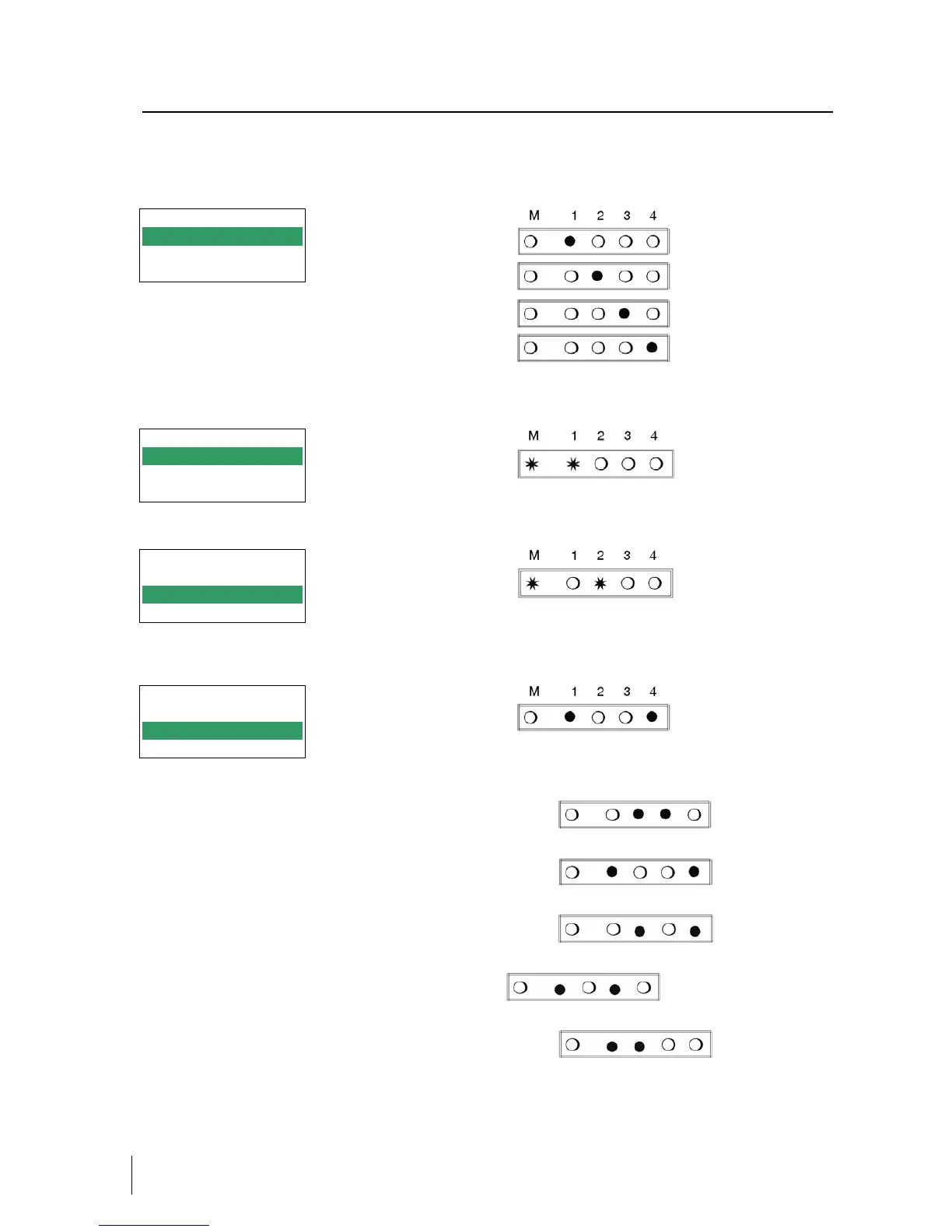
Press keys (UP)+(DOWN) simultaneously to enter menu ‘Type of mounting’. Select the ‘Type of mounting’
by pressing (UP) or (DOWN).
Lin.actuator, left-hand
mount.
1 Mounting
1.1 Lin left
1.2 Lin right
1.3 rot cclockw
Lin.actuator, right-hand
mount.
Rotary actuator,
opening ccw
(Further menus with (UP) key.)
Rotary actuator,
opening cw
Press keys (UP)+(DOWN) simultaneously to confirm and save.
The SRD moves back to menu level 1 and is in main menu again.
SRD Main Menu
1 Mounting
2 Autostart
3 Valve Action
To enter next menu (= menu 2, AUTOSTART)
press (UP) once.
To enter next menu (= menu 2, AUTOSTART)
press (UP) once, and the LEDs ‘M’ and ‘2’ flash.
SRD Main Menu
1 Mounting
2 Autostart
3 Valve Action
Press keys (UP)+(DOWN) simultaneously to enter menu ‘Autostart’. Select Full or Short autostart* by
pressing (UP) or (DOWN).
Full autostart
2 Autostart
2.1 Endpoints
2.2 Standard
2.3 Enhanced
Different Autostart options are available:
2.1 Endpoints
Determines only the mechanical stops of actuator/valve
2.2 Standard
Autostart recommended for standard application.
2.3 Enhanced
Enhanced Autostart. Optimized control behaviour compared to Standard Autostart.
2.4 Smooth resp.
Extended Autostart. Dampened control behaviour for e.g. smaller actuators.
2.5 Fast resp.
Extended Autostart. Undampened control behaviour for e.g. larger actuators.
Press keys (UP)+(DOWN) simultaneously to confirm and to launch Autostart.
The automatic adaptation to the valve is composed of a sequence of steps, explained on the LCD or
indicated by the LEDs.
Following the last step the device is IN OPERATION.-


 To Next Page
 Loading...