RETURN
CAMERA ID
FOXEER
A B C D E F G H I J K L M N O P Q
R S T U V W X Y Z
- ! ” # $ % & ( ) _ ˋ , ¥ : ; <=> ? @
\ ˆ﹡﹣×+/
←→↑↓ CLR POS
00 : 00 00 : 0
WARNING: Read the ENTIRE instruction
manual to become familiar with the
features of the product before operating.
Failure to operate the product correctly
can result in damage to the product,
personal property and cause serious
injury.
NOTICE: This product is only intended for
use with unmanned, hobby- grade,
remote-controlled vehicles and aircraft.
FOXEER disclaims all liability outside of
the intended purpose and will not
provide warranty service related thereto.
SUPPORT: Visit www.foxeer.com/ to get
more information.
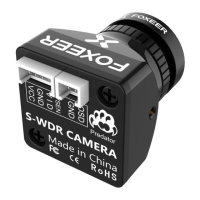
PREDATOR MICRO PREDATOR MINI
MENU: Push MENU(center button) to go to
the main menu.
UP/DOWN: Move up and down through the
menu.
Left/Right: Modify the menu parameters.
Main MENU
SETUP MENU
CAMERA ID
EXIT
PICT ADJUST
LANGUAGE
CAMERA RESET
ENGLISH
YES
ON
Camera ID: ON/OFF. You can setup pilot
name and position.
1. Camera ID
To connect the camera directly to the video
transmitter, plug the 3 pin wiring harness from
the video transmitter into the camera leaving
the OSD pin open.
CAMERA-VIDEO
TRANSMITTER CONNECTION
1. TIME: ON/OFF
2. POWER: ON/OFF
4. EXIT
3. VOL ALARM:
You can setup a bat
boundary
(single), click LEFT/RIGHT button to decrease/
increase the value, 3.6V default.
Press top button for 3s, you can access OSD
menu.
FPV OSD Setup
DISPLAY
TIME
EXIT
POWER
VOL ALARM 3.6
ON
ON
CAUTION: If you are using ESC’s with active
braking, we recommend powering the
camera system through a BEC or voltage
regulator.
CAMERA-OSD SWITCH
CONNECTION
Camera Back OSD Switch Front
S-WDR CAMERA
1. FLIP:
OFF/ H-FLIP/ V-FLIP/ HV-FLIP
2. BRIGHTNESS
3. CONTRAST
4. SHARPNESS
5. HUE
6. COLOR GAIN
2. PICT ADJUST
PICT ADJUST
FLIP
COLOR GAIN
BRIGHTNESS
CONTRAST
SHARPNESS
HUE
160
136
090
136
OFF
122
RETURN
7 Languages: ENGLISH/ DEUTSCH/ FRANCAIS/
PYCCKNN/ PORTUGUES/ ESPANOL/ 中文
3. LANGUAGE
4. Camera reset
Save All: Save all setup.
cancel: Cancel Setup.
Not Save: Can save the value
temporary, but once power o, the
value won't save.
5. EXIT
EXIT
SAVE ALL
NOT SAVE
CANCEL
RETURN

 Need help?
 General

 To Next Page