This document serves as the user manual for the FoxESS EV Charger, providing comprehensive instructions for its assembly, installation, commissioning, maintenance, and troubleshooting. It is intended for qualified electricians who will perform these tasks.
Function Description
The FoxESS EV Charger is an AC charger designed for electric vehicles. It facilitates the charging process and offers various operational modes to suit user preferences. The device includes safety features such as over-current protection, grounding protection, lightning protection, over-voltage protection, under-frequency protection, and over/under-temperature protection. It supports different start-up modes including "Plug and Charge," "RFID Card," and "APP" control.
Important Technical Specifications
The FoxESS EV Charger, specifically the A7300 model, operates as an AC charger.
Input Specifications:
- Input Line: 1P+N+PE
- Rated Voltage: 230Vac, ±20%
- Rated Current: 32A
- Rated Frequency: 50/60Hz
Output Specifications:
- Output Voltage: 230Vac, ±20%
- Maximum Output Current: 32A
- Rated Power: 7.3kW
Interaction Method:
- Charging Connection Method: Available with cable or socket.
- Card Reader: Mifare ISO/IEC 14443 A
- Start-up Mode: Plug and Charge/RFID Card/APP
Communication Method:
- Bluetooth: Yes, 3db, -40-85°C
- WiFi: Yes, 2412-2484MHz, 802.11b/g/n: 20db
Using Environment:
- Installation Method: Wall mounting/column mounting
- Working Temperature: -30°C to 50°C
- Working Humidity: 5%-95% no condensation
- Altitude: ≤2000m
Size and Weight:
- Size (Socket version): 320190144.5 mm
- Size (Plug version): 320190130 mm
- Weight (Socket version): 2.0kg
- Weight (Plug version): 3.55kg
Safety:
- Waterproof Rating: IP65
- Anti-collision Grade: IK08
- Type A RCD: 6mA DC
- Protection Functions: Over-current protection, grounding protection, lightning protection, over-voltage protection, under-frequency protection, over/under-temperature protection.
- Certification: CE/UKCA
- Certification Standard: EN/IEC 61851-1: 2019, EN/IEC 61851-21-2: 2018
Usage Features
The FoxESS EV Charger offers flexible charging modes and clear status indicators.
Charger Status Indicators:
The device features an LED indicator that communicates its status:
- Green Flashing: Device available.
- Blue Steady: EV connected, user not authorized.
- Blue Flashing: Authorized, waiting for charging.
- Blue Marquee Light: Charging in progress.
- Blue Flashing (during charging): Charging suspension.
- Green Steady: Charging finished, waiting for unplug.
- Yellow Steady: Device locking.
- Red Steady: Device fault.
Charging Modes and Operation:
Users can select from three charging modes via the APP's charging mode setting interface:
- Plug and Charge Mode:
- Start Charging: Charging begins automatically once the EV is plugged in.
- Stop Charging: Press the stop button located on the side of the charger.
- Controlled Mode: This mode allows users to initiate or cease charging using the APP or by swiping an RFID card. It also supports reservations via the APP.
- Controlled Mode with RFID Card:
- Start Charging: Set the charger to Controlled mode, insert the charging plug into the EV, swipe the RFID card, wait for authorization, and the charging session will start.
- Stop Charging: Swipe the RFID card again to end the charging session.
- Controlled Mode with APP:
- Start Charging: Set the charger to Controlled mode, insert the charging plug into the EV, click "Start the Charge" on the APP, wait for authorization, and the charging session will start.
- Stop Charging: Click "Stop the Charge" on the APP to end the charging session.
- Locked Mode: In this mode, the charger is locked and cannot be used.
APP Download:
Users can download the FoxSwitch APP by scanning the QR code provided in the quick installation manual or by searching for "FoxSwitch" in the App Store (for iOS) or Google Play (for Android).
Maintenance Features
The manual provides guidance for troubleshooting and decommissioning the charger.
Troubleshooting:
Faults can be identified through alarm information displayed on the APP or LCD, or by observing the LED indicator light blinks. The manual lists common fault codes and their corresponding solutions:
- Electronic lock fault: Set the electronic lock status to the correct position or seek help.
- Emergency stop fault: Reset the emergency stop button or seek help.
- Abnormal CP voltage: Seek help.
- Abnormal AC output contactor: Seek help.
- Over current: Reduce output current or seek help.
- Over voltage: Wait for the grid voltage to return to normal or seek help.
- Undervoltage: Wait for the grid voltage to return to normal or seek help.
- Electric leakage: Seek help.
- Reverse connection of line N: Correctly connect P and N lines or seek help.
- Abnormal frequency: Wait for the grid frequency to return to normal or seek help.
- Over temperature of charging interface: Wait for the temperature of the charging interface to return to normal or seek help.
Decommissioning:
- Dismantling the Charger:
- Disconnect the charger from AC Input and AC output.
- Disconnect communication and optional connection wirings.
- Remove the charger from the bracket.
- Remove the bracket if necessary.
- Packaging: If possible, use the original packaging. If not, an equivalent box suitable for loads over 30 kg, with a handle, and fully closable, should be used.
- Storage and Transportation: Store the charger in a dry place with ambient temperatures between -40°C and 70°C. Handle with care during storage and transportation, keeping stacks to a maximum of four cartons. Disposal of the charger or related components must comply with local waste handling regulations, ensuring delivery to appropriate disposal sites.

 Need help?
 General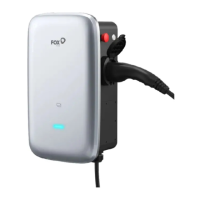

 To Next Page