15
Step 2: PV Wiring
• Turn off the DC switch.
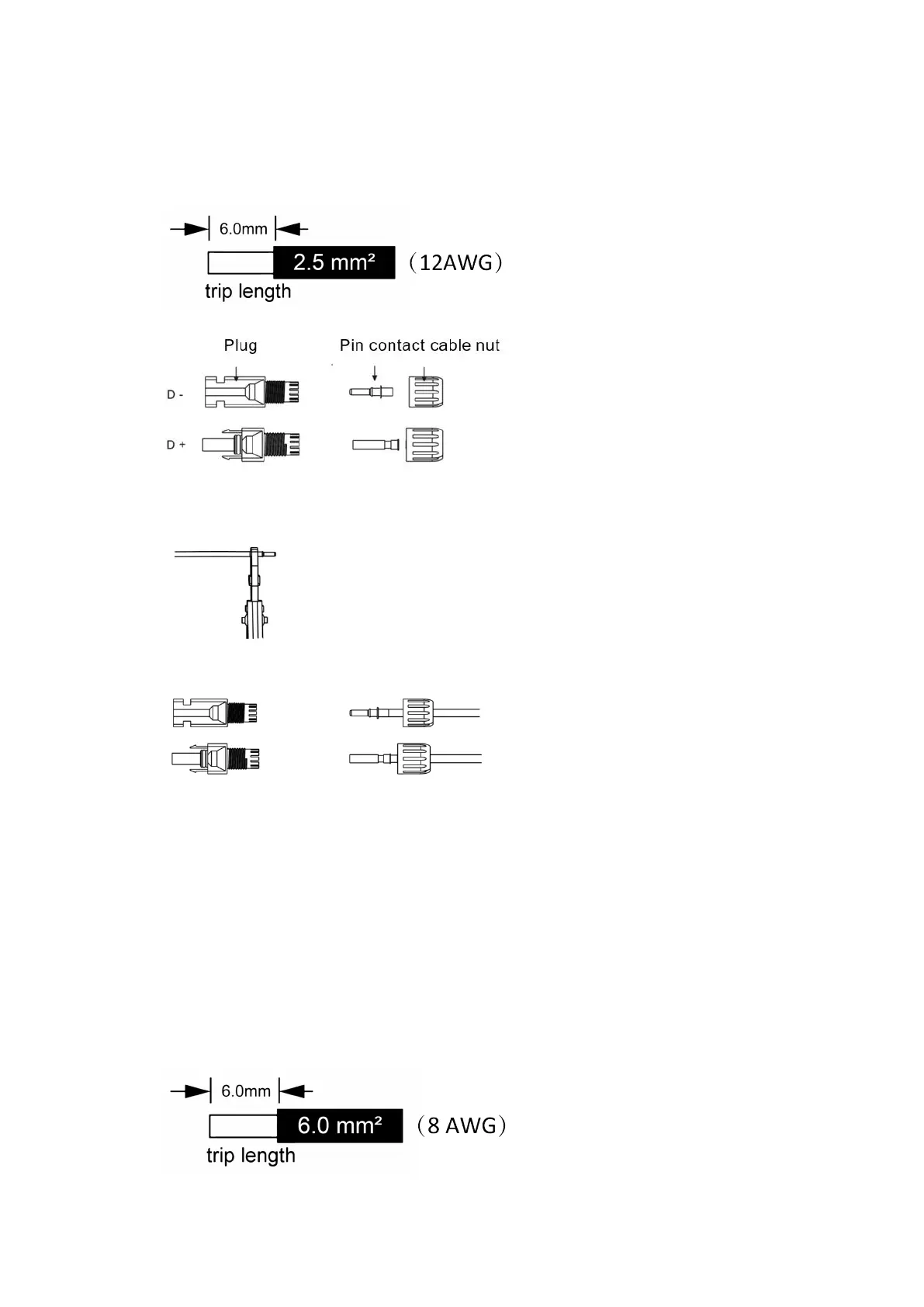
• Choose 12 AWG wire to connect the PV module.
• Trim 6mm of insulation from the wire end.
• Separate the DC connector (PV) as below.
• Insert striped cable into pin contact and ensure all conductor strands are captured in the pin contact.
• Crimp pin contact by using a crimping plier. Put the pin contact with striped cable into the
corresponding crimping pliers and crimp the contact.
• Insert pin contact through the cable nut to assemble into back of the male or female plug. When you
feel or hear a “click” the pin contact assembly is seated correctly.
• Unlock the DC connector
- Use the specified wrench tool.
- When separating the DC + connector, push the tool down from the top.
- When separating the DC - connector, push the tool down from the bottom.
- Separate the connectors by hand.
6.2 Battery Connection
• Turn off the DC switch.
• Choose 8 AWG wire to connect the battery.
• Trim 6mm of insulation from the wire end.



 To Next Page