EasyManua.ls Logo

Foxpro Prairie Blaster 2 - User Manual

Foxpro Prairie Blaster 2
36 pages
Print Icon
To Next Page IconTo Next Page
Loading...
Question and Answer IconNeed help?

Do you have a question about the Foxpro Prairie Blaster 2 and is the answer not in the manual?

Summary

Important Information and Company Details

Contact and Company Information

Provides contact details, address, and operating hours for FOXPRO Inc.

Online Resources and Website

Directs users to the FOXPRO website for updates, sounds, and product information.

Features Overview of the Prairie Blaster

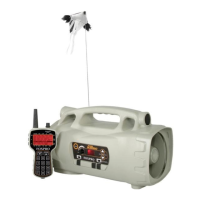
Prairie Blaster Component Identification

Identifies and lists the key physical components of the Prairie Blaster unit.

Quick Operating Guide

Installing Batteries in Devices

Instructions for installing batteries in both the Prairie Blaster and the TX-505 transmitter.

Manual Sound Playback Operation

Steps to play sounds directly from the Prairie Blaster unit without the remote.

Remote Control Operation Basics

How to turn on and operate the Prairie Blaster using the TX-505 remote control.

Prairie Blaster Speaker System

Understanding Speaker Configuration

Details the three types of speakers and their optimal use for different sound reproduction.

High Power Mode Engagement

How to enable High Power mode for maximum gain, noting battery life impact.

Built-in Decoy Operation

Assembling and Operating the Decoy

Instructions on connecting and manually operating the integrated decoy.

Remote Decoy Control

How to control the decoy remotely using the TX-505 transmitter's auxiliary button.

AUX Jack Functionality

Connecting External Devices via AUX

Explains the purpose and electrical limits of the auxiliary jack for external devices.

Using External Speakers

Connecting External Speakers

Guidelines for connecting external speakers, including impedance recommendations.

Disabling Internal Speakers Manually

How to manually disable internal speakers using slide switches to use external ones.

TX-505 Speaker Control

Turning Speakers On;Off Remotely

Instructions on using the TX-505 to control front and rear speaker output.

TX-505 Remote Control Overview

TX-505 Transmitter Features

Lists and describes the key features and components of the TX-505 remote.

Installing TX-505 Batteries

Detailed steps for installing batteries in the TX-505 transmitter.

Understanding the TX-505 Menu System

Navigating the Main Menu

Explains how to access and navigate the main menu of the TX-505 transmitter.

Menu Structure and Sub-menus

Describes the organization of menus, including PRAIRIE BLASTER CONTROL and TX505 CONFIG.

Selecting Sounds with TX-505

Rotary Selector Method for Sounds

Using the rotary knob to scroll and select sounds for playback.

Numerical Entry Method for Sounds

Directly entering sound numbers via the keypad for quick selection.

Volume and Mute Control

Setting the Volume Level

Adjusting volume and customizing volume step size for playback.

Muting and Pausing Sound

Using the mute button for silencing sound and its function as a pause feature.

Sound Sequence Creation and Use

Creating Custom Sound Sequences

Explains manual creation of sequence files using text editors.

Sequence File Format and Commands

Details the plain text format and commands (S, V, P, J, R, Q) for sequence files.

Sound Presets and Quick Access

Creating and Saving Presets

Steps to save favorite sounds and volume levels as presets (P1-P10).

Playing Saved Presets

How to access and play previously saved sound presets using the TX-505.

FOXFADE Feature

Adjusting Speaker Volume Fade

Using FOXFADE to fade volume between front/rear speakers or turn them off.

FOXFADE with Stereo Files

How FOXFADE works with stereo audio files for realistic sound scenarios.

AUTO-V Functionality

Engaging AUTO-V Mode

How to turn on AUTO-V for automatic volume adjustment and attenuation.

Disengaging AUTO-V Mode

Steps to turn off AUTO-V and its effect on volume levels.

AUX and Recall Functions

AUX Jack Operation Configuration

Setting the AUX jack for momentary or latched output for external devices.

Using the Recall Button

Recalling the last used sound and volume setting or preset.

Channel Selection

Changing TX-505 Channel

Steps to select the operating channel for the TX-505 transmitter via the menu.

Changing Prairie Blaster Channel

How to adjust the channel setting on the Prairie Blaster using DIP switches.

FOXBANG Feature

Turning FOXBANG On or Off

Instructions for enabling or disabling the FOXBANG feature on the TX-505.

FOXBANG Options and Sensitivity

Configuring FOXBANG features and adjusting sensitivity for firearm detection.

TX-505 and Prairie Blaster Customizations

Prairie Blaster Control Menu Options

Customizing playback modes like Mono/Stereo and Play Modes (Repeat, Single, Jukebox).

TX505 Configuration Menu Options

Configuring AUX, Display settings (Text, Graphics, Contrast, Scroll, Backlight), Channel, and Volume Steps.

Reprogramming Sounds on Prairie Blaster

Purchasing and Downloading New Sounds

Information on buying and acquiring new sound files from the FOXPRO website.

Installing the FOXPRO Programming Utility

Steps to download and install the software utility for reprogramming.

Programming the Prairie Blaster

Adding and Managing Sound Files

Using the utility to add, overwrite, or remove sound files from the device.

Copying Sounds to the Caller

Finalizing the sound programming process by copying files to the Prairie Blaster.

Downloading New Playlists to TX-505

Transferring Playlists to TX-505

Process for uploading sound lists from the Prairie Blaster to the TX-505 transmitter.

FCC Information and Compliance

FCC Part 15 Compliance

Details on the equipment's compliance with digital device interference limits.

RF Exposure Safety Notice

Guidelines for safe operating distances to minimize RF energy exposure.

Industry Canada Compliance

Information regarding compliance with Industry Canada's license-exempt RSS standards.

Limited Warranty Statement

Warranty Coverage and Exclusions

Outlines the 5-year warranty period, coverage, and specific exclusions like batteries and water damage.

Summary

Important Information and Company Details

Contact and Company Information

Provides contact details, address, and operating hours for FOXPRO Inc.

Online Resources and Website

Directs users to the FOXPRO website for updates, sounds, and product information.

Features Overview of the Prairie Blaster

Prairie Blaster Component Identification

Identifies and lists the key physical components of the Prairie Blaster unit.

Quick Operating Guide

Installing Batteries in Devices

Instructions for installing batteries in both the Prairie Blaster and the TX-505 transmitter.

Manual Sound Playback Operation

Steps to play sounds directly from the Prairie Blaster unit without the remote.

Remote Control Operation Basics

How to turn on and operate the Prairie Blaster using the TX-505 remote control.

Prairie Blaster Speaker System

Understanding Speaker Configuration

Details the three types of speakers and their optimal use for different sound reproduction.

High Power Mode Engagement

How to enable High Power mode for maximum gain, noting battery life impact.

Built-in Decoy Operation

Assembling and Operating the Decoy

Instructions on connecting and manually operating the integrated decoy.

Remote Decoy Control

How to control the decoy remotely using the TX-505 transmitter's auxiliary button.

AUX Jack Functionality

Connecting External Devices via AUX

Explains the purpose and electrical limits of the auxiliary jack for external devices.

Using External Speakers

Connecting External Speakers

Guidelines for connecting external speakers, including impedance recommendations.

Disabling Internal Speakers Manually

How to manually disable internal speakers using slide switches to use external ones.

TX-505 Speaker Control

Turning Speakers On;Off Remotely

Instructions on using the TX-505 to control front and rear speaker output.

TX-505 Remote Control Overview

TX-505 Transmitter Features

Lists and describes the key features and components of the TX-505 remote.

Installing TX-505 Batteries

Detailed steps for installing batteries in the TX-505 transmitter.

Understanding the TX-505 Menu System

Navigating the Main Menu

Explains how to access and navigate the main menu of the TX-505 transmitter.

Menu Structure and Sub-menus

Describes the organization of menus, including PRAIRIE BLASTER CONTROL and TX505 CONFIG.

Selecting Sounds with TX-505

Rotary Selector Method for Sounds

Using the rotary knob to scroll and select sounds for playback.

Numerical Entry Method for Sounds

Directly entering sound numbers via the keypad for quick selection.

Volume and Mute Control

Setting the Volume Level

Adjusting volume and customizing volume step size for playback.

Muting and Pausing Sound

Using the mute button for silencing sound and its function as a pause feature.

Sound Sequence Creation and Use

Creating Custom Sound Sequences

Explains manual creation of sequence files using text editors.

Sequence File Format and Commands

Details the plain text format and commands (S, V, P, J, R, Q) for sequence files.

Sound Presets and Quick Access

Creating and Saving Presets

Steps to save favorite sounds and volume levels as presets (P1-P10).

Playing Saved Presets

How to access and play previously saved sound presets using the TX-505.

FOXFADE Feature

Adjusting Speaker Volume Fade

Using FOXFADE to fade volume between front/rear speakers or turn them off.

FOXFADE with Stereo Files

How FOXFADE works with stereo audio files for realistic sound scenarios.

AUTO-V Functionality

Engaging AUTO-V Mode

How to turn on AUTO-V for automatic volume adjustment and attenuation.

Disengaging AUTO-V Mode

Steps to turn off AUTO-V and its effect on volume levels.

AUX and Recall Functions

AUX Jack Operation Configuration

Setting the AUX jack for momentary or latched output for external devices.

Using the Recall Button

Recalling the last used sound and volume setting or preset.

Channel Selection

Changing TX-505 Channel

Steps to select the operating channel for the TX-505 transmitter via the menu.

Changing Prairie Blaster Channel

How to adjust the channel setting on the Prairie Blaster using DIP switches.

FOXBANG Feature

Turning FOXBANG On or Off

Instructions for enabling or disabling the FOXBANG feature on the TX-505.

FOXBANG Options and Sensitivity

Configuring FOXBANG features and adjusting sensitivity for firearm detection.

TX-505 and Prairie Blaster Customizations

Prairie Blaster Control Menu Options

Customizing playback modes like Mono/Stereo and Play Modes (Repeat, Single, Jukebox).

TX505 Configuration Menu Options

Configuring AUX, Display settings (Text, Graphics, Contrast, Scroll, Backlight), Channel, and Volume Steps.

Reprogramming Sounds on Prairie Blaster

Purchasing and Downloading New Sounds

Information on buying and acquiring new sound files from the FOXPRO website.

Installing the FOXPRO Programming Utility

Steps to download and install the software utility for reprogramming.

Programming the Prairie Blaster

Adding and Managing Sound Files

Using the utility to add, overwrite, or remove sound files from the device.

Copying Sounds to the Caller

Finalizing the sound programming process by copying files to the Prairie Blaster.

Downloading New Playlists to TX-505

Transferring Playlists to TX-505

Process for uploading sound lists from the Prairie Blaster to the TX-505 transmitter.

FCC Information and Compliance

FCC Part 15 Compliance

Details on the equipment's compliance with digital device interference limits.

RF Exposure Safety Notice

Guidelines for safe operating distances to minimize RF energy exposure.

Industry Canada Compliance

Information regarding compliance with Industry Canada's license-exempt RSS standards.

Limited Warranty Statement

Warranty Coverage and Exclusions

Outlines the 5-year warranty period, coverage, and specific exclusions like batteries and water damage.

Foxpro Prairie Blaster 2 Specifications

General IconGeneral
BrandFoxpro
ModelPrairie Blaster 2
Sound LibraryYes
Remote ControlYes
Remote Range300 yards
Weight2.5 lbs
Power SourceBattery
TypeElectronic Game Caller
SpeakersDual speakers