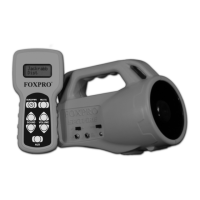
“SEND/PWR” button for about one second. The screen will display
“FOXPRO
®
TX-24” and it will show the remote version number. After
the remote has finished the power-on cycle, the screen will display
“Select Sound”.
3) Select the sound you wish to play by pressing the sound up or down
arrow buttons until you reach the desired sound.
4) Once the desired sound is displayed on the screen, press the
“SEND/PWR” button to begin playing that sound. The screen will
display that sound name until you send a new sound to the SPITFIRE.
5) Now that you have selected the sound to be played, simply bring the
volume up to desired level by depressing the volume up arrow button.
As you depress the volume up arrow, note that the volume indicator will
increase from 1 – 5.
Muting the Sound
To mute the sound, simply press the mute button. The mute also serves as a
pause feature, meaning that when you un-mute the sound, it will start playing
where you muted the sound instead of starting over again.
Changing the Sound
To change the sound, simply use the sound up or down arrow button to cycle
through the available sounds. When you land upon the sound you wish to play,
press the “SEND/PWR” button. Your sound will instantly change and the
display on the TX-24 will show your new sound.
1.4 POWERING DOWN
Be sure to power down both the SPITFIRE and TX-24 after use to help prolong
the battery life.
Powering Down the TX-24
Push and hold the “SEND/PWR” button for about 4 seconds until the screen
displays “POWER DOWN”. Should you forget to turn off the transmitter when
you are finished, it will automatically shut down after one hour of non-use.
Powering Down the SPITFIRE
Turn off the SPITFIRE by moving the power slide switch to the “OFF” position.
2.0 “AUX” JACK FUNCTION
The SPITFIRE is equipped with an auxiliary jack labeled “AUX”. The purpose of


 To Next Page