Page | 12
5.0 REPROGRAMMING SOUNDS ON YOUR WILDFIRE
You can locate an extensive guide to programming your WILDFIRE on the
FOXPRO
®
website at: http://www.gofoxpro.com/program.php
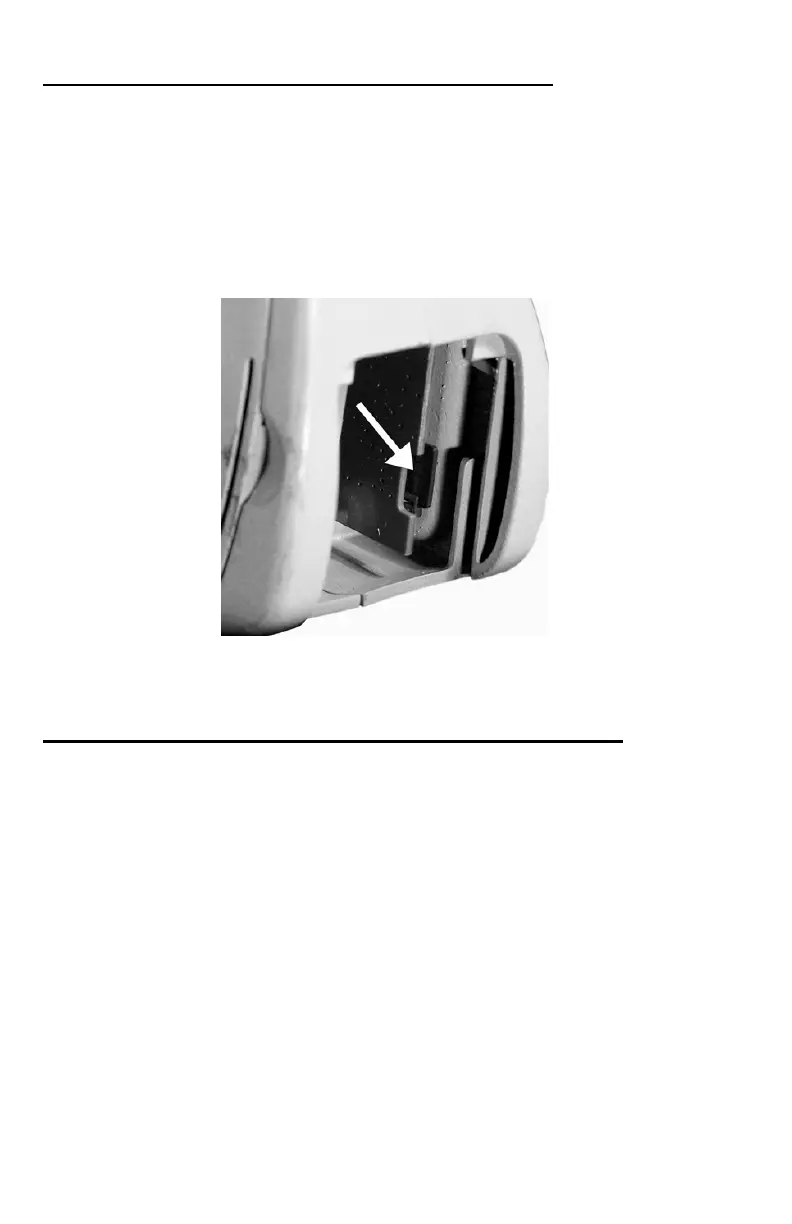
The WILDFIRE sounds are stored on a removable Micro-SD memory card.
This card is accessible by removing the compartment door on the back (see
image below). You can remove the card from its push-pull socket. Once
removed, the card can be interfaced by using a Micro-SD card reader that
interfaces to your home computer.
After the card reader is attached to your PC with the memory card installed,
you can then use the FOXPRO
®
programming utility to reprogram the sounds.
5.1 DOWNLOADING THE FOXPRO
®
PROGRAMMING UTILITY
We have developed a utility that simplifies the reprogramming of sounds on
your WILDFIRE. You can download the utility from our website.
To download and install the newest version of the utility online:
1) Using your web browser, navigate to: http://www.gofoxpro.com
2) Click on “Programs/Utilities” from the main menu
3) Locate and click on “FOXPRO
®
Programming Utility”
4) Click on “Download Now”
5) Click on the Save button to save the executable file to your hard drive for
installation. If you choose to save the file to your hard drive, we
recommend saving it to your desktop.


 To Next Page