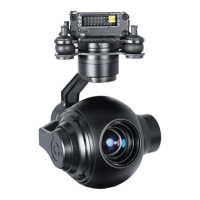
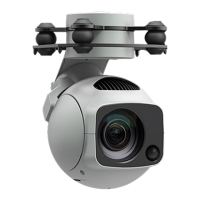
The EH30-M TIR Dual Sensor 30X Optical Zoom Camera with 3-axis Gimbal is a sophisticated imaging solution designed for industrial drone applications, offering both visible light and thermal imaging capabilities. This user manual provides comprehensive details on its composition, installation, operation, and technical specifications, ensuring users can effectively deploy and maintain the device.
Function Description
The EH30-M is a versatile camera system that integrates a high-resolution optical zoom camera with a thermal infrared (TIR) sensor, all mounted on a stable 3-axis gimbal. This dual-sensor configuration allows for simultaneous capture of visible light and thermal imagery, making it ideal for a wide range of applications such as surveillance, inspection, search and rescue, and environmental monitoring. The 30X optical zoom enables detailed inspection from a distance, while the thermal sensor provides critical data for detecting heat signatures, even in challenging visual conditions like smoke, fog, or darkness. The 3-axis gimbal ensures stable footage by compensating for drone movements, providing smooth and clear images regardless of flight dynamics. The system supports real-time video streaming (RTSP) and photo capture, with data stored on an internal 128GB Micro SD card. It also features smart target tracking, electronic fogging, and various exposure modes to enhance image quality and operational efficiency.
Important Technical Specifications
- Model: EH30-M TIR Dual Sensor 30X Optical Zoom Camera with 3-axis Gimbal
- Dimensions: 136mm x 110mm x 170mm
- Weight: 806g (Standard) / 772g (Quick-detach)
- Operating Voltage: 12V-25V
- Power Consumption: 8.4W
- Operating Temperature: -20°C to 60°C
- Storage Temperature: -40°C to 80°C
- Gimbal Control Accuracy: ±0.008°
- Gimbal Rotation Range:
- Pitch: 70° to -90°
- Yaw: 360°
- Gimbal Mechanical Range:
- Pitch: 75° to -100°
- Yaw: 360°
- Visible Light Camera:
- Sensor: CMOS: 1/2.8"; Total pixels 2.16 Mega
- Optical Zoom: 30X
- Lens: F: 4.7 to 141mm
- Minimum Shooting Distance: 1m to 1.5m (near-focus-far-focus)
- Field-of-View Angle (horizontal): 60° to 2.3°
- Image Storage Format: JPEG
- Video Storage Format: MP4
- Working Mode: Video; Taking pictures
- Electronic Shutter: 1/3 to 1/30000 seconds
- Encoding Resolution (Main Stream): 25fps (1920×1080, 1280×720)
- Encoding Resolution (Secondary Streams): 25fps (1920×1080, 1280×720, 704×576, 352×288)
- Noise Reduction: 2D and 3D (auto-on)
- Exposure: Automatic mode
- Info Video Overlay (OSD): Support
- Point to Zoom: Support (1 to 30 times optical)
- One-click Zoom to 1X Image: Support
- Thermal Imaging Camera:
- Detector Type: VOx Uncooled infrared focal plane detector
- Cell Spacing: 12 microns
- Respond to the Band: 8 to 14 microns
- Sensitivity: ≤50mk@25°C, F#1.0
- Range of Temperature Measurements: Two-speed: -20°C to 150°C (default), 0°C to 550°C
- Temperature Measurement Accuracy: ±3°C or 3% of the ± readings (take larger)
- Ambient Temperature for Measurement: -20°C to 60°C
- Measurement Tool: Point, line, area analysis
- Focal Length: 19mm fixed focus
- Encoding Resolution (Main Stream): 25fps (704×576)
- Encoding Resolution (Secondary Stream): 25fps (704×576, 640×512)
- Storage: Built-in 128GB Micro SD card
- Interface: Net port
- Video Transmission: RTSP video stream
Usage Features
The EH30-M is designed for ease of use with comprehensive control options.
- Installation and Setup: The manual details the process of modifying the IP address of the Pod and IDU to meet videolink requirements. This involves connecting the Pod to a computer, configuring TCP/IPv4 settings, and using the GCS ground station for gateway settings. Camera IP modification is also covered, requiring users to access the camera's web interface via a browser and update network settings.
- GCS Software Usage: The Ground Control Station (GCS) software provides a user-friendly interface for controlling the camera. It allows for full operation of the pod through mouse, virtual keys, or a USB joystick. Key functions include photo capture, video recording (REC), one-key downward/forward movements, yaw following, manual and auto focus, and target following.
- Operating Pods: The GCS software supports remote real-time download of camera-side video (MP4) and photos (JPG). Users can view a photo preview window and switch download types. The manual also includes a table detailing the distance measured by the thermal camera with different focal lengths (9mm, 19mm, 25mm) for identifying, recognizing, and detecting people and vehicles, providing practical guidance for operational planning.
- Smart Target Tracking: The system supports smart target tracking, allowing the camera to automatically follow a designated object, which is crucial for dynamic surveillance and inspection tasks.
- Electronic Fogging: This feature enhances visibility in foggy or hazy conditions, improving image clarity for both visible light and thermal sensors.
- Exposure Modes: Various exposure modes are available, including automatic mode, to optimize image quality under different lighting conditions.
- Info Video Overlay (OSD): On-Screen Display provides real-time information overlaid on the video feed, enhancing situational awareness for the operator.
- Point to Zoom: This feature allows users to easily zoom in on specific areas of interest within the frame.
- One-click Zoom to 1X Image: A convenient function to quickly return to the original 1X zoom level.
Maintenance Features
The manual emphasizes several aspects related to the maintenance and troubleshooting of the EH30-M:
- Hardware Checking: In case of "No Image" issues, users are advised to check the power supply for the pod and IDU module, ensuring all connections are secure and wires are not broken. This includes verifying the datalink (sky end and ground end) power supply and connections to the IDU module and computer.
- Software Setup Check: It is crucial to ensure the computer network is correctly configured and that Wi-Fi is turned off when connecting the datalink. The computer should not be connected to any network other than the data link. If the gimbal or camera IP address changes, the software IP must be synchronously modified through the GCS software's network settings.
- Password Management: Users are explicitly warned not to modify the default password, as doing so may prevent the software from functioning properly. If a password modification interface appears, it should be canceled.
- Firmware Updates: The manual directs users to a specific Foxtech FPV webpage for the latest product information, technical support, and user manuals, including updates. It is recommended to download and use the latest user manual, as further update notices may not be given separately.
- Disclaimer: Foxtech emphasizes that users should read the instruction manual carefully and strictly follow installation and usage requirements. Foxtech will not be held responsible for any losses resulting from improper use, installation, final assembly, or modifications by users.
- Intellectual Property Rights: All intellectual property rights for the product and manual are owned by Foxtech Trade Co., Ltd., and unauthorized copying, reproduction, or distribution is prohibited.
This comprehensive description highlights the EH30-M's advanced capabilities, robust design, and user-centric features, making it a powerful tool for professional drone operations.

 Need help?
 General

 To Next Page