Need help?
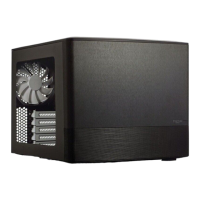
Do you have a question about the Fractal Node 202 and is the answer not in the manual?
Instructions for safely detaching the top panel of the computer case.
Instructions for safely detaching the bottom panel of the computer case.
Step-by-step guide to installing the power supply unit (PSU).
Steps to prepare the motherboard before installation into the case.
Instructions for mounting the prepared motherboard inside the case.
Guide for installing 2.5-inch storage drives into the case.
Instructions for installing a graphics card into the system.
 General
| Form Factor | Mini-ITX |
|---|---|
| Material | Steel |
| Drive Bays | 2 x 2.5" |
| Power Supply Support | SFX |
| CPU Cooler Max Height | 56 mm |
| Expansion Slots | 2 |
| Case Volume | 10.2 liters |
| Weight | 3.5 kg (7.7 lbs) |
| Cooling Support | 2 x 120mm fans |
| Front I/O Ports | 2 x USB 3.0, Audio in/out |
| GPU Max Length | 310 mm |
| Dimensions | 377 x 82 x 330 mm |

 To Next Page