15
FREECOM MOBILE HARD DRIVE
FREECOM DESKTOP HARD DRIVE
Creating two or more partitions on the Freecom Mobile Hard Drive / Desktop
Hard Drive under Windows XP / Vista / 7
1. Repeat the steps from the previous chapter (Creating a partition on the Freecom
Mo
bile Hard Drive / Desktop Hard Drive under Windows XP / Vista / 7) for creating
the first partition.
2. Click with the right mouse button on the "My Computer" icon on your desktop.
3. Select the option "Manage".
4. Select the option "Storage" -> "Disk Management".
5. Right-click on the unallocated space of your Freecom Mobile Hard Drive / Desktop
Hard Drive and select the option "New partition". The "New Partition Wizard" opens.
Click on "Next".
6. S
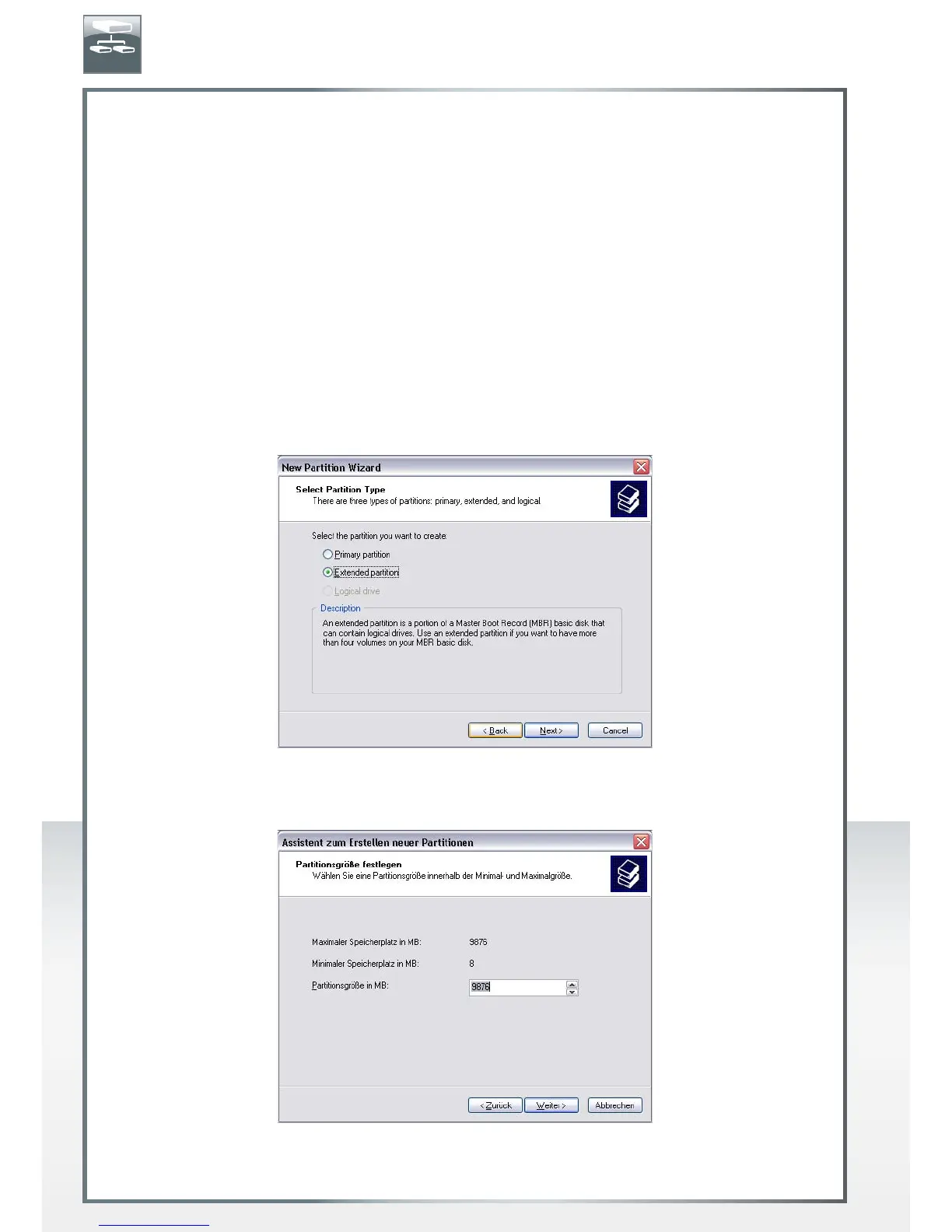
elect "Extended partition" and click on "Next".
7. Now you can adjust the size of your partition. Enter the size and click on "Next".
EN











 To Next Page