1
Before use: To access the FREELOADER SiXER’s connection arms,
remove the impact and water resistant gel case.
Product Specifications:
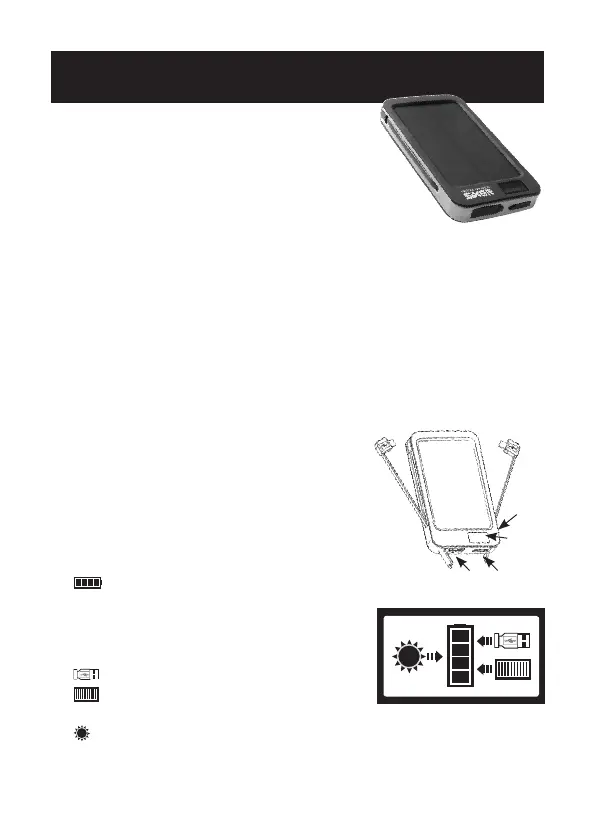
• 220mA high efficiency solar cell (1)
• 6000mAh lithium-ion polymer battery
• 5V/2.1A output
• LCD screen (2)
• Built in lightning connector (for Apple devices)
on charging arm (3)
• Built in micro connector on charging arm (4)
• Micro USB power / charging port (5)
• Female USB port (6)
• ower button (on side of unit) (7)
• The Sixer and can tolerate temperatures
from -20C to +60C
• Built in support stand
(1)
(6)
(2)
(5)
(7)
(3)(4)
Fig 1
Included in the box
• FREELOADER SiXER
solar battery pack
• Instructionmanual
• Gelcase
• USBchargingcable
• Velcroattachmentstrap
Understanding the FREELOADER SiXER LCD Screen
Press power button (7) to illuminate screen.
The
icon indicates the amount of charge
remaining in the battery (see Fig 2) quantified by:
•Nobars=nopower •3bars=60%to80%
•1bar=10%to40% •4bars=80%to100%
•2bars=40%to60%
The icon indicates a charge via the USB port (A).
The
icon (B) indicates an incoming charge from
the internal solar cell.
The icon (C) indicates an incoming charge from the ‘Supercharger’
(The Supercharger 5w booster solar panel is sold separately, for more details on
FREELOADER SiXER accessories visit www.solartechnology.co.uk).
The FREELOADER SiXER is supplied with some
charge in its battery, we recommend charging
the battery fully by the USB port before use.
Thereafter, and to maintain the battery condition
we recommend you charge the FREELOADER SiXER
once every three months by the USB port.
Allow up to 12 hours to fully charge the battery in both these instances.
Fig 2
(A)
(B)
(C)


 To Next Page