42 PB
TROUBLESHOOTING
Troubleshooting Tips
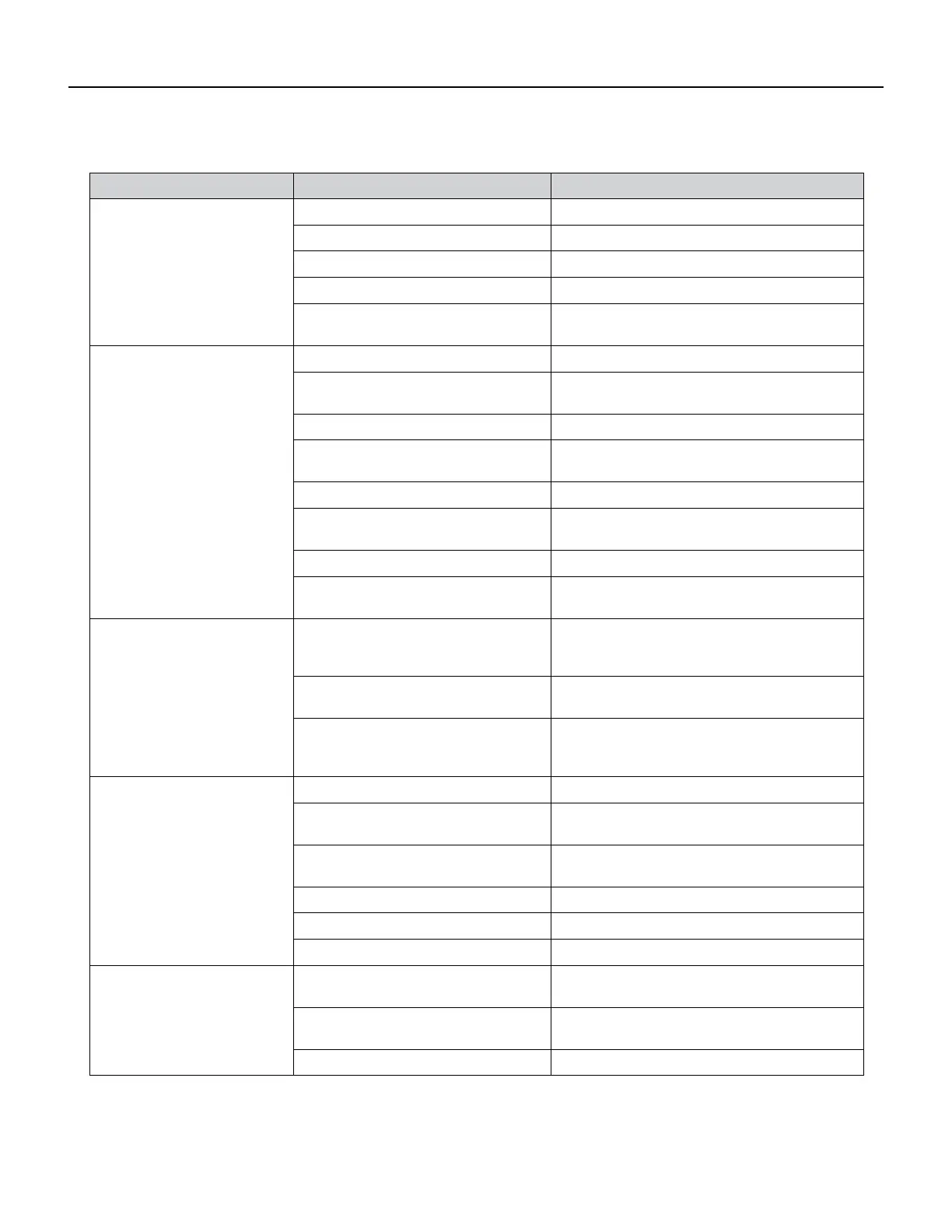
COMPLAINT CAUSE SOLUTION
Fan motor does not run.
Inoperative system button Test button & replace user interface if inoperative
Broken, loose or incorrect wiring Refer to applicable wiring diagram
Open capacitor Test capacitor & replace if inoperative
Fan speed button defective Replace user interface if inoperative
Inoperative fan motor
Test fan motor & replace if inoperative (be sure
internal overload has had time to reset)
Does not cool or only cools slightly
Undersized unit Refer to industry standard sizing chart
Indoor ambient thermistor open or
shorted
See diagnostic codes and replace thermistor if
needed.
Dirty lter Clean as recommended in Owner’s Manual
Dirty or restricted condenser or evapora-
tor coil
Use pressure wash or biodegradable cleaning
agent to clean
Poor air circulation Adjust discharge louvers. Use high fan speed
Fresh air or exhaust air door open
Close doors. Instruct customer on use of this
feature
Low capacity - undercharge Check for leak & make repair
Compressor not pumping properly
Check amperage draw against nameplate. If not
conclusive, make pressure test
Unit does not run
Fuse blown or circuit tripped
Replace fuse, reset breaker. If repeats, check fuse
or breaker size. Check for shorts in unit wiring &
components
Loose or disconnected wiring control
board or other components
Check wiring & connections. Reconnect per wiring
diagram
The LCDI power cord has tripped (Reset
button has popped out).
Press and release RESET (Listen for click. Reset
button latches and remains in.) Check that the
green LED light is on to resume operation.
Evaporator coil freezes up
Dirty lter Clean lter (see Routine Maintenance)
Restricted air ow
Check for dirty or obstructed coil. Clean coil (refer
to routine Maintenance)
Inoperative thermistor
Check Diagnostic Codes. Check Thermstors and
replace as necessary.
Short of refrigerant De-ice coil & check for leak
Inoperative fan motor Test fan motor & replace if inoperative
Partially restricted capillary tube De-ice coil. Replace capillary tube
Compressor runs continually & does
not cycle off
Excessive heat load
Unit undersized. Test cooling performance & re-
place with larger unit if needed. See sizing chart.
Restriction in line
Check for partially iced coil & check temperature
split across coil
Thermistor shorted Replace thermistor or electronic control board
Figure 716 (Troubleshooting Tips)



 To Next Page