19
OVEN CONTROLS
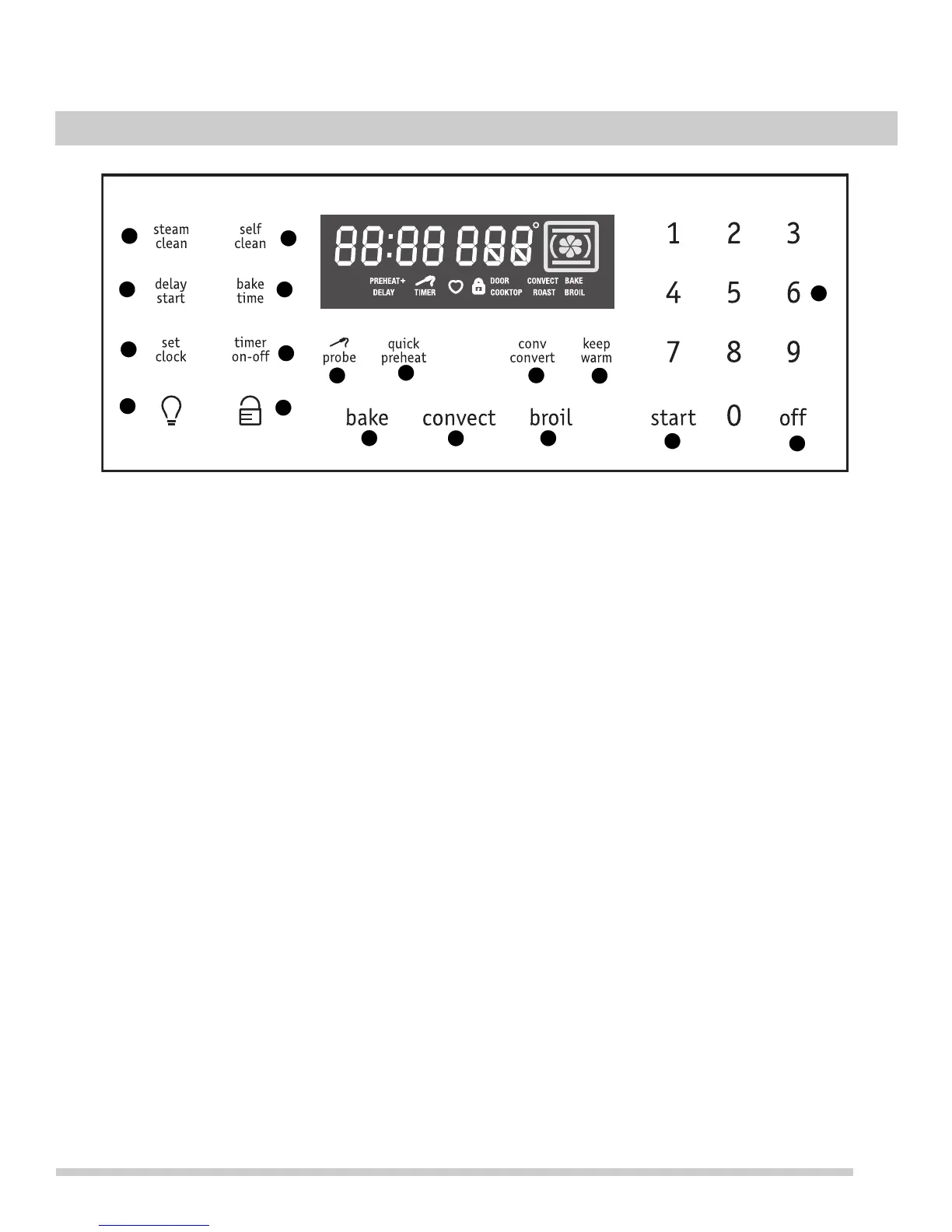
Oven Control Features
To get the best use of your oven, take some time to become
familiar with the various features and functions of you oven
model. Detailed instructions on using each oven feature
and function of the controls can be found in this section of
the owner’s manual.
1. steam clean — Use for steam clean function (page 34).
2. delay start — Use to program a delayed time bake or
delayed self cleaning cycle start time (page 26).
3. set clock — Use along with the numeric keypad to set
the time of day (page 20).
4. Oven light — Use to turn the oven light on and off
(page 22).
5. self clean — Use to select self clean function
(page 35).
6. bake time — Use to enter the length of baking time
(page 25).
7. timer on-off — Use to set or cancel the timer. The timer
does not start or stop the cooking process (page 22).
8. Oven lockout — Use to lock the oven door and the
control panel (page 22).
9. probe — Use to monitor internal temperature of food for
required doneness (page 29).
10. quick preheat — Use to preheat oven temperature
before cooking (page 22).
11. conv convert — Use to convert regular recipe temper-
ature to convection recipe temperatures (page 25).
12. keep warm — Use to keep food and dishes warm until
served (page 26).
13. bake — Use to select the bake cooking feature
(page 23).
14. convect — Use to select between convection bake,
convection roast, and convection broil (page 24).
15. broil — Use to select broil cooking feature (page 27).
16. Numeric keypad — Use to enter temperatures and
times.
17. start — Use for starting all cooking features.
18. off — Use to turn off or cancel any oven function
entered except time of day and minute timer.
1
2
3
4
5
6
7
8
9
10
11
12
13
14
15
16
17
18
OVEN CONTROLS



 To Next Page