Air Conditioner Features
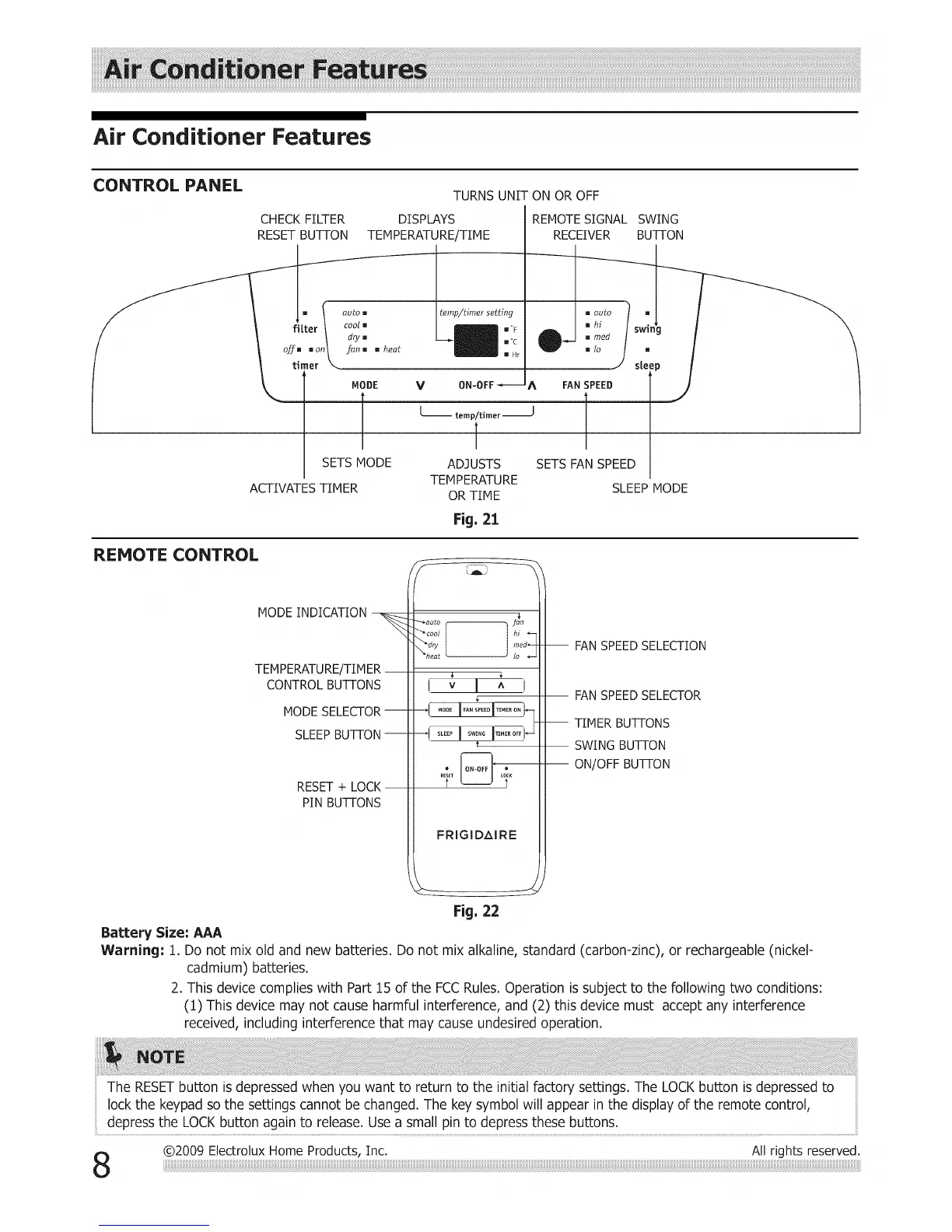
CONTROL PANEL
TURNS UNIT ON OR OFF
CHECK FILTER DISPLAYS REMOTESIGNAL
RESETBUTTON TEMPERATURE/TIME RECEIVER
(
= \ auto []
filter / coot m
dry []
fan m u
o]_m mon I heat
timer \_
temp/timer setting
K'F
moc
m Hr
MODE V A FAN SPEED
f f
[-- temp/timer ----J
1
SETS MODE ADJUSTS SETSFAN SPEED
TEMPERATURE
OR TIME
SWING
BUTTON
swmg
Fig, 21
ACTIVATES TIMER
m
s[eep
SLEEP MODE
REMOTE CONTROL
MODE INDICATION
\
TEM PERATU RE/TIM ER
CONTROL BUTTONS
MODE SELECTOR-
SLEEP BUTTON --
RESET+ LOCK
PIN BUTTONS
_auto fSun
I v I ^ i
_[ .... I........I.......F
--! .....I ..... I_......it
• _ •
RESET_ L?K
FRIGIDAIRE
-- FANSPEEDSELECTION
FANSPEEDSELECTOR
-- TIMER BUTTONS
SWING BUTTON
ON/OFF BUTTON
Fig, 22
Battery Size: AAA
Warning: 1. Do not mix old and new batteries. Do not mix alkaline, standard (carbon-zinc), or rechargeable (nickel-
cadmium) batteries.
2. This device complies with Part 15 of the FCCRules. Operation is subject to the following two conditions:
(1) This device may not cause harmful interference, and (2) this device must accept any interference
received, including interference that may cause undesired operation.
The RESETbutton is depressed when you want to return to the initial factory settings. The LOCKbutton is depressed to
lock the keypad so the settings cannot be changed. The key symbol will appear in the display of the remote control,
depress the LOCK button again to release. Use a small pin to depress these buttons.
@2009 ElectroluxHome Products, Inc. All rights reserved.



 To Next Page