28
CONVENIENT FEATURES
This section gives instructions for operating each
function. Please read this section carefully.
USER REFERENCE
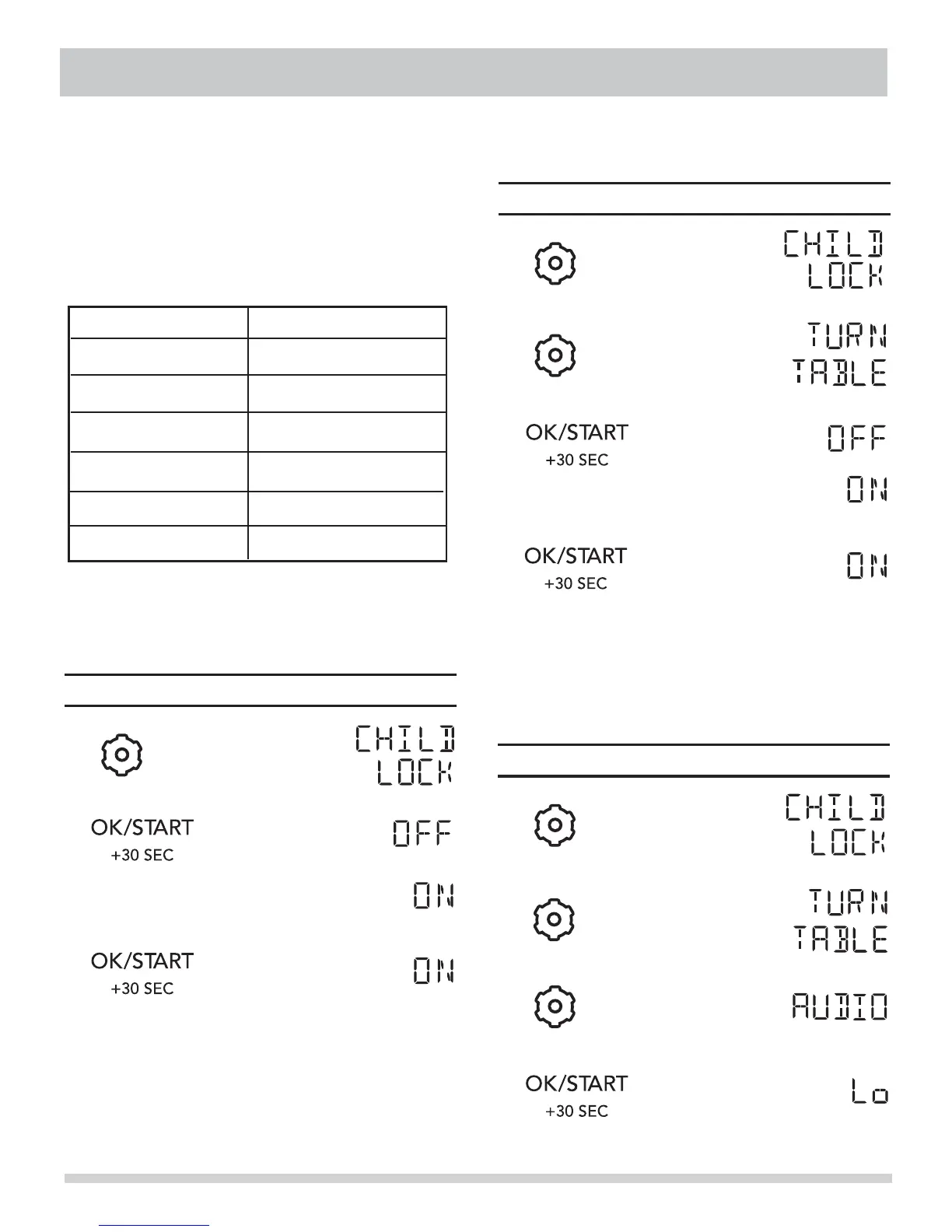
SETTING CHILD LOCK ON/OFF
Option
Key press
The
microwave oven has settings that allow you to
customize the operation for your convience. Below is
the table showing the various settings. Touch the User
setting function.
•
Display Shows:Touch
1.
2.
3.
4.
>
Display for 2 seconds then clear.
SETTING TURNTABLE ON/OFF
Display Shows:Touch
1.
2.
4.
5.
>
Display for 2 seconds then clear.
3.
SETTING AUDIO LOW/MED/HIGH/OFF
Display Shows:Touch
1.
2.
3.
4.
USER PREF
Suppose you want to turn on the Child Lock.
U
Pref key multiple times to scroll to the desired
User Pref x 1 Child Lock
User Pref x 2 Turn Table
User Pref x 3 Audio
User Pref x 4 Weight
User Pref x 6 Demo Mode
• Suppose you want to turn on the Turntable.
• Suppose you want to turn on the Audio Off.
User Pref x 5 Language



 To Next Page