13
It is recommended to always set the clock for the
correct time of day before using the appliance. The
clock cannot be changed whenever any timed or
delayed time feature is active.
NOTE
Changing oven temperature display
The oven control is preset to display °F (Fahrenheit) when
shipped from the factory.
To change the temperature to display °C (Celsius)
(oven should not have bake or self-clean active
when setting this feature):
SETTING OVEN CONTROLS
Setting the clock
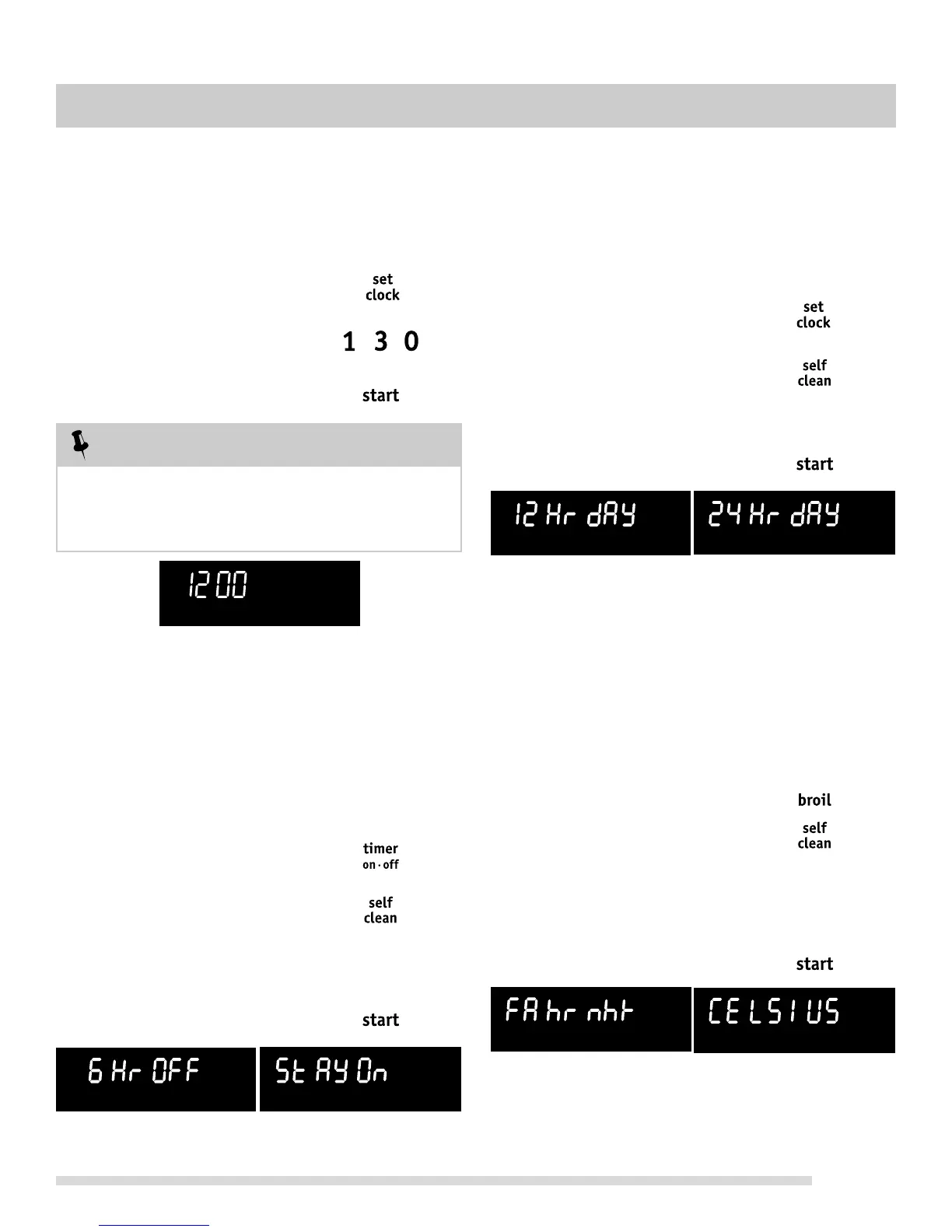
When the range is first powered up, “12:00” will flash in the
display (See Fig. 1).
To set the clock to 1:30:
Step Press
1. Press set clock.
2. Enter 1:30.
3. Press start.
Changing between continuous bake
setting or 6-Hour Energy Saving feature
The oven control has a factory preset built-in 6 Hour
Energy Saving feature that will turn off the oven if the
oven is left on for more than 6 hours. The control may be
programmed to override this feature to continuously bake.
To turn off 6-Hour Energy saving mode:
Step Press
1. Press and hold timer on•off
for 6 seconds.
2. Press self-clean
to toggle between “6 Hr OFF”
(Fig. 2) or “StAY On” (Fig. 3).
Select “StAY On” to turn off
6-Hour Energy Saving mode.
3. Press start to accept.
Fig. 2 Fig. 3
Setting 12 or 24 hour display modes
The clock display mode allows you to choose between 12
or 24 hr mode. The factory pre-set clock display mode is
12 hr. See the example below to change the default
mode to 24 hr display.
To set 12 or 24 hour mode:
Step Press
1. Press and hold set clock
for 6 seconds.
2. Press self-clean
to toggle between “12 Hr dAY”
or “24 Hr dAY” display modes
(See Figs. 4 & 5).
3. Press start to accept.
Step Press
1. Press and hold broil for
6 seconds.
2. Press self-clean to toggle
between “FAhrn ht” or
“CELSIUS” temperature display
modes (Figs. 6 & 7).
If Celsius display is needed, select
“CELSIUS”.
3. Press start to accept.
Fig. 4
Fig. 5
Fig. 6
Fig. 7
Fig. 1




 To Next Page