12
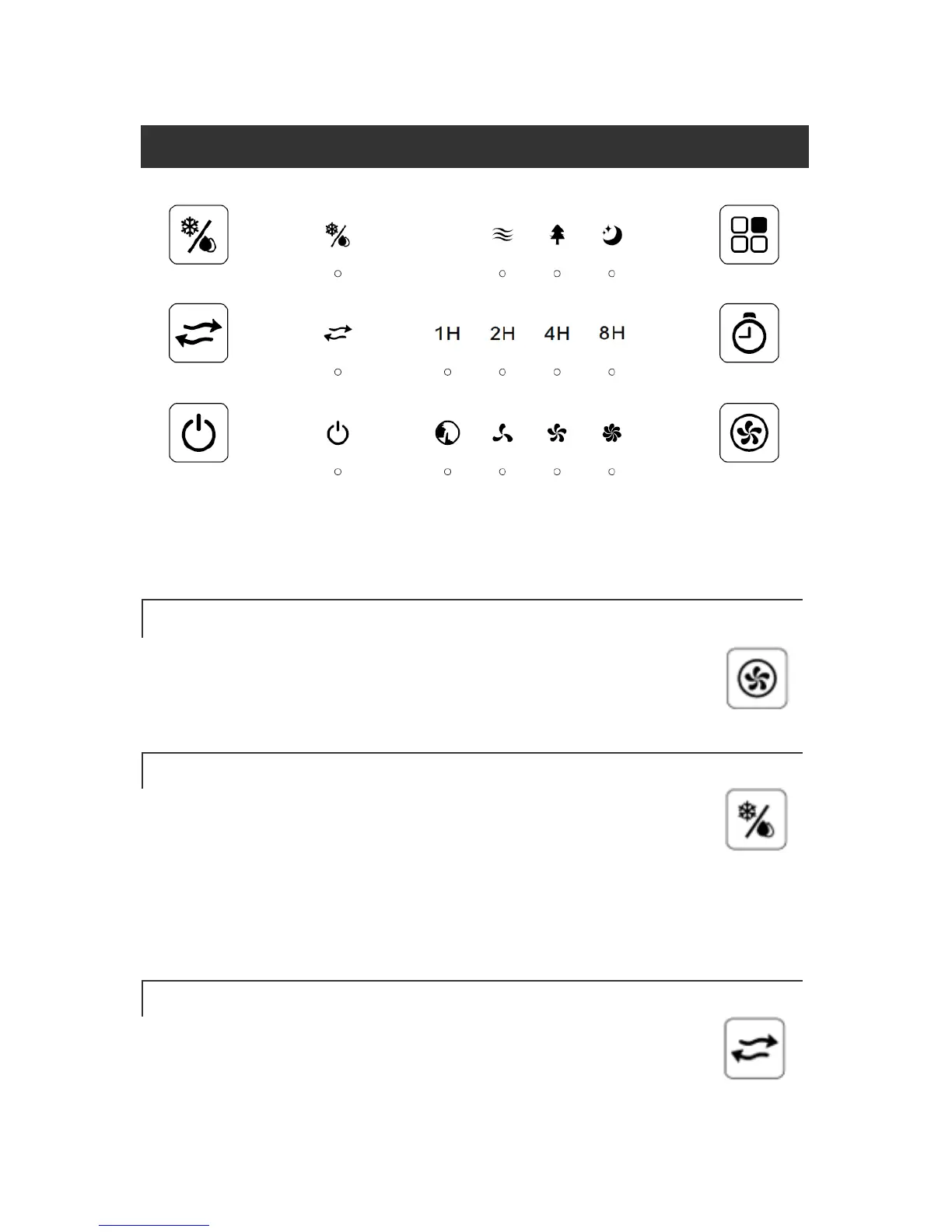
CONTROL & DISPLAY PANELS
Note: The unit will beep twice when the unit is plugged in, then the unit will
enter standby mode. Press the power button to begin operation.
FAN SPEED BUTTON
The fan speed can be changed by pressing the Fan Speed button.
The sequence scrolls through: Silent → Low → Medium → High.
EVAPORATIVE COOLING BUTTON
Before activating evaporative cooling, make sure you slide the side
lever down to lower the water pump into the water tank. After
doing so, press this button to turn On/Off evaporative cooling. Press this
button once to activate evaporative cooling, and by doing so, the pump turns
on. Press this button again to turn off evaporative cooling, and so on.
OSCILLATION BUTTON
With the power on, press this button to turn on the oscillation
function that oscillates the blades from the left to the right.



 To Next Page