19
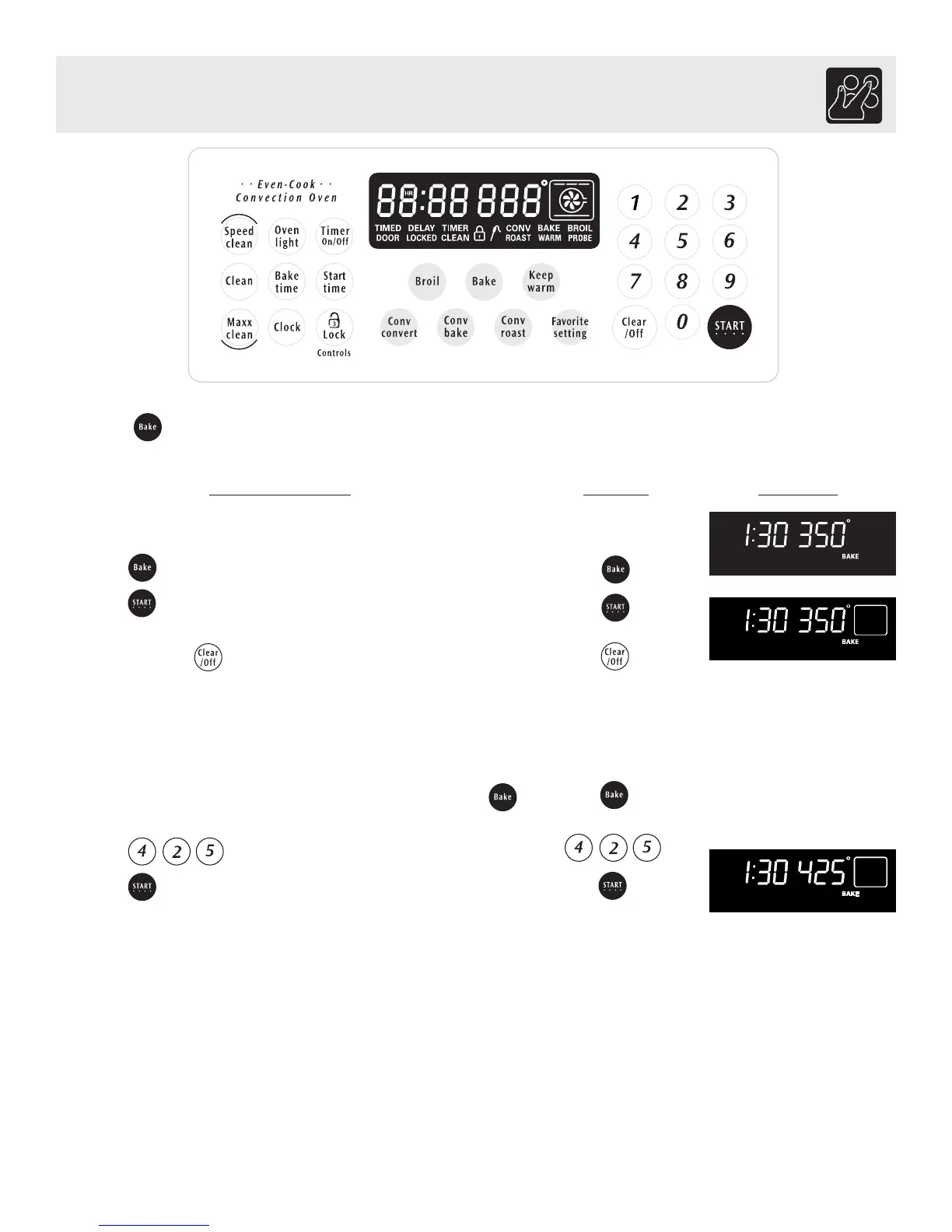
To set the Bake Temperature to 350°F:
1. Arrange interior oven racks and place food in oven.
2. Press (See Fig. 1).
3. Press . A long beep will sound once the oven set
temperature reaches 350° F (See Fig. 2).
Note: Pressing will cancel the Bake feature at any time.
To change the Bake Temperature (example changing
from 350° to 425°F):
1. After the oven has already been set to bake at 350°F and the
oven set temperature needs to be changed to 425°F, press
(See Fig. 2).
2. Press . 425° will appear in the display.
3. Press (See Fig. 3).
4. The oven is now set for 425°F.
INSTRUCTIONS PRESS DISPLAY
Setting Bake
The BAKE pad controls normal baking. The oven can be programmed to bake at any temperature from 170°F to 550°F
(The sample shown below is for 350°F).
Setting Oven Controls
Fig. 1
Fig. 2
Fig. 3



 To Next Page