8
Air Conditioner Features
(continued)
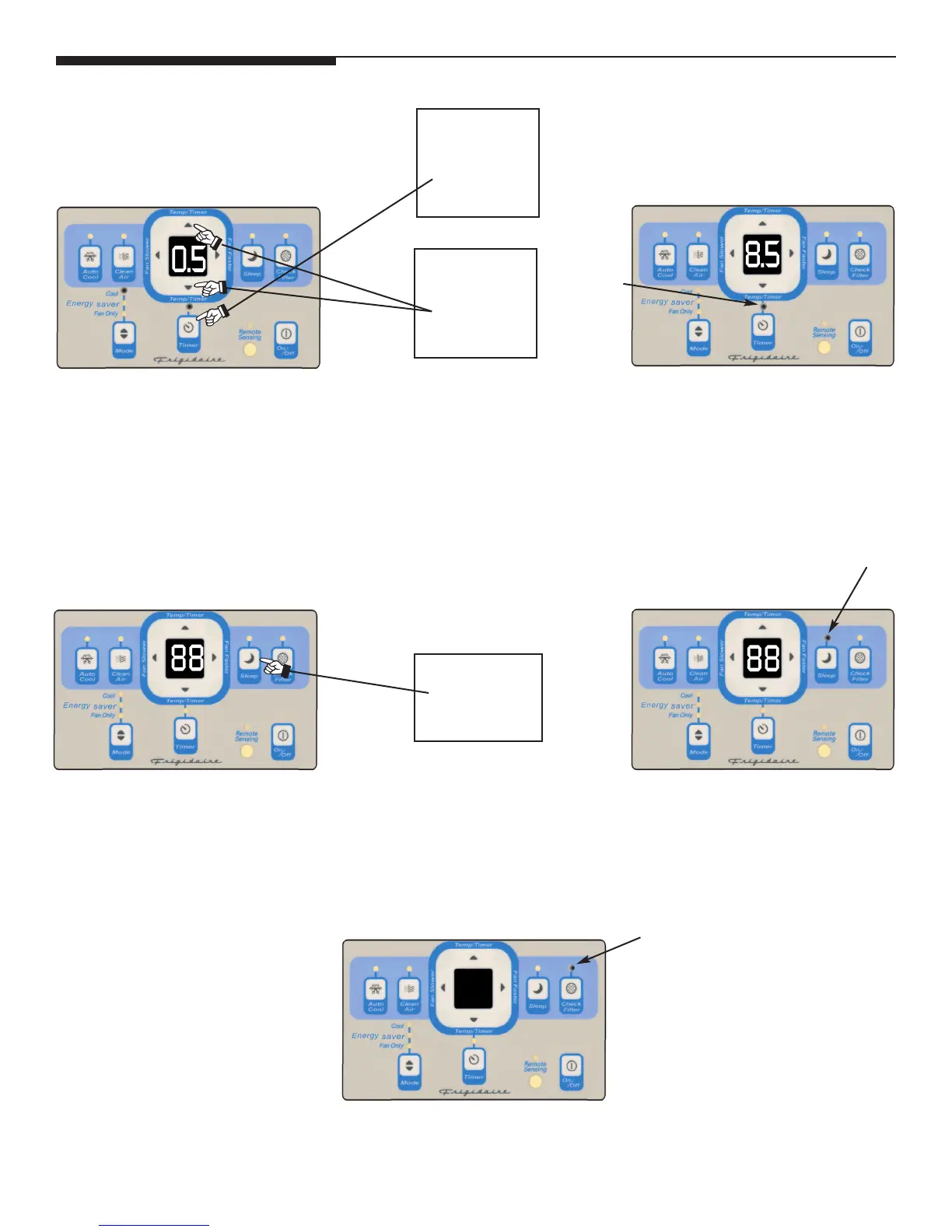
YOU WILL SEE HOW MUCH
TIME IS CHOSEN:
TIMER: DELAY START/STOP
FEATURE:
Note 1: For Delay Stop, the unit must be in the ON position.
Note 2: For Delay Start, the unit must be in the OFF position.
LIGHT
ON
DO THIS:
PRESS SLEEP
BUTTON
YOU WILL SEE:SLEEP FEATURE:
Note: In this “MODE” the set temperature will increase by 2 degrees F, 30 minutes after the mode is selected. The temperature
will then increase by another 2 degrees F after an additional 30 minutes. This new temperature will be maintained for 7 hours
before it returns to the originally selected temperature. This ends the “Sleep” MODE and the unit will continue to operate
as originally programmed. The “Sleep” MODE program can be cancelled at any time during operation by pressing “Sleep”
MODE button.
YOU WILL SEE:
CLEAN FILTER FEATURE:
LIGHT ON
LIGHT ON
Note: This feature is a reminder to clean the Air Filter (See Care and Cleaning) for more efficient operation and cooling. The
LED (light) will illuminate after 250 hours of operation. To reset after cleaning the filter, press the “Clean Filter” button and the
light will go off.
Then, to adjust timer setting, tap or hold the UP arrow(
^
) or DOWN arrow (
v
) to change the delay time by .5 hour increments up to
10 hours, then by 1 hour increments up to 24 hours. The control will count down the time remaining until start (8, 7.5, 7, etc.).
The Delay Start mode automatically selects cooling with maximum Fan Speed. The temperature maintained will be the same as
previously set. To change the set temperature, press “COOL” then Up or Down arrows until the desired temperature is indicated
on the display. After 5 seconds, the control will automatically change the display back to the hours remaining until the unit will
start/stop. PRESSING The on/off button,at anytime,will cancel the delay function.



 To Next Page