EasyManua.ls Logo

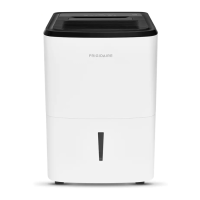
Frigidaire FFAD3533W1 - User Manual

Frigidaire FFAD3533W1
11 pages
Print Icon
To Next Page IconTo Next Page
Loading...
TABLE OF CONTENTS
www.frigidaire.com USA 1-800-944-9044 www.frigidaire.ca Canada 1-800-265-8352
Use & Care
of your
Dehumidifier
......................................................
3
3
..............................................................
2...............................
Care And Cleaning............................................... 9
Before You Call................................................... 10
Major Appliance Limited Warranty........................ 11
Normal Sounds................................................... 9
Storage .............................................................. 9
All about the
16120100A12519
Important Safety Instructions
Location
How It Works
4..........................................
Dehumidifier Features
Operating Instructions......................................... 4-8
Question and Answer IconNeed help?

Do you have a question about the Frigidaire FFAD3533W1 and is the answer not in the manual?

Summary

Important Safety Instructions

General Safety Precautions

Key warnings and precautions to prevent fire, electric shock, injury, and property damage.

Location & How It Works

Selecting a Location

Guidance on choosing the optimal placement for effective dehumidifier operation.

How It Works

Explanation of the dehumidifier's operating principle and internal components.

Dehumidifier Features & Operating Instructions

Dehumidifier Features

Overview of the electronic control panel and its indicators.

Operating Instructions

Steps to follow for initial setup and starting the dehumidifier operation.

Operating Instructions

Fault Codes

Troubleshooting guide for error codes displayed on the unit.

Removing Collected Water

Instructions for emptying the water bucket and dealing with the 'BUCKET FULL' indicator.

Operating Instructions

Continuous Drainage

Procedure for setting up continuous water drainage using a garden hose.

Care and Cleaning & Storage

Care and Cleaning

Steps for cleaning the filter, cabinet, and water bucket for maintenance.

Storage

Instructions on how to store the dehumidifier when not in use.

Normal Sounds

Description of typical operational sounds and their causes.

Before You Call for Service

Troubleshooting Common Issues

Identifies common occurrences and provides solutions to resolve them before calling for service.

Major Appliance Limited Warranty

Warranty Exclusions

Details what the limited warranty does not cover.

Obtaining Service

Information on how to contact Electrolux for warranty service.

Summary

Important Safety Instructions

General Safety Precautions

Key warnings and precautions to prevent fire, electric shock, injury, and property damage.

Location & How It Works

Selecting a Location

Guidance on choosing the optimal placement for effective dehumidifier operation.

How It Works

Explanation of the dehumidifier's operating principle and internal components.

Dehumidifier Features & Operating Instructions

Dehumidifier Features

Overview of the electronic control panel and its indicators.

Operating Instructions

Steps to follow for initial setup and starting the dehumidifier operation.

Operating Instructions

Fault Codes

Troubleshooting guide for error codes displayed on the unit.

Removing Collected Water

Instructions for emptying the water bucket and dealing with the 'BUCKET FULL' indicator.

Operating Instructions

Continuous Drainage

Procedure for setting up continuous water drainage using a garden hose.

Care and Cleaning & Storage

Care and Cleaning

Steps for cleaning the filter, cabinet, and water bucket for maintenance.

Storage

Instructions on how to store the dehumidifier when not in use.

Normal Sounds

Description of typical operational sounds and their causes.

Before You Call for Service

Troubleshooting Common Issues

Identifies common occurrences and provides solutions to resolve them before calling for service.

Major Appliance Limited Warranty

Warranty Exclusions

Details what the limited warranty does not cover.

Obtaining Service

Information on how to contact Electrolux for warranty service.

Overview

This document serves as a comprehensive Use & Care Manual for a Frigidaire dehumidifier, providing detailed instructions for its operation, maintenance, and troubleshooting. The dehumidifier is designed to efficiently remove moisture from the air, contributing to a more comfortable and healthier indoor environment.

Function Description

The Frigidaire dehumidifier operates by drawing moisture-laden air across a set of dehumidifying coils. These coils condense the moisture from the air, which is then collected in a front-mounted bucket. The now dry, warm air is then expelled back into the room through air outlet louvers. This process helps to reduce humidity levels, preventing issues such as sweating, dampness, and associated odors. The unit is designed to function optimally within a temperature range of 41°F (5°C) to 89°F (32°C), with performance significantly impacted outside this range. A built-in "Compressor" circuit includes an automatic 3-minute time delay for starting, which prevents overheating of the compressor and potential circuit breaker trips when the unit is turned off and on quickly. Proper installation of the water collection tank is crucial for the unit to operate.

Usage Features

The dehumidifier features an electronic control panel that allows users to manage various settings. Before initial operation, it's recommended to allow the unit to reach room temperature and remain upright for at least one hour. The unit should be plugged into a properly grounded 115-volt AC outlet. If the "BUCKET FULL" light is on, the bucket needs to be removed and re-installed to reset the float switch.

Upon activation, the unit defaults to a "CONTINUOUS" mode with high fan speed, indicated by "CO" on the display. This mode is suggested for the first three to four days to effectively address initial dampness and odors. After this initial period, users can adjust the desired relative humidity (RH) between 35% and 85% using the "HUMIDITY" up or down buttons, which change the setting in 5% increments. The display will show the actual room humidity after a 5-second delay from setting the desired RH. To revert to "CONTINUOUS" mode, the "HUMIDITY" down button can be pressed until "CO" is displayed.

The fan speed can be adjusted to "Hi," "Med," or "Lo" using the "FAN SPEED" button, with an indicator light showing the selected setting. Higher fan speeds facilitate quicker moisture removal.

A "TIMER" function allows for either a delayed start or delayed stop of the unit, configurable from 0.5 to 24 hours. When the unit is running, setting the timer will initiate a delayed stop. If the unit is off, setting the timer will initiate a delayed start. Timer settings are adjusted in 0.5-hour increments up to 10 hours, and then in 1-hour increments up to 24 hours. The control panel will count down the remaining time. For delayed start, the fan speed and humidity settings will be the same as the previous operation. The timer function can be stopped at any time by pressing the "TIMER" button again. It's important to ensure power is supplied and the desired room humidity is set before entering timer settings.

The unit also features a "Filter reset" light that illuminates after 250 hours of operation, signaling that the air filter needs cleaning. After cleaning and re-installing the filter, pressing the "Filter reset" button will extinguish the light.

In the event of a power outage, the unit will remember the last settings and resume operation with those settings once power is restored.

The dehumidifier also includes fault codes for troubleshooting:

  • "AS" or "ES" indicates a sensor failure, requiring service.
  • "EC" suggests issues with outlet voltage (should be 115V±10%) or ambient temperature (outside 41°F-89°F). Unplugging and re-plugging the unit under normal conditions may resolve this; otherwise, service is needed.
  • "E4" signifies a communication fault between the display PCB and the main control PCB, also requiring service.

Water collection can be managed in two ways:

  1. Emptying the Bucket: When the bucket is full, the unit automatically shuts down, and the "BUCKET FULL" indicator illuminates. The unit should not be moved at this point to prevent spills. The bucket can be gently unclipped, removed, and emptied. A "click" sound confirms correct re-installation, and the unit will resume operation. If the "BUCKET FULL" light remains on, the float needs to be checked for proper seating. The collected water is not potable and should be discarded.
  2. Continuous Drainage: For continuous operation without manual emptying, a garden hose can be attached to the drain connector on the back of the unit. The drain cap should be unscrewed, the female threaded end of the hose inserted and screwed onto the drain connector, ensuring a secure, leak-free connection. The hose should be directed towards a drain, free of kinks or elevations that could impede water flow. A 1/2" (12.7mm) or larger dehumidifier drain hose is recommended. When a hose is not attached, the drain cap must be securely screwed to prevent leakages.

Maintenance Features

Regular maintenance is essential for the dehumidifier's optimal performance and longevity.

  • Filter Cleaning: The air filter should be cleaned every two weeks under normal operating conditions. To clean, open the back grille, pull out the filter, wash it with clean water, dry it, and then re-install.
  • Cabinet Cleaning: The exterior cabinet can be dusted with an oil-free cloth or a damp cloth. The grill can be cleaned using a vacuum cleaner with a brush attachment.
  • Water Bucket Cleaning: The water collection bucket should be cleaned with warm water and detergent.
  • Storage: When the unit is not in use for an extended period, it should be unplugged, and the power cord can be wrapped for storage.

The manual also describes normal operating sounds, including the sound of rushing air from the fan, gurgling or hissing from refrigerant passing through the evaporator, dripping water during the dehumidification cycle, and a high-pitched chatter from the high-efficiency compressor. These sounds are considered normal and do not indicate a malfunction.

Frigidaire FFAD3533W1 Specifications

General IconGeneral
BrandFrigidaire
ModelFFAD3533W1
CategoryDehumidifier
LanguageEnglish

Videos

How to Solve Automatic Drain Problems with Frigidaire FFAD3533W1

Related product manuals