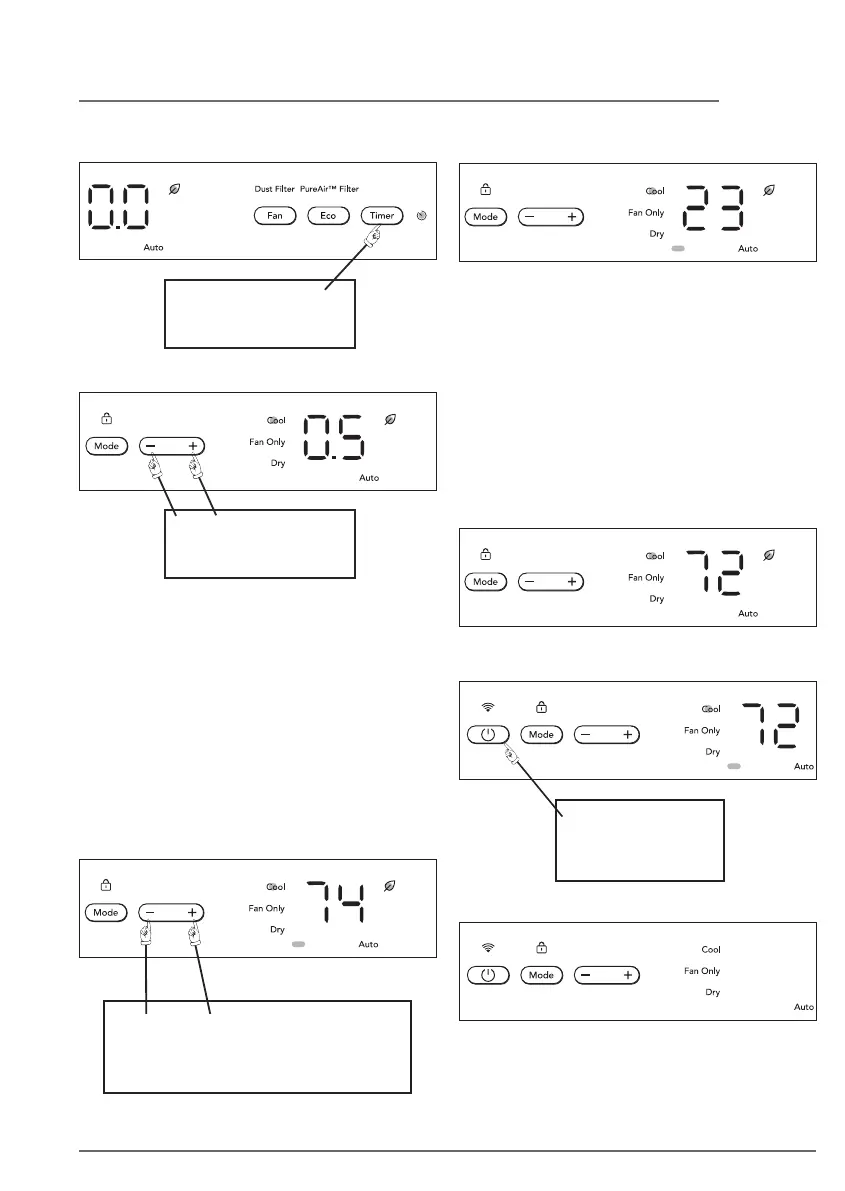
TO CHANGE THE TEMPERATURE SCALE
(°F OR °C):
DO THIS:
PRESS AND HOLD THE UP/DOWN
BUTTONS SIMULTANEOUSLY
FOR 3 SECONDS
TO ACTIVATE TIMER FEATURE:
Note: For Delay Stop or Start, press the Timer
button when the unit is in the On or O position.
Then tap or hold the “ ” or “ ” button to
change delay timer at 0.5 hour increments, up to
10 hours, then at 1 hour increments up to 24
hours. After 5 seconds, the control will count
down the time remaining until Stop or Start (8h,
7.5h, 7h, etc.).
Pressing the unit On/O button at any time will
cancel the Delay Start/Stop function. Or press
the timer button for 2 seconds
TO SET TIMER
DO THIS:
PRESS TIMER
BUTTON
DO THIS:
PRESS UP/DOWN
BUTTONS
YOU WILL SEE:
Note: The control is capable of displaying
temperature in degrees Fahrenheit or
degrees Celsius.
QUIET FEATURE:
Quiet mode can only be activated by APP. In
this mode, due to low frequency operation of
compressor, it may result in insucient
cooling and heating capacity. Press ON/OFF
or Mode button while operating will cancel
quiet feature.
In Quiet mode all Fan speed LED will be o, as
shown below.
TO TURN UNIT OFF:
DO THIS:
PRESS
ON/OFF BUTTON
YOU WILL SEE:
19OPERATING INSTRUCTIONS




 To Next Page