11
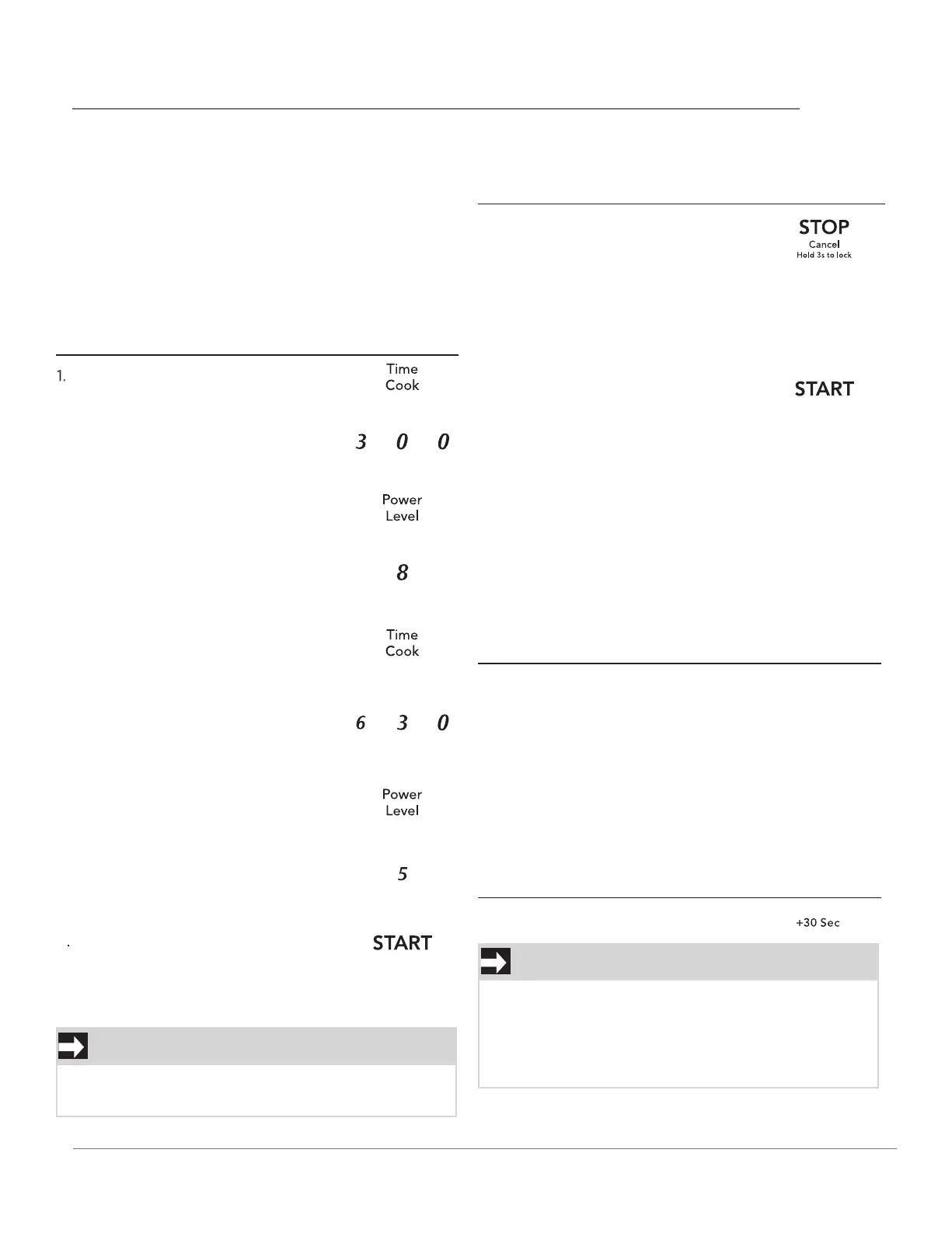
Press TimeCook.
press START pad.
When heating has finished you will hear beeps and
"End" will display.
NOTE
USING THE +10 SEC /+ 30 SEC KEY
This feature will let you quickly start or add 10 or
30 seconds
Press the +10 sec/+30 sec pad to:
+10 Sec / +30 Sec
Press +30 pad twice.
NOTE
Press the Stop/Cancel pad to:
9
OPERATION
When heating has finished you will hear beeps
and "End" will display.
"Food" will be displayed if a quick start cooking
cycle or + 10 Sec/+30 Sec key is pressed more
than 5 minutes after the door of microwave oven
is closed. You must open then close the door
again to clear ''Food'' from the display.
HEATING WITH MULTIPLE COOKING
STAGES
For best results, some microwave recipes call for
different power levels or different lengths of time
for cooking. Your microwave may be set to change
from one stage to another automatically (2 stages
maximum).
Example: to cook food for 3 minutes at 80%
power and then 50% power for 6 minutes
30 seconds:
2. Use the number pads to enter
heating time for the 1st stage
(cook time may be set up to 99
minutes and 99 seconds).
1. Erase if you have entered wrong
information.
2. Cancel timer setting process.
3. Press pad once to pause the oven
temporarily during cooking.
(Press START pad again to resume
cooking.)
4. Return the time of day (clock) to
the display after cooking cycle is
completed.
5. Cancel a program during cooking,
press twice.
1. Start programmed cooking.
2. Start cooking for 10 seconds/30 seconds at 100%
power level.
3. Extend cooking time in multiples of 10
seconds/30 seconds each time this pad is
pressed during microwave cooking.
4. Use the number keys to enter
power level for the 1st stage.
P-80 appears in the display (80
% power).
5. Press Time Cook pad for 2nd
stage.
6. Use the number pads to enter
heating time for the 2nd stage
(cook time may be set up to 99
minutes and 99 seconds).
7. Press Power Level pad for 2nd
stage.
8. Use the number key to enter
power level for the 2nd stage.
P-50 aappears in the display
(50 % power).
3. Press Power Level pad once.
USING THE STOP/CANCEL KEY
This feature will let you quickly stop or cancel
the cooking process.
Example: to add 1 minute of cook time during
100% microwave cooking :



 To Next Page