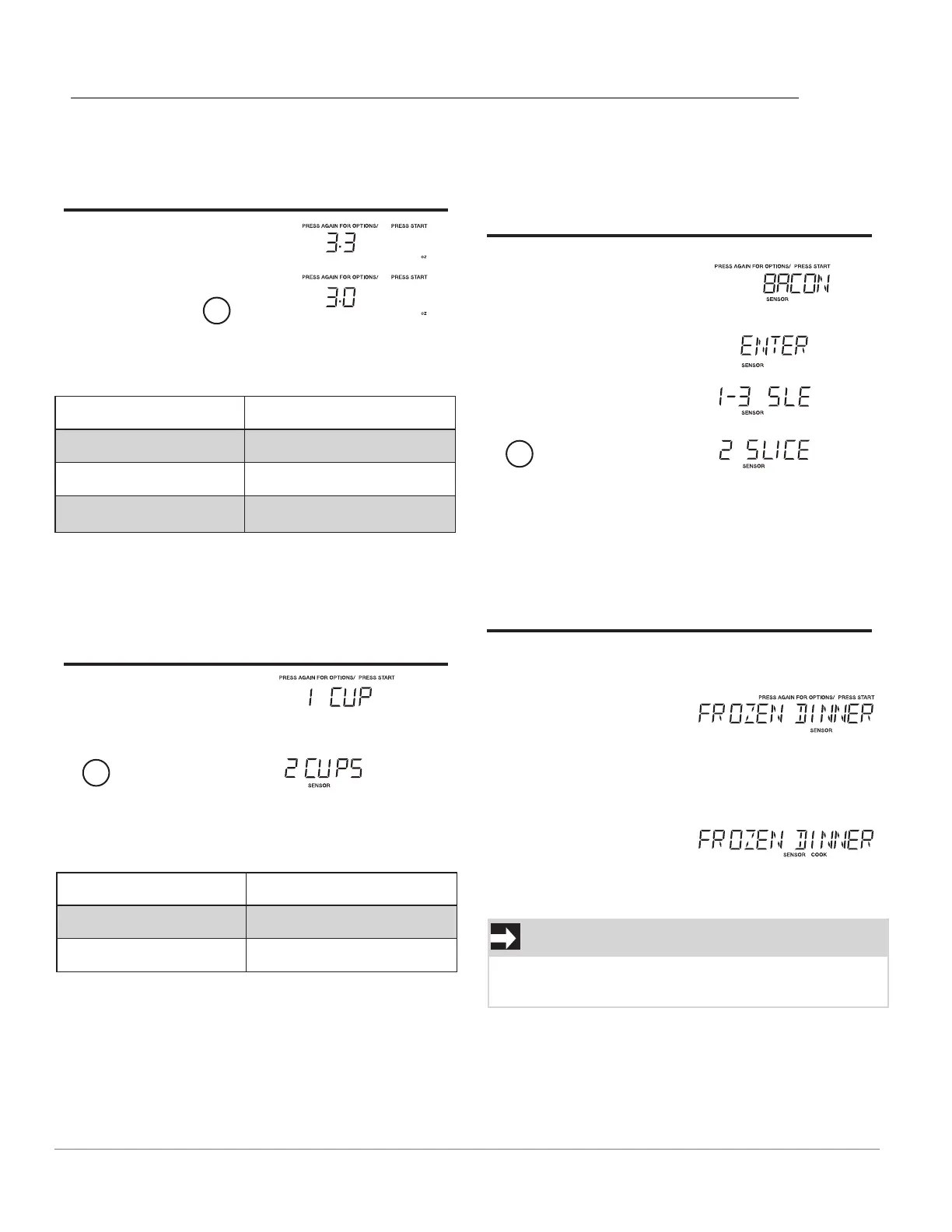
Touch: Display Shows:
1. Popcorn
Popcorn X2 or
2
START
Touch popcorn Weight
x1 3.3 oz
x2 3.0 oz
x3 1.75 oz
Beverage
• Suppose you want to cook Frozen Dinner
Suppose youwant to cook 2 cups of beverage.
Touch: Display Shows:
1. Beverage
2.
3.
2
START
Popcorn
Sensor Cook
The weight of these menus cannot be adjust except
bacon menu.
•
Suppose you
want cook 2 slices of bacon.
Touch: Display Shows:
1. Sensor
Cook
X1
2. START
3.
2
4. START
Touch: Display Shows:
1. Sensor
Cook
X2
2. START
Ac^^]aSg]ceO\bb]Q]]Y3.0oz^]^Q]`\
2.
3.
Touch number key Amount
1 1 cup
2 2 cups
Frozen Dinner
•
•
.
OPERATION
11
Time counting down
Time counting down
Time counting down
NOTE
When the food is near completion, the display
will show time count down.
Touch sensor cook once, Bacon displays, then
Touch start to enter the slice setting, 1-3 SLE will
display, touch 1, 2, or 3 slices.




 To Next Page