9
LIGHT
OPERATION
• Before operating your new appliance make sure
you read and understand this Use and Care
Guide completely.
• The clock can be disabled when the microwave
is first plugged in and the STOP key is selected.
To re-enable the clock follow clock instructions.
1.
XX:XX
LOCK
STOP
(for 3 seconds)
Touch: Display Shows:
1.
x 1
2. x 2
3. x 3
4. x 4
Display Shows:
1.
x 1
2. x 2
3. x 3
Touch: Display Shows:
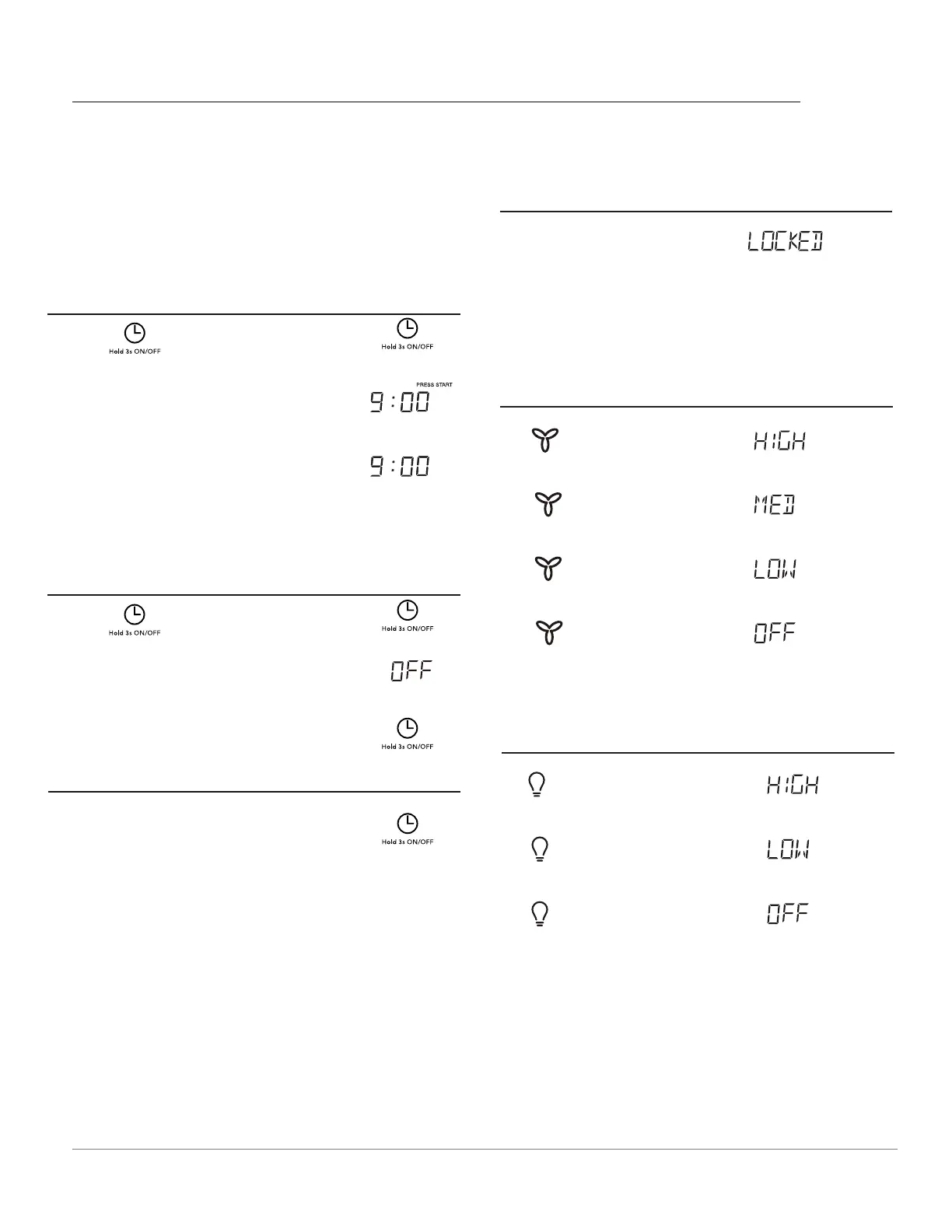
CHILD LOCK
•
Suppose you want to lock or unlock the controls.
VENT FAN
Touch:
SETTING THE CLOCK
Example: setting clock display for 9:00:
1. Touch
2. Enter time using number pads.
3. Touch pad .
p ad once .
START
SETTING THE CLOCK ON/OFF
1. Touch
2.
Time will display, after 3s, OFF
will display.
and
hold pad .
3.
1.
Example: to turn off clock display:
Example: to turn on clock display:
Hold the clock button for 3s and the
clock will show in the display and when
ON is shown in the display the clock will
remain on.
Tap the clock button to see the current
time if the display is off.
(current time will display after 2 seconds)




 To Next Page