Setting Oven Controls
Setting Continuous Sake or 12 Hour Energy Saving
The TmMERON/OFF _ and CLEAN _°_/pads controU the Continuous Bake or 12 Hour Energy Saving features, The
oven
controUhas a factory preset built-in 12 Hour Energy Saving feature that wHUshut off the oven ifthe oven controU is Uefton for
more than 11 hours and 59 minutes, The oven can be programmed to override this feature for Continuous Baking,
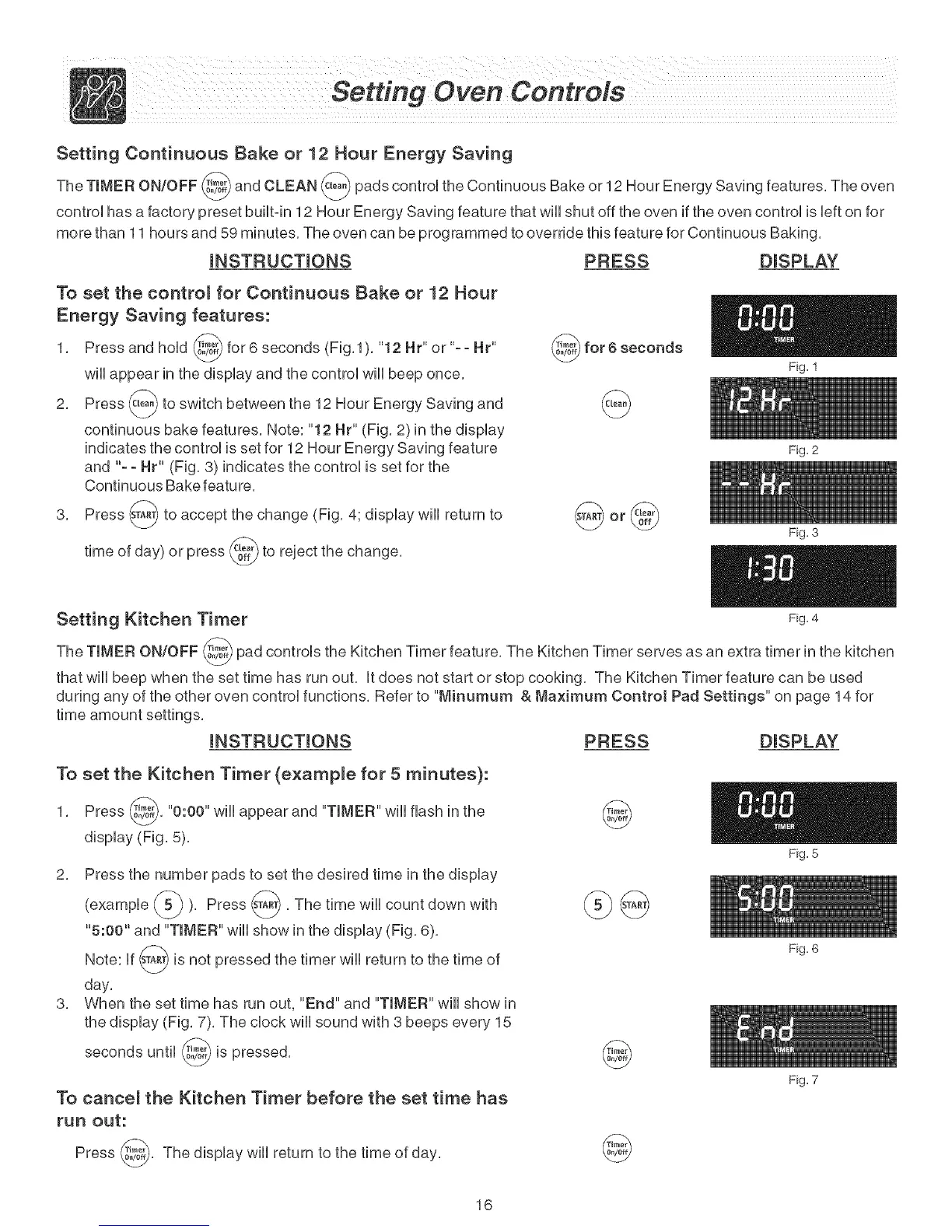
INSTRUCTIONS PRESS DISPLAY
To set the contro_ for Continuous Bake or 12 Hour
Energy Saving features:
1, Press and hoUd @ for 6 seconds (Fig J), "12 Hr" or "-- Hr"
wHUappear in the dispUayand the control wHUbeep once,
2, Press _L_ to switch between the 12 Hour Energy Saving and
continuous bake features, Note: "12 Hr" (Fig, 2)in the display
indicates the control is set for 12 Hour Energy Saving feature
and "- - Hr" (Fig, 3) indicates the control is set for the
Continuous Bake featu re,
3, Press s_ to accept the change (Fig, 4; display will return to
day) or press c_00_._to reject the change,
time of
Setting Kitchen Timer
Fig. 1
Fig. 2
Fig. 3
Fig. 4
The TIMER ON/OFF _i,_ pad controls the Kitchen Timer feature, The Kitchen Timer serves as an extra timer in the kitchen
v
that will beep when the set time has run out, It does not start or stop cooking, The Kitchen Timer feature can be used
during any of the other oven control functions, Refer to "Minurnum & Maximum Control Pad Settings" on page 14 for
time amount settings,
INSTRUCTIONS PRESS DISPLAY
To set the Kitchen Timer (example for 5 minutes):
1, Press _, "0:00" will appear and "TIMER" will flash in the
display (Fig, 5),
2, Press the number pads to set the desired time in the display
_ ), Press s_, The time will count down with(exampUe
v
"5:00" and "TIMER" will show in the display (Fig, 6),
Note: If s_A_ is not pressed the timer will return to the time of
day,
3, When the set time has run out, "End" and "TIMER" will show in
the display (Fig, 7), The clock will sound with 3 beeps every 15
seconds until _, is
pressed,
@
Fig. 5
To cance_ the Kitchen Timer before the set time has
run out:
Press _, The display will return to the time of
day,
16
Fig. 6
Fig. 7



 To Next Page