Setting Oven Controls
I _!/nk Cenve_iee I!v_
Digital Ceaking Yect_mla!
Speed Oven Timer
Ctean Light 0n!eft
Bake Start Broi{ Bake Keep
Ciea. Time Time Warm 7 8 9
Ma×a C&eck _ Cony Cony Cone Favorite Ctear 0 START
Clean Lock Convert Bake Roast Betting Off
Setting Bake
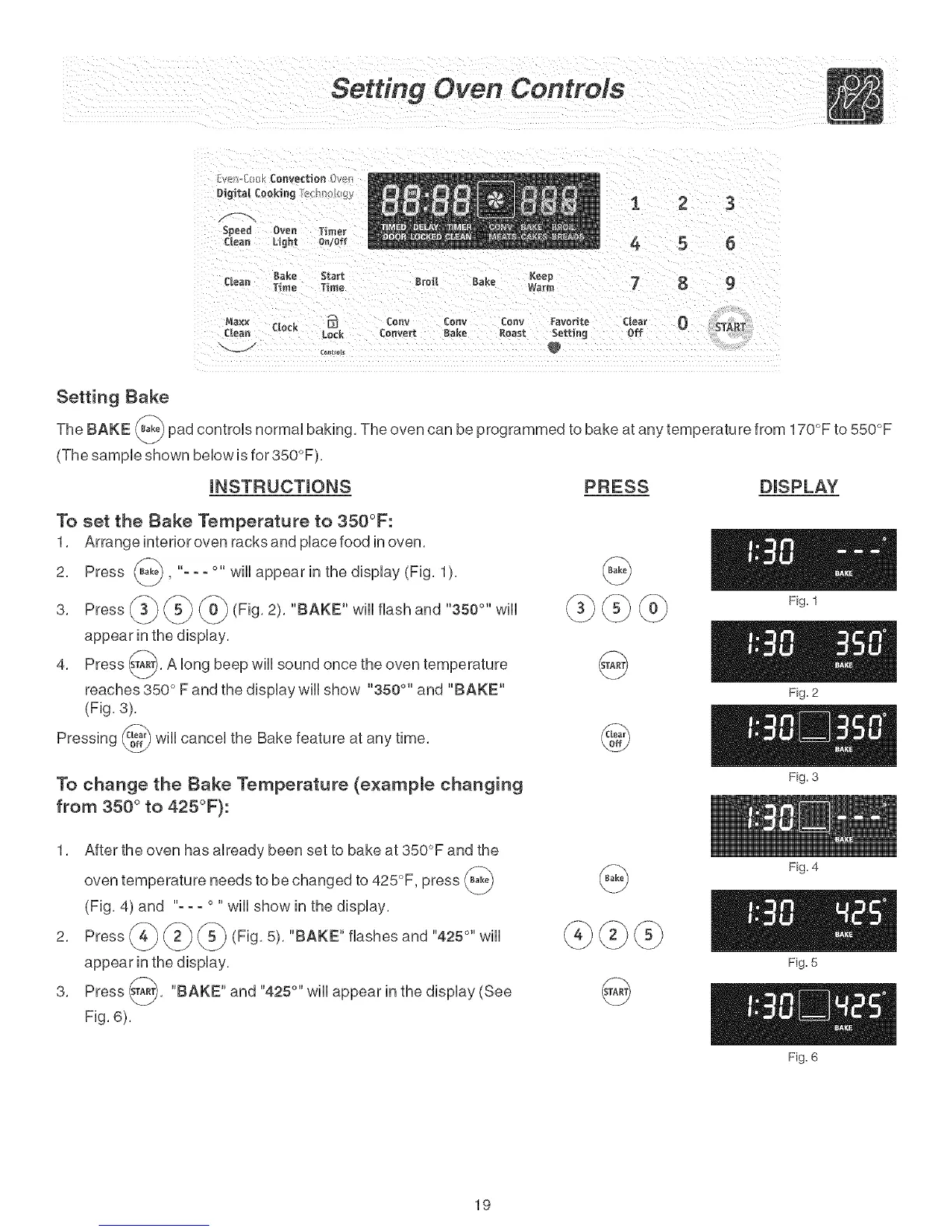
The BAKE _ pad controls normal baking, The oven can be programmed to bake at any temperature from 170°F to 550°F
(The sample shown below is for 350°F),
iNSTRUCTiONS PRESS DISPLAY
To set the Bake Temperature to 350°F:
1, Arrange interior oven racks and place food in oven,
2, Press (_, "- - - °" will appear in the display (Fig, 1
),
3, Press
(Fig, 2), "BAKE" will flash and "350 °" will
4, Press (_), A long beep will sound once the
oven
temperature
reaches 350 ° F and the display wiii show "350 °'' and "BAKE"
(Fig, 3),
_} will cancel the Bake feature at any time,
Pressing
To change the Bake Temperature (example changing
from 350 ° to 425°F):
@
@
Fig. 1
Fig. 2
Fig. 3
1, After the oven has already been set to bake at 350°F and the
oven temperature needs to be changed to 425°F, press
(Fig, 4) and "- - - ° " will show in the display,
v d V
appear in the display,
3, Press _A_, "BAKE" and "425 °'' will appear in the
display (See
Fig, 6),
@@
@
Fig. 4
Fig. 5
Fig. 6
19



 To Next Page