//} t i}t}{ {{ }/ /{/: ::3
Setting Oven Controls
Using the Favorite Settings Feature
The @ FAVORITE SETTING pad is used to record and recall your favorite recipe settings, This feature may store and
recall from 1 to 3 different settings, The Favorite Betting feature may be used with Bake or a Timed Bake, This feature will
not work with any other function including a Delayed Timed Bake setting,
mNSTRUCTmONS PRESS DISPLAY
To Program the Oven to record a recipe setting and begin
baking (sample shown is for bake at 350°F):
1, Place the food in the oven,
@
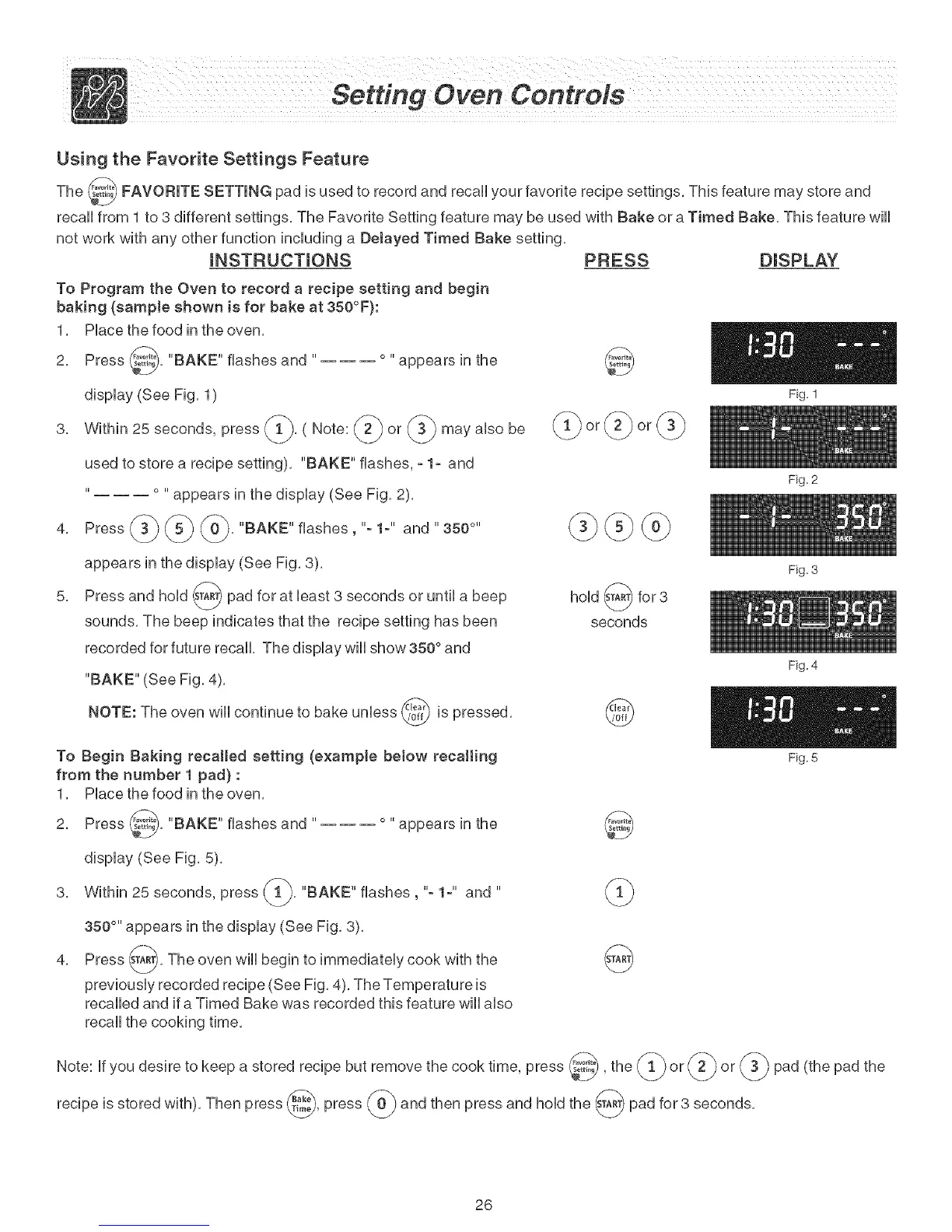
2, Press ........, "BAKE" flashes and ..... appears in the
display (See Fig, 1)
3, Within 25 seconds, press _, ( Note: @ or may abe be
used to store a recipe setting), "BAKE" flashes, - 1- and
Fig. 1
° " appears in the display (See Fig, 2),
4, Press
"BAKE"flashes,"-1-" and"350 °''
5,
appears in the display (See Fig, 3),
Press and hold s_ pad for at bast 3 seconds or until
a beep
sounds, The beep indicates that the recipe setting has been
recorded for future recall, The display will show 350 ° and
"BAKE" (See Fig, 4),
NOTE: The oven will continue to bake unless _ is
pressed,
',t,xj
To Begin Baking recalled setting (example betow recalling
from the number 1 pad) :
1, Place the food in the oven,
2, Press @, "BAKE" flashes and ..... appears in the
display (See Fig, 5),
hold @ for3
seconds
@
@
Fig. 2
Fig. 3
Fig. 4
Fig. 5
3, Within 25 seconds, press "BAKE" flashes, "- 1-" and "
350 °" appears in the display (See Fig, 3),
Press _A-_, The oven wiii begin to immediately cook with the _A_)
4,
v
previously recorded recipe (See Fig, 4), The Temperature is
recalled and if a Timed Bake was recorded this feature will also
recall the cooking time,
Note: if you desire to keep a stored recipe but remove the cook time, press @,the (_ or _} or @ pad (the pad the
recipe is stored with), Then press _}, press }and then press and hold the s___ pad for 3 seconds,
26



 To Next Page