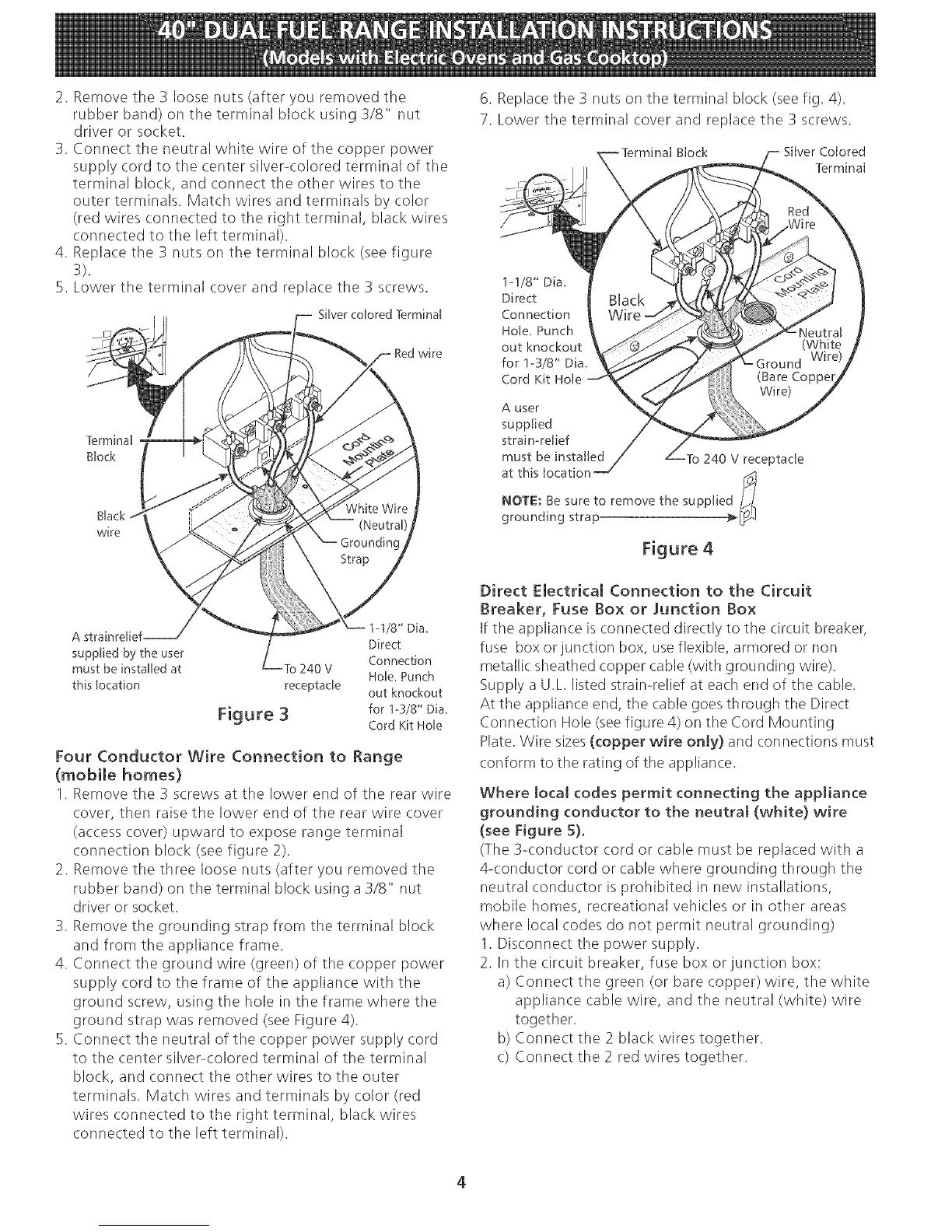
2. Remove the 3 loose nuts (after you removed the
rubber band) on the terminal block using 3/8" nut
driver or socket.
3. Connect the neutral white wire of the copper power
supply cord to the center silver-colored terminal of tile
terminal block, and connect the other wires to the
outer terminals. Match wires and terminals by color
(red wires connected to the right terminal, black wires
connected to the left terminal).
4. Replace tile 3 nuts on tile terminal block (see figure
3).
5. Lower the terminal cover and replace the 3 screws.
Silver colored Terminal
wire
Black
wire
6. Replace the 3 nuts on the terminal block (see fig. 4).
7. Lower the terminal cover and replace the 3 screws.
Block Silver Colored
Terminal
1-1/8" Dia.
Direct
Connection
Hole. Punch
out knockout
for 1-3/8" Dia.
Cord Kit Hole
A user
supplied
strain-relief
must be installed To 240 V receptacle
at this location I_t
NOTE: Be sure to remove the supplie
grounding strap
/8" Dia.
A strainrelief Direct
supplied by the user
Connection
must be installed at To 240 V
Hole. Punch
this location receptacle out knockout
Figure 3 for 1-3/8" Dia.
Cord Kit Hole
Four Conductor Wire Connection to Range
(mobile homes)
1. Remove the 3 screws at the lower end of the rear wire
cover, then raise the lower end of the rear wire cover
(access cover) upward to expose range terminal
connection block (see figure 2).
2. Remove the three loose nuts (after you removed the
rubber band) on the terminal block using a 3/8" nut
driver or socket.
3. Remove the grounding strap from the terminal block
and from the appliance frame.
4. Connect the ground wire (green) of the copper power
supply cord to the frame of the appliance with the
ground screw, using the hole in the frame where the
ground strap was removed (see Figure 4).
5. Connect the neutral of the copper power supply cord
to the center silver-colored terminal of the terminal
block, and connect the other wires to the outer
terminals. Match wires and terminals by color (red
wires connected to the right terminal, black wires
connected to the left terminal).
Direct Electrical Connection to the Circuit
Breaker, Fuse Box or Junction Box
If the appliance is connected directly to the circuit breaker,
fuse box or junction box, use flexible, armored or non
metallic: sheathed copper cable (with grounding wire).
Supply a U.L listed strain-relief at each end of the cable.
At the appliance end, the cable goes through the Direct
Connection Hole (seefigure 4) on the Cord Mounting
Plate. Wire sizes(copper wire only} and connections must
conform to the rating of the appliance.
Where tocaJ codes permit connecting the appliance
grounding conductor to the neutral (white) wire
(see Figure 5)°
(The 3-conductor cord or cable must be replaced with a
4-conductor cord or cable where grounding through the
neutral conductor is prohibited in new installations,
mobile homes, recreational vehicles or in other areas
where local codes do not permit neutral grounding)
1. Disconnect the power supply.
2. In the circuit breaker, fuse box or junction box:
a) Connect the green (or bare copper) wire, the white
appliance cable wire, and the neutral (white) wire
together.
b) Connect the 2 black wires together.
c) Connect the 2 red wires together.
4


 To Next Page
 Loading...