Setting Oven Controls
Setting Preheat
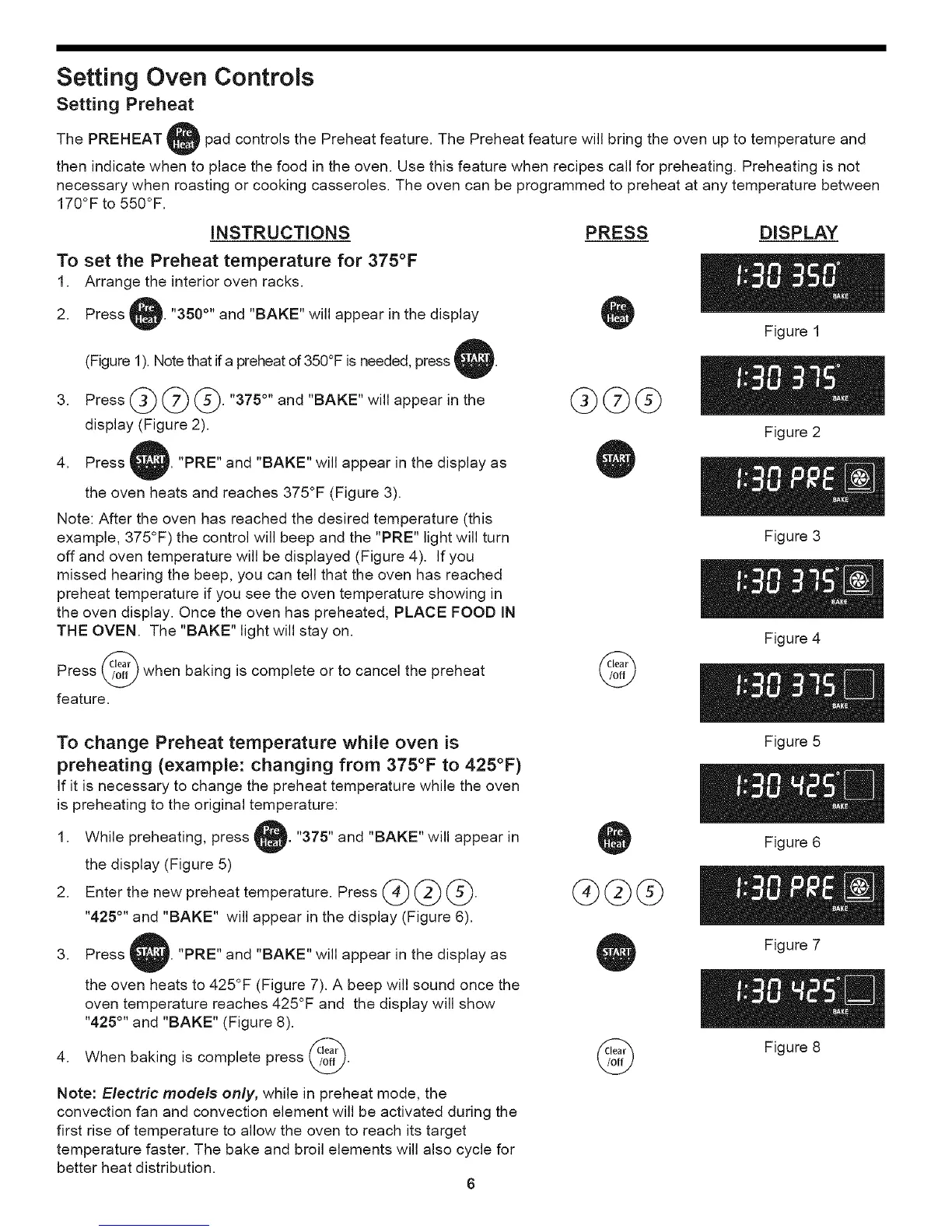
The PREHEAT pad controls the Preheat feature. The Preheat feature will bring the oven up to temperature and
then indicate when to place the food in the oven. Use this feature when recipes call for preheating. Preheating is not
necessary when roasting or cooking casseroles. The oven can be programmed to preheat at any temperature between
170°F to 550°F.
INSTRUCTIONS PRESS DISPLAY
To set the Preheat temperature for 375°F
1. Arrange the interior oven racks.
2. Press L "350 °'' and "BAKE" will appear in the display
(Figure 1). Note that ifa preheat of 350°F is needed, press t
Press @ _ @. "375 °" and "BAKE" will appear in the
display (Figure 2).
Figure 1
Figure 2
4. Press "PRE" and "BAKE" will appear in the display as
the oven heats and reaches 375°F (Figure 3).
Note: After the oven has reached the desired temperature (this
example, 375°F) the control will beep and the "PRE" light will turn
off and oven temperature will be displayed (Figure 4). If you
missed hearing the beep, you can tell that the oven has reached
preheat temperature if you see the oven temperature showing in
the oven display. Once the oven has preheated, PLACE FOOD IN
THE OVEN. The "BAKE" light will stay on.
Press _ when baking is complete or to cancel the preheat
feature.
©
Figure 3
Figure 4
To change Preheat temperature while oven is
preheating (example: changing from 375°F to 425°F)
If it is necessary to change the preheat temperature while the oven
is preheating to the original temperature:
,
While preheating, press i "375" and "BAKE" will appear in
the display (Figure 5)
Enter the new preheat temperature. Press (_) (_ (_.
"425 °'' and "BAKE" will appear in the display (Figure 6).
GGG
Figure 5
Figure 6
3. Press "PRE" and "BAKE" will appear in the display as
the oven heats to 425°F (Figure 7). A beep will sound once the
oven temperature reaches 425°F and the display will show
"425°" and "BAKE" (Figure 8).
4. When baking is complete press _.
Note: Electric models only, while in preheat mode, the
convection fan and convection element will be activated during the
first rise of temperature to allow the oven to reach its target
temperature faster. The bake and broil elements will also cycle for
better heat distribution.
6
©
Figure 7
Figure 8






 To Next Page