17
CONTROLS AND SETTINGS
Alarms
POWER
OUT
In the event of a power
outage, the POWER OUT
alert illuminates once power
has been restored and a tone
sounds. Press any button to
silence the tone.
DOOR
OPEN
If you leave a door open for
5 minutes or more, an alarm
sounds and the DOOR OPEN
indicator illuminates on the
display. Turn the alarm o by
closing the door or pressing
any key. The control panel
returns to normal operations
after you close the door.
WATER
FILTER
Replace the water filter when
the indicator illuminates.
Change the water filter every 6
months or after you have dis-
pensed 120 gallons of water.
To reset, press and hold the
button for 3 seconds. A tone
then sounds.
AIR
FILTER
Replace the air filter when the
indicator illuminates. Change
the air filter every 6 months.
To reset, press and hold the
button for 3 seconds. A tone
then sounds.
HIGH
TEMP
In the event of the internal
temperature of the refrig-
erator rising and staying at
a temperature above the
safe temp zone for a period
of time, HI displays on the
corresponding compartment
display (refrigerator and/or
freezer). An alarm sounds
in addition to the display
warning every 10 seconds
until acknowledged. The
refrigerator automatically
tries to cool down to improve
the condition. However, if the
temperature has not cooled
after some time, the warning
and alarm will appear again.
If the problem continues
please call 1 (800) 374-4432.
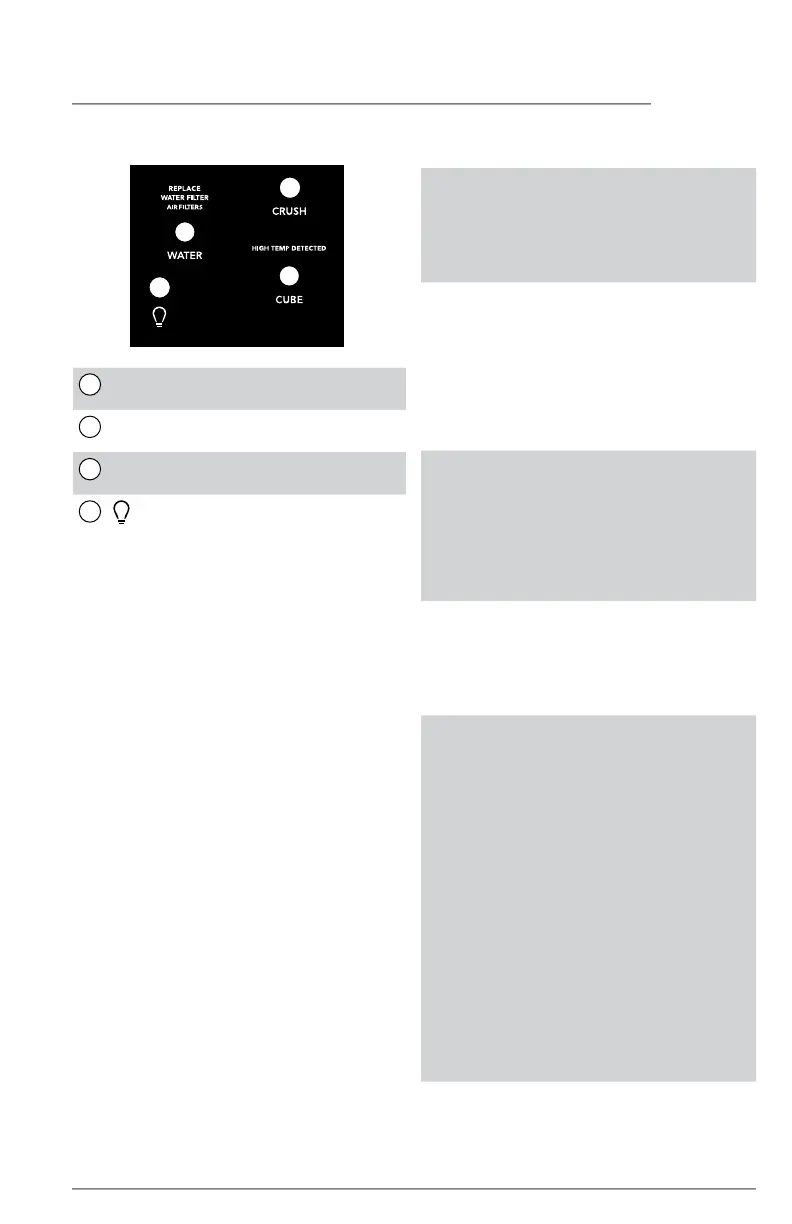
External Appliance Control Display
1
WATER
Press WATER to select water.
2
CRUSH
Press CRUSH to select crushed ice.
3
CUBE
Press CUBE to select cubed ice.
4
Toggles the dispenser light on and o.
1
2
3
4



 To Next Page