Operation
CALIBRATION (CONTINUED)
Single Position Calibration
1. Turn on the pH meter..
2. Fill a small beaker with deionized water.
a. NOTE: Deionized water should have a pH of 7.00. Tap water can
have a much higher pH and will affect the accuracy of the readings.
3. Add the 7.00 pH solution to the water and mix thoroughly.
4. Uncap the pH electrode and place the cap to the side.
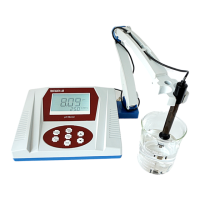
5. Lower the pH electrode (supported by the electrode arm) into the
solution.
6. Wait until the display is stable, then press ON/OFF | CAL and hold it until
CAL displays on the LCD display. The display will then read “pH 7.00”.
7. The pH (at this temperature) is stored.
8. Remove the electrode from the solution and rinse with purified water.
Slope Calibration
NOTE: For more accurate results calibrate using all three buffer solutions.
If the device has been calibrated recently and you are measuring pH’s
below 7.00, use the 4.01 pH solution. For measuring pH’s above 7.00 use
the 10.01 pH solution. If you expect pH’s to range between acidic and
alkaline calibrate using both solutions.
1. Conduct the single point calibration (above).
2. Remove the electrode from the solution and rinse with purified water.
3. Fill a small beaker with deionized water.
4. Add the 4.01 or 10.01 pH solution (depending on if you will measure acidic
or alkaline solutions) to the water and mix thoroughly.
5. Lower the pH electrode (supported by the electrode arm) into the
solution.
6. Wait until the display is stable, then press ON/OFF | CAL and hold it until
CAL displays on the LCD display. The display will then read “pH 4.01” or
“pH 10.01”.
7. The pH (at this temperature) is stored.
7


 To Next Page
 Loading...