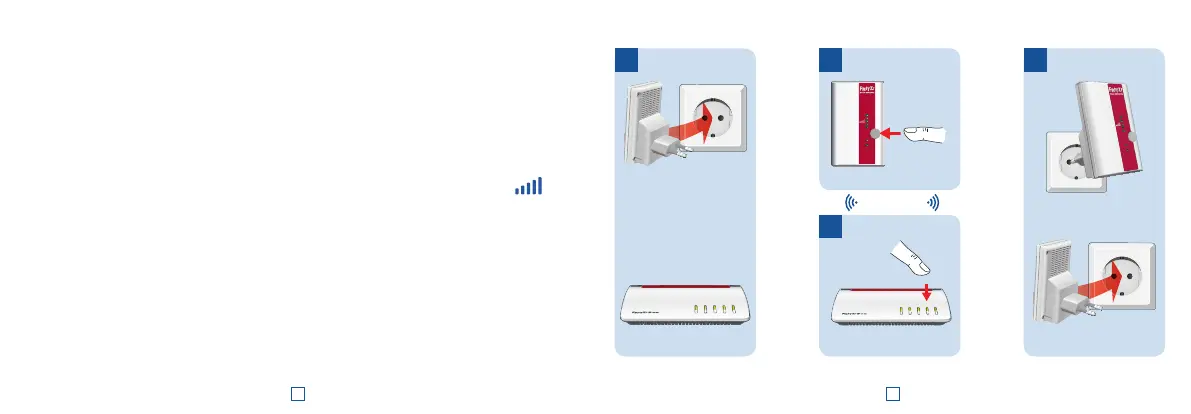
1. Insert the FRITZ!WLANRepeater 310 in an outlet in the vicinity of your wireless access point (for instance,
a FRITZ!Box).
2. Press the WPS button on the FRITZ!WLANRepeater 310 until the “WLAN” LED starts to fl ash.
3. Within twominutes, press the button on your wireless access point that initiates WPS. For more infor-
mation, see the documentation of this device.
The FRITZ!WLANRepeater 310 adopts the SSID (radio network name) and the network key from your
wireless access point and establishes a secure wireless connection. “Power”, “WLAN” and “
” light
up.
4. Insert the FRITZ!WLANRepeater in an outlet located about halfway between your wireless access point
and the wireless devices to be added to the wireless network.
The FRITZ!WLAN Repeater 310 is connected with your home network by wireless LAN. Check the settings and
perform an update if necessary. Continue on page 9.
Connecting the FRITZ!WLAN Repeater 310 with WiFi at the Touch of a Button
Wireless LAN
2
3
41
WPS
Power
WLAN
Powe
r
/
DSL
WLAN
Fo
n
/
DECT
Connec
t
/
WPS
Info
Power
WLAN
WPS
Powe
r
/
DSL
WLAN
Fo
n
/
DECT
Connec
t/
WPS
Info
6 7














 To Next Page