17
Navigating
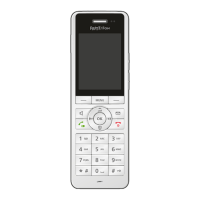
You can access the functions of your FRITZ!Fon
via a main menu and several submenus.
• Navigate up and down through the menus
using the and keys.
• Select and conrm functions with or the
right key.
• Use the left key to cancel a selection or
return to the next higher menu.
• With the key you return to the start
screen or end a call.
Making Telephone Calls
Making a Call
• Enter a telephone number.
• Press the key to establish the connection.
• Press the key to end the call.
Accepting a Call
You can take a call by pressing these keys:
•
•
• (answer)


 To Next Page