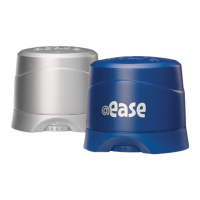
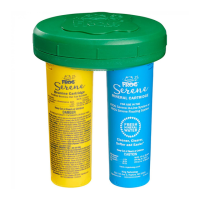
The combination provides the Fresh Mineral Water
®
benefits of
cleaner, clearer and softer
®
water that’s easier to take care of.
2
1
3
Sanitizing
System Operating
Instructions
for Bullfrog Spas
®
Step 1: Prepare the Hot Tub
1.
Fill hot tub with fresh water. If using source water that is high in
calcium, iron or other metals, see your dealer before filling the hot
tub. It may require the use of a metal control product.
Silver -
FROG
@ease
SmartChlor
®
Cartridge
(180 gr)
Rounded Cartridges
Triangle Cartridges
FROG
®
@ease
®
and FROG @ease XL
™
are hot tub sanitizing systems
+
custom
designed for Bullfrog Spas that takes the guess work out of water care so
you always feel at ease while enjoying your hot tub.
DIRECTIONS FOR USE: It is a violation of Federal Law to use this product in a
manner inconsistent with its labeling. For use in hot tubs up to 600 gallons.
Use with the FROG @ease SmartChlor Cartridge in the FROG @ease Sanitizing
System for Bullfrog Spas. Ensure all hot tub equipment is working properly.
Operate the pump and filter as recommended by your hot tub manufacturer.
Clean filter following manufacturer’s directions. May be used with a previously
filled hot tub unless it was sanitized with bromine or biguanides. Then drain and
fill the hot tub with fresh water before using this product.
Read entire operating instructions for complete directions for use.
Active Ingredient:
Silver Chloride ...........0.5%
Other Ingredients: .....99.5%
Total: ........................100.0%
KEEP OUT OF REACH OF CHILDREN
CAUTION
Very Important! After balancing and
before using cartridges, establish an ini-
tial residual of 0.5 - 1.0 ppm free chlorine
with FROG
®
Jump Start
®
start-up shock,
included in this package, that quickly dis-
solves with an effervescent fizzing action
– one packet per 600 gallons.
4.
Heat water to the manufacturer’s recommended
temperature.
5.
Step 2: Set the Cartridges
1. Remove the FROG @ease SmartChlor Cartridge from its
bag before proceeding.
3. Set the FROG @ease SmartChlor Cartridge to the setting that match-
es your hot tub model number and the type of cartridge being used.
For Triangular Shaped Cartridges Setting #
A5L, R5L 1
A6, A6L, M6, R6, R6L, STIL5, X6L, X7, X7L 2
A7, A7L, M7, M8, R7, R7L, R8L, STIL7, X8, X8L 3
A8, A8D, A8L, A9L, M9, R8, 4
For Round Shaped Cartridges Setting #
A5L 2
A6, A6L, STIL5, X6L 3
X7, X7L 3
A7, A7L, STIL7 3
M7, X8, X8L 4
A8D, A8L, M8 4
A9L, M9 5
Step 3: Put the System to Work
Remove filter snap cap.
1.
2.
Set the FROG @ease Mineral Cartridge to the highest
setting using the dial on the bottom of the cartridge. No
further adjustments are necessary for the life of the cartridge.
Hold weir door/filter plate out into the hot
tub slightly or remove from hot tub. If car-
tridge holder is already installed between
the filter cartridges, remove by pulling up
on the handle.
2.
d. Lastly test for Hardness. It should be between 150 and 250
ppm. If higher, partially drain the hot tub (about 6 inches) and fill
with water low in calcium. If lower, add Calcium Increaser.
If balancing takes longer than 2 days shock the water and
maintain a chlorine level while continuing balancing.
c. After Total Alkalinity is in range, test for pH. It should be
between 7.2 and 7.6. If higher or lower, add a pH adjuster.
3.
Water Balance Guidelines
pH: 7.2 – 7.6
Total Alkalinity: 80 - 120 ppm
Hardness: 150 - 250 ppm
Total Dissolved Solids: <1500
Cyanuric Acid: 0 - 50 ppm
2.
Clean or replace filter cartridges when dirty (Follow
manufacturer’s instructions).
IMPORTANT: Always follow printed instructions on the balancing
chemical packages. Add balancing chemicals in small incre-
ments one at a time with the jets on and wait 6 hours before
testing again and adding any additional balancing chemicals.
b. Look at the Total Alkalinity reading first. Adjustments
should be made to bring the Total Alkalinity in the range of
80 – 120 ppm prior to making any adjustments to pH even if
it throws pH off further.
a. Take a water sample from the hot
tub and dip a FROG @ease Test Strip
into it.
Balance water by following STEPS a - d in order.
If previously using bromine and switching to FROG @ease System,
you must drain and refill your hot tub before using this product.
If previously using dichlor you may convert to FROG @ease System
without having to drain the hot tub, as long as cyanuric acid level is
below 80 ppm.
Snap the FROG @ease Mineral Cartridge into one opening of
the cartridge holder. With the @ease logo facing the holder, put
the dial end of the cartridge into the holder first by connecting
the tab on the holder with the indent in the cartridge.
3.
Detail of
Cartridge
Holder Tab
Dial end of cartridge
Holder
Cartridge
Holder Tab
FROG @ease Mineral Cartridge
Between Filter Cartridges
Then push the top part
of the cartridge in until it
snaps into place
4.
Holder
Cartridge
top
Blue -
FROG
@ease
Mineral
Cartridge
Blue -
FROG
@ease
Mineral
Cartridge
Silver -
FROG
@ease
SmartChlor
®
Cartridge
(180 gr)
Silver -
FROG
@ease XL
SmartChlor
®
Cartridge
(300 gr)
If needed, you may increase or decrease the dial setting. Once set,
the FROG @ease SmartChlor Cartridge will maintain a low 0.5 to
1.0 ppm chlorine level as long as the pH stays within 7.2 and 7.6
so typically there is little need to adjust the cartridge setting.

 Need help?
 General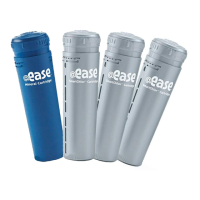

 To Next Page