5
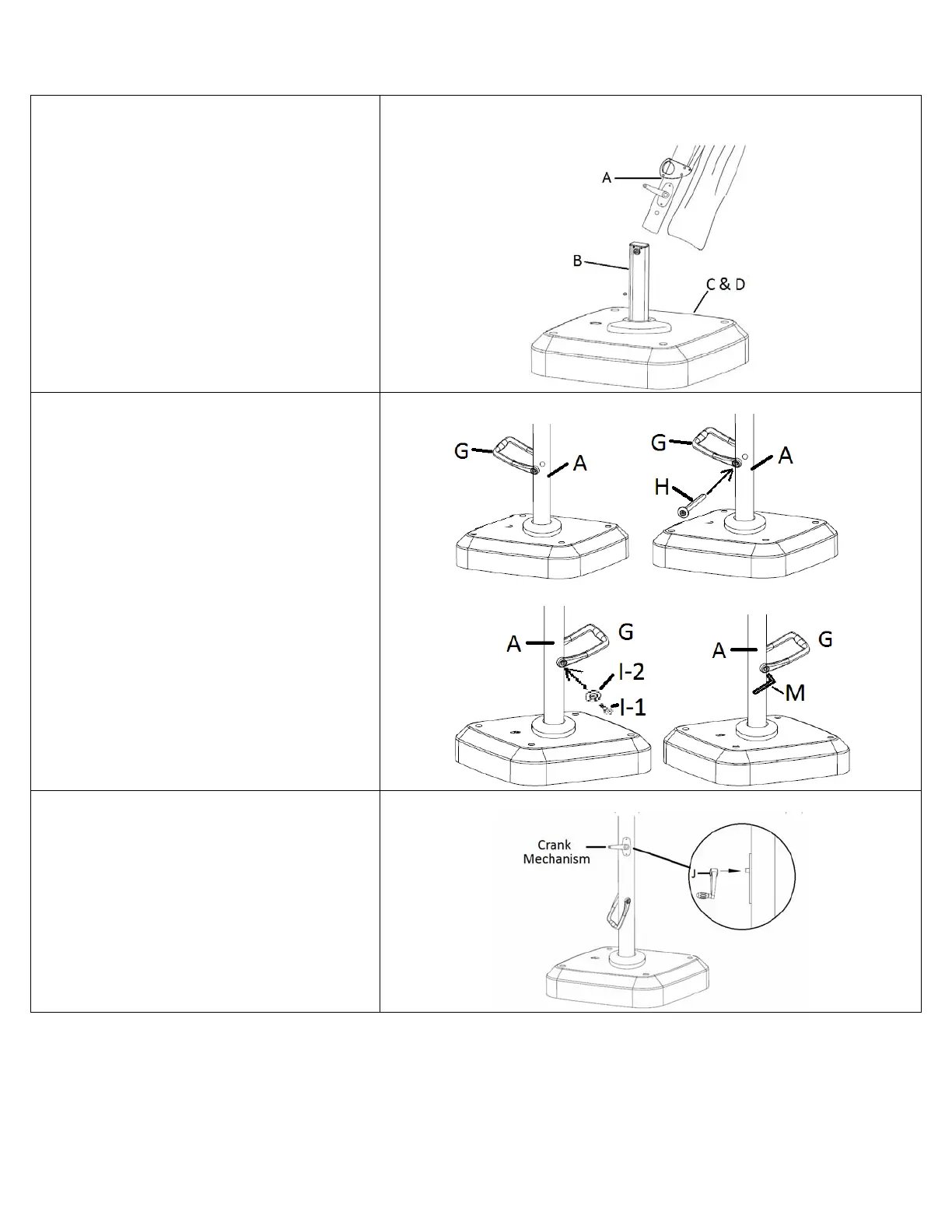
9. Carefully slide UMBRELLA (A) onto UMBRELLA
MOUNT (B). See Diagram 9.
Diagram9
10. LINE UP the ROTATION HANDLE (G) around
the lowest hole in the UMBRELLA (A) POLE, just
above the BASE ASSEMBLY. See Diagram 10a.
11. Slide the PIVOT TUBE (H) thru one side of the
ROTATION HANDLE and thru the UMBRELLA (A)
POLE. See Diagram 10b.
12. On the OPPOSITE side of the UMBRELLA (A)
POLE, SLIDE the ROTATION HANDLE BOLT (I-1)
thru the ROTATION HANDLE WASHER (I-2) and
then into the THREADED end of the PIVOT TUBE
(H). See Diagram 10c.
13. TIGHTEN with the ALLEN KEY (M). See
Diagram 10d.
Diagram10aDiagram10b
Diagram10cDiagram10d
14. Install the CRANK HANDLE (J) by SLIDING it
onto the CRANK MECHANISM, which is located on
the UMBRELLA (A) POLE. It should snap in place.
No hardware is needed. See Diagram 11.
Diagram11


 To Next Page