6
II.OPERATINGINSTRUCTIONS
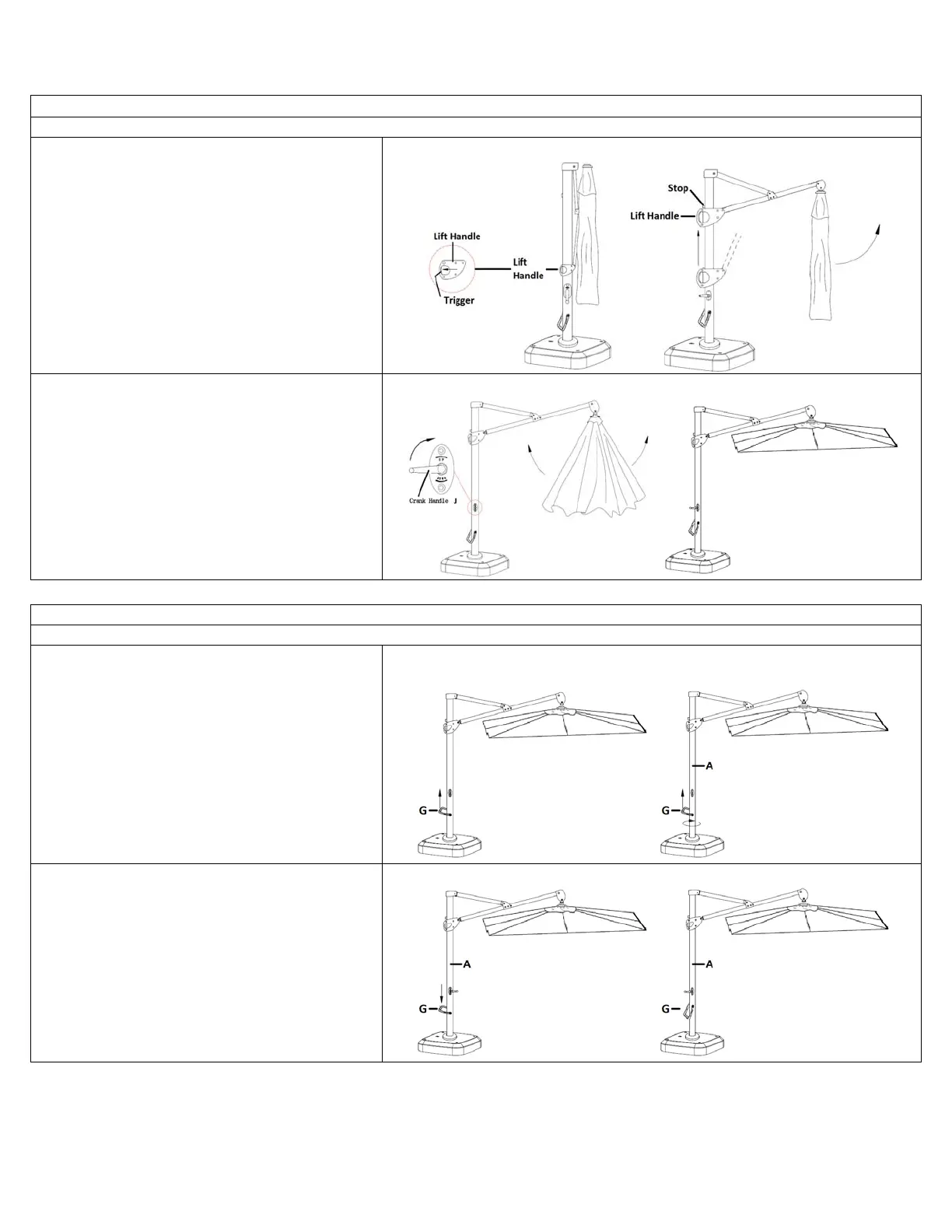
A. To RAISE and OPEN your UMBRELLA;
1. GRASP the LIFT HANDLE firmly.
2. DEPRESS the TRIGGER in the LIFT HANDLE with
your FINGERS. See close-up in Diagram 12a.
3. While keeping the BUTTON in the LIFT HANDLE
DEPRESSED, SLIDE the LIFT HANDLE UP until it
reaches the STOP. See Diagram 12b.
4. RELEASE the BUTTON in the LIFT HANDLE.
Diagram12aDiagram12b
5. TURN the CRANK HANDLE (J) CLOCKWISE until
your UMBRELLA is fully OPEN. See Diagram 13.
Diagram13
Your UMBRELLA can be ROTATED 360 degrees and TILTED to better protect you from the sun.
B. To ROTATE your UMBRELLA;
1. Lift up on the ROTATION HANDLE (G). See
Diagram 14a.
2. While holding the ROTATION HANDLE (G) up,
ROTATE the UMBRELLA by grasping the
UMBRELLA (A) POLE firmly and turning it. See
Diagram 14b.
Diagram 14a Diagram 14b
3. When you reach the desired position, lower the
ROTATION HANDLE (G) to lock the POLE (A) in
place. See Diagram 15a & b.
Diagram 15a Diagram 15b


 To Next Page