Panic Alarm
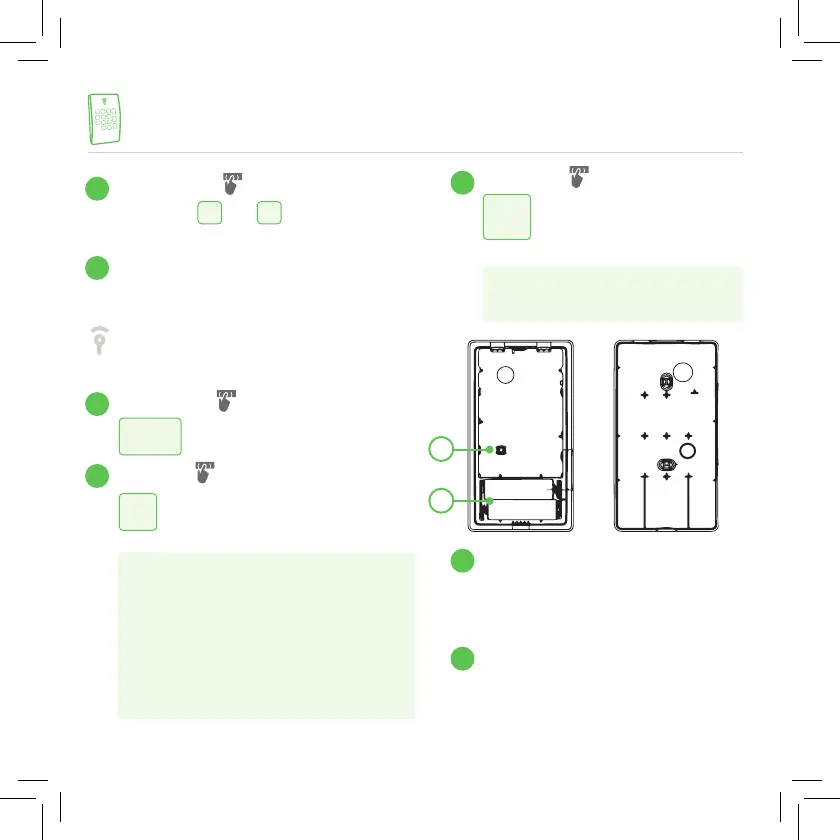
Press both
#
and
*
keys together
to trigger a panic alarm for police.
Frontpoint Logo LED
(Green/Red/Amber)
Green: activation of Disarmed mode.
Red: the system is in Arm Away mode.
Orange: the system is in Arm Stay mode.
Disarm Key
Stay Key
This key is used for entering
Arm Stay mode.
Press the Stay Key to enter Arm Stay mode.
Press and hold the Stay Key for 3 seconds,
release the button and the system will enter
Arm Stay without Entry Delay mode.
Doing so will eliminate the 30 second delay
to disarm the system and will automatically
trigger an alarm.
Away Key
This key is used for entering
Arm Away mode.
Press the Away Key to enter Arm
Away mode.
Tamper Switch
The Tamper Switch protects the
Remote Keypad from unauthorized
cover opening.
Battery Compartment
FRONTPOINT KEYPAD
5
6
7
8
9
10
11
disarm
away
11
10
stay
To access more information or to chat with a customer care agent, visit
support.frontpoint.com or call Customer Care at 1-877-602-5276


 To Next Page