6. Operation
Power On/Off
Once the inverter has been properly installed, press the power switch to turn on the unit. The
unit will work automatically in line mode or inverter mode according to input utility power's
status. When press the power switch again, the unit will be turned off.
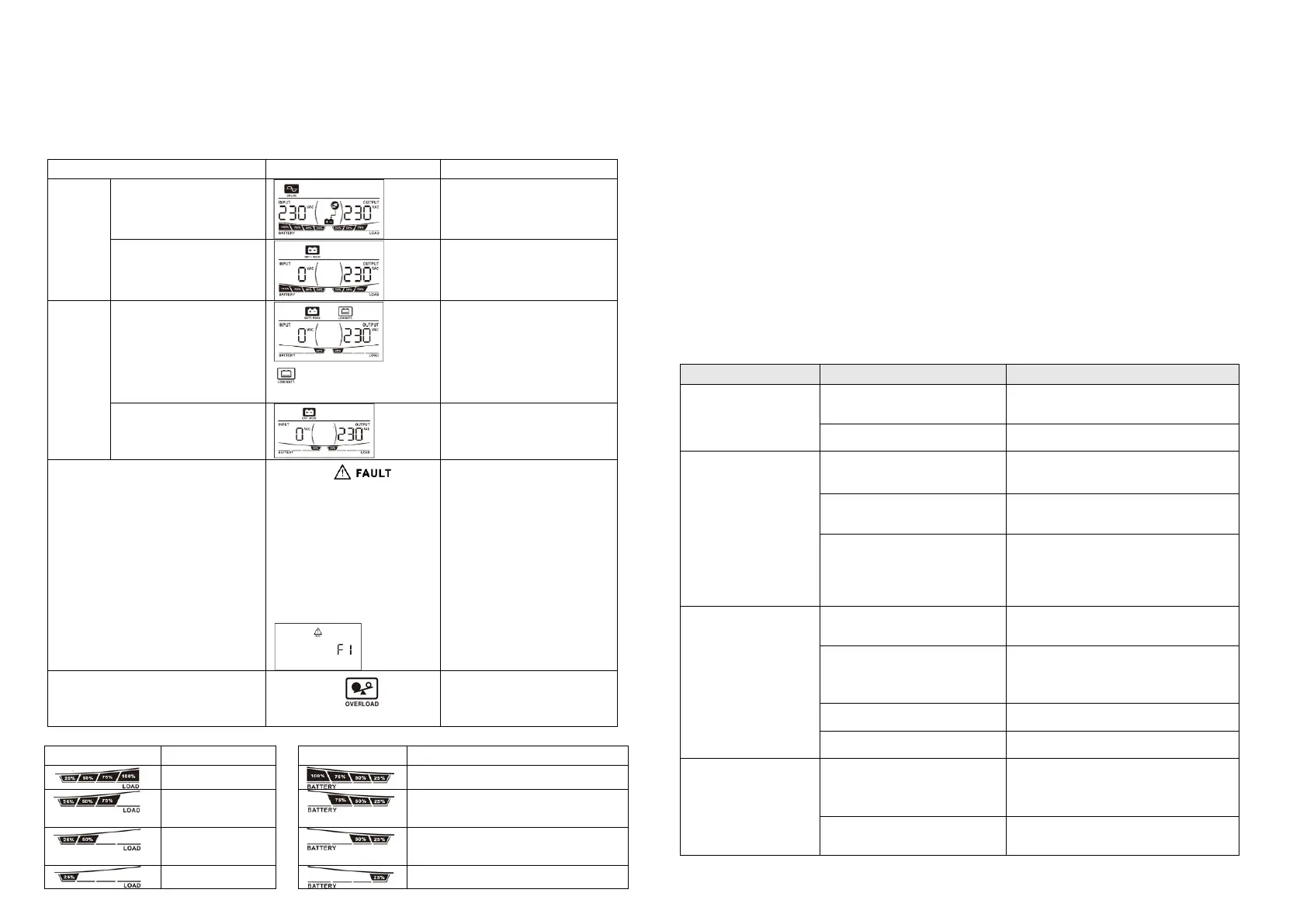
LCD Display & Audible Alarm
and
will flash every 2
second.
The mark and
fault code will be
displayed. Short fault: F0
Overload fault: F1
Battery bad: F2
High output voltage: F3
Main Relay Stick:F4
Fan fault: F5
Example:
Continuously sounding for
30 min. and then alarm
off.
The mark will
flash every second.
Load level indicator: Battery level indicator:
battery voltage ≥ 12.5V (25V)
12.5V (25V)> battery voltage ≥
11.5V (23V)
11.5V (23V)> battery voltage ≥
11.0V (22V)
battery voltage < 11.0V (22V)
Operation Mode Selector
a). “UPS”: setting for conventional electrical appliance.
If you select this mode, the unit's input utility range will be 170~280Vac as normal home UPS.
If the utility is higher or lower than this range, the unit will transfer to inverter mode
automatically. And you can connect the computer systems or other precision home
equipment when you select this operation mode.
b). “INV.”: setting for energy saving
If you select this mode, the unit's input utility range will be extended to 90~280Vac. If the
utility is higher or lower than this range, the unit will transfer to inverter mode automatically.
So, you can connect the home equipments, such as light bulb, fluorescent tube, fan, or TV on
this mode.
Caution!! If you select the “INV.” mode and connect the computer to the output of the unit,
the computer may reboot if the input voltage is too low to be accepted.
7. Trouble Shooting
Use the table below to solve minor problems.
Utility power is
normal but the unit
is in inverter mode.
AC input power cord is not
connected well.
Check AC input power connection.
Input breaker is activated.
When power fails,
the backup time is
shorten.
Remove some non-critical loads.
Battery voltage is too low.
Charge the unit at least 8 hours.
Battery capacity is not full
even after charge the unit for
at least 8 hours.
Check the date code of the battery. If
the batteries are too old, replace the
batteries.
Nothing is display on
the front panel when
the utility power is
normal.
The unit is not turned on.
Press power switch to turn on the
unit.
Battery is not connected well.
Check the external battery cable and
terminal. Make sure all the battery
connections to the unit are all correct.
Battery voltage is too low.
Charge the unit at least 8 hours.
Inverter fault and
restart circularity.
Verify that the load matches the
capability specified in the
specification.
Check the load which connect to the
unit, and eliminate short circuit load.
If there is any abnormal situations occur, which doesn't list above, please call the service
people immediately for professional examine.


 To Previous Page
 Loading...