EasyManua.ls Logo

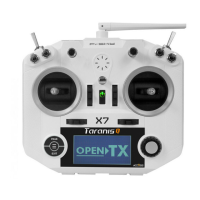
FrSky TARANIS Q X7 - User Manual

FrSky TARANIS Q X7
2 pages
Print Icon
To Next Page IconTo Next Page
Loading...
Battery charging port
(adaptive with FCX07)
Earphone port Trainer Port
FrSky Electronic Co., Ltd. www.frsky-rc.com Contact us: frsky@frsky-rc.com
Add: F-4,Building C, Zhongxiu Technology Park, No.3 Yuanxi Road, Wuxi, 214125, Jiangsu, China Technical Support: sales4tech@gmail.com
FrSky Electronic Co., Ltd. www.frsky-rc.com Contact us: frsky@frsky-rc.com
Add: F-4,Building C, Zhongxiu Technology Park, No.3 Yuanxi Road, Wuxi, 214125, Jiangsu, China Technical Support: sales4tech@gmail.com
FrSky Electronic Co., Ltd. www.frsky-rc.com Contact us: frsky@frsky-rc.com
Add: F-4,Building C, Zhongxiu Technology Park, No.3 Yuanxi Road, Wuxi, 214125, Jiangsu, China Technical Support: sales4tech@gmail.com
FrSky Electronic Co., Ltd. www.frsky-rc.com Contact us: frsky@frsky-rc.com
Add: F-4,Building C, Zhongxiu Technology Park, No.3 Yuanxi Road, Wuxi, 214125, Jiangsu, China Technical Support: sales4tech@gmail.com
Instruction Manual for FrSky 2.4GHz Taranis Q X7 Instruction Manual for FrSky 2.4GHz Taranis Q X7

Other manuals for FrSky TARANIS Q X7

Question and Answer IconNeed help?

Do you have a question about the FrSky TARANIS Q X7 and is the answer not in the manual?

Summary

Introduction

Meanings of Special Markings

DANGER

Procedures that may lead to death/serious injury if not followed.

WARNING

Procedures that may lead to dangerous conditions or death/serious injury.

CAUTION

Procedures with a danger of injury or physical damage if not followed.

Note

Steps, tips, or additional information.

System Overview

Switch Default Settings

Default settings for transmitter switches (SA-SH).

Adjust Sticks

Instructions on adjusting the transmitter's sticks.

Battery Connector Polarity

Ensuring correct polarity for battery connection.

Antenna Handling Cautions

Rotating Antenna

Information on rotating and angling the antenna.

Antenna Angle Adjustment

How to adjust antenna angle for signal strength.

System Specifications

Key Features

Key features of the Taranis Q X7 system.

Interface Definition

TF Card and USB Port

Notes on TF card availability and USB port functionality.

Battery Warnings and Notes

General Battery Precautions

Important safety precautions and notes regarding battery usage.

Model Setup for Taranis Q X7 Internal RF Module

Step 1: Set Mode

Set Taranis Q X7 to match receiver mode (D8, D16, LR12).

Step 2: Set Channel Range

Configure and double-check the channel range (up to 16 channels).

Step 3: Set Receiver Number

Assign and manage receiver numbers (00-63) for binding.

Step 4: Bind

Procedure for binding the receiver to the transmitter.

Step 5: Set Failsafe Mode

Configure failsafe modes (No Pulse, Hold, Custom, Receiver).

Step 6: Range Check

Performing a pre-flight range check for effective distance.

FCC Statement

§ 15.19 Labelling Requirements

Device compliance with FCC Part 15 rules.

§ 15.21 Information to User

User information regarding changes or modifications.

§ 15.105 Information to User

Limits for Class B digital devices and interference correction.

RF Warning for Portable Device

Evaluation of device for general RF exposure requirements.

CE Marking

Flying Safety

General Safety Precautions

General safety precautions for operation and maintenance.

Battery Safety

Precautions for battery usage, charging, and low battery warnings.

Where to Fly

Recommendations for flying locations and field awareness.

At the Flying Field

Proper sequence for turning equipment on/off and testing controls.

Prevent Transmitter Tip-Over

Warning about transmitter tipping over and throttle stick movement.

Maintain Visibility

Importance of keeping the aircraft visible to avoid loss of control.

Antenna Handling During Flight

Avoid Grasping Antenna

Do not grasp the transmitter's antenna during flight to maintain signal quality.

Antenna Signal Strength

Positioning the antenna for optimal signal transmission.

Extend Antenna Fully

Extend the transmitter antenna fully before taxiing.

Avoid Flying in Rain

Precautions against water entry and risks of erratic operation.

MicroSD Card Handling

Secure Digital (SD) Card Handling Instructions

Instructions for inserting, removing, and handling MicroSD cards.

MicroSD Card Data Storage

Notes on non-volatile memory and backing up data.

Clock Dependency

The transmitter clock depends on the internal battery.

Updates

Firmware Updates

Information on updating firmware via USB or MicroSD card.

OpenTX Information

Details about the OpenTX firmware used in the transmitter.

Read Data from a PC

Stored Data

MicroSD Card Life

Information on MicroSD card lifespan and data backup.

Overview

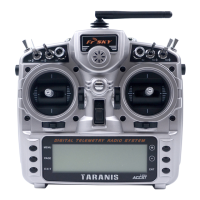
The FrSky 2.4GHz ACCST Taranis Q X7 is a digital telemetry radio system designed for remote control of models, offering a comprehensive set of features for both novice and experienced users. This system prioritizes safety, ease of use, and continuous improvement through updates.

Function Description

The Taranis Q X7 serves as the central control unit for your model, transmitting commands and receiving telemetry data. It supports up to 16 channels, allowing for complex control setups. The system is compatible with FrSky X series, D series, and V8-II series receivers, with an EU version specifically compatible with X/LR series EU receivers. An external module bay expands compatibility to other receiver types.

Key functionalities include:

  • Quad Ball Bearing Gimbals: These provide smooth and precise control inputs for enhanced maneuverability.
  • Receiver Match: This feature ensures that the transmitter is uniquely paired with a specific receiver, preventing accidental control of other models.
  • Audio Speech Outputs: The system can vocalize values, alarms, and settings, providing real-time feedback without requiring constant visual attention to the screen.
  • Real-time Flight Data Logging: This allows for the recording of flight parameters, which can be invaluable for post-flight analysis and troubleshooting.
  • Receiver Signal Strength Indicator (RSSI) Alerts: These alerts notify the user of declining signal strength, providing a crucial safety measure to prevent loss of control.
  • Super Low Latency: This ensures minimal delay between control input and model response, leading to a more responsive and precise flying experience.
  • Vibration Alerts: In addition to audio, the transmitter can provide haptic feedback for alarms and notifications.
  • Model File Compatibility: Model settings are compatible with other TARANIS transmitters (X9D/X9D Plus/X9E), simplifying the transfer of configurations.
  • Open Source Firmware (OpenTx): The system runs on OpenTx firmware, offering extensive customization options and a vibrant community for support and development.

Usage Features

The Taranis Q X7 is designed for intuitive operation with several user-friendly features:

  • Adjustable Sticks: The transmitter features four centered sticks. Users can customize the stick mode and feeling to suit their preferences, allowing for personalized control.
  • Rotating and Angled Antenna: The antenna can be rotated 180 degrees and angled 90 degrees. This allows users to optimize signal transmission based on their flying style, as the strongest signal is emitted from the sides of the antenna. It's important not to force the antenna beyond its limits to avoid damage.
  • Model Setup Menu: The MODEL SETUP menu facilitates easy configuration of the internal RF module. Users can select the appropriate mode (D8, D16, LR12) corresponding to their receiver type, set the channel range (up to 16 channels), and assign a receiver number.
  • Binding Procedure: The "Bind" function allows for easy pairing with receivers. Once bound, the procedure does not need to be repeated unless the receiver number is changed.
  • Failsafe Modes: The system offers four failsafe modes: No Pulse, Hold, Custom, and Receiver. These modes dictate the model's behavior upon signal loss, enhancing safety. "No Pulse" stops all pulses, "Hold" maintains the last known positions, "Custom" allows for pre-set positions, and "Receiver" delegates failsafe settings to the receiver (for D16 or LR12 modes). For D-series receivers, failsafe must be set on the receiver side.
  • Range Check Mode: A pre-flight range check is crucial before each flying session. The "Range" mode reduces the effective distance to 1/30, allowing users to verify signal integrity at a reduced range.
  • MicroSD Card Support: The transmitter utilizes a MicroSD card (not included) for storing model data, music, sound files, pictures, and text. This allows for easy transfer of data and customization of audio alerts. The card is inserted by pushing it in until it locks and removed by pushing it again.
  • USB Port: The USB port allows for upgrading firmware, reading/writing MicroSD cards, and accessing the internal memory of the radio.
  • Battery Charging: The device supports battery charging (adaptive with FCX07).

Maintenance Features

Proper maintenance is essential for the longevity and safe operation of the Taranis Q X7:

  • Regular Check-ups: Although the system uses non-volatile EEPROM memory for model data, regular check-ups for wear and tear are recommended. FrSky suggests sending the system to their service center annually for a complete check-up.
  • Battery Care: Use a fully charged battery (DC 6-15V). Pay attention to the transmitter's built-in timer during flying sessions and ensure receiver batteries are fully charged. Do not rely solely on low battery warnings; always check battery status before each flight. Avoid dropping the battery, pulling wires forcefully, or removing the battery while the voltage warning is blinking.
  • Firmware Updates: FrSky continuously adds features and improvements. Users can update the firmware via the USB port or MicroSD card, which is easy and free. Checking the FrSky website for the latest updates and guides is recommended.
  • MicroSD Card Handling: Always turn off the transmitter before inserting or removing the MicroSD card. Avoid excessive force, dirt, moisture, water, fluids, strong static electricity, magnetic fields, direct sunlight, excessive humidity, or corrosive environments. Never remove the card or turn off power while data is being entered. Ensure the card is inserted in the correct direction.
  • Data Backup: The life of a MicroSD card is limited. It is crucial to keep a backup of your models and data on your MicroSD card to prevent loss in case of card failure.
  • Antenna Care: Do not touch the antenna during operation, as this can interfere with transmission. Avoid carrying the transmitter by the antenna or pulling it forcefully, as this can break the antenna wire. Ensure the transmitter antenna is extended to its full length before taxiing to avoid reduced flying range and loss of control.
  • Environmental Considerations: Avoid flying in the rain or wet weather, as moisture can cause erratic operation or loss of control. If flying in wet conditions is unavoidable, cover the transmitter with a plastic bag or waterproof barrier. Never fly if lightning is expected.
  • Flying Field Awareness: Always adhere to flying field rules and be aware of spectators, wind direction, and obstacles. Avoid flying near power lines, tall buildings, or communication facilities to prevent radio interference.
  • Power On/Off Sequence: To prevent damage, always follow the proper power-on sequence: throttle stick to idle, turn on transmitter, confirm model, turn on receiver, test controls, start engine, complete range check. For power-off: throttle stick to idle, disarm motor/engine.
  • Transmitter Stability: Ensure the transmitter is stable and cannot tip over to prevent accidental stick movement or damage.
  • Line of Sight: Maintain visual contact with your aircraft at all times. Avoid flying behind large objects that could interrupt the radio frequency link.

FrSky TARANIS Q X7 Specifications

General IconGeneral
InterfaceRF Wireless
Product colorBlack
Remote control proper use-
Proper useMultirotor, Quadcopter
Display typeLCD
Product typeRemote control
Channels quantity16 channels
Display resolution128 x 64 pixels
Telemetry receiverYes
Brand compatibilityFrSky
Compatible memory cardsMicroSD (TransFlash)
Operating temperature (T-T)-10 - 45 °C
Battery voltage15 V

Related product manuals