INSTALLATION OF THE NEW POWER SUPPLY
ATTENTION
2
At first, remove the old PSU from the system case. Firstly, draw off all plugs from the PSU, that are
connected with the main board or other components in the PC. Now remove the screws at the back side of
the case which connects the PSU with the case. After the screws are removed, remove the old PSU from
the case carefully and replace it with your new FSP PSU.
Set the PSU into the intended position in the housing and tighten it with the supplied screws. If you
purchased a PSU with modular cables, put all necessary cables on the PSU. No need to connect cables that
are not intended to be used on the PSU.
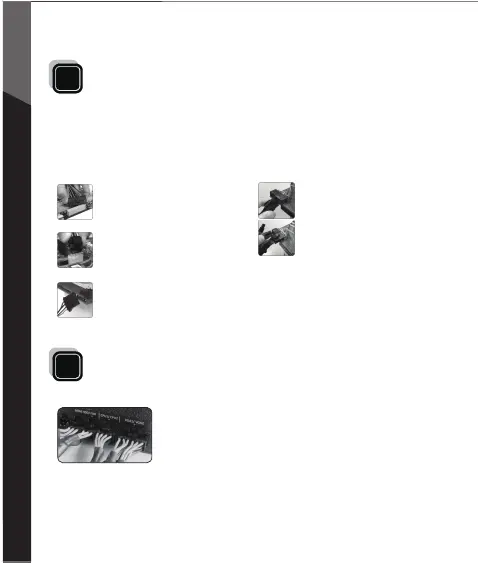
Connect the 8-pin plug to the Main
board. If your Main board only has a
4-pin connector, then use the 4-pin plug
or split the 8-pin connector in half.
Put the 24-pin ATX plug through the
housing to the correct connection of the
Main board.
For graphic cards with 6-pin connector or
connectors, use the suitable cables.
Modern graphic cards with 8-pin
connectors are also supported. In this
case, use the other two pins beside the
regular 6-pin plug in order to create an
8-pin connector.
Lastly connect the peripheral devices
such as hard disks and optical drives
with 4-pin Molex-or 15-pin SATA
connectors.
HYDRO G Series is full modular design, each cable, connector come
with its connector design, please:
1) Make sure connectors have been connected until hear ”Click”
2) If connectors broken, please stop using and contact with your dealer immediately.
3) It’s recommended to check connectors per 6 months.
4) Connectors would be burned or short circuit occurred if connectors loose.
2.1 Please make sure the modular connector must be connected with flat cable closely.
2.2 Side sticker to be used only once.
2.3 Intelligent fan will start to spin when loading operation is over 30%.



 To Next Page