6.8REPLACING DAMAGED ROTOR BLADES
To replace rotor blades on your FTX Skyash you must follow the following instructions:
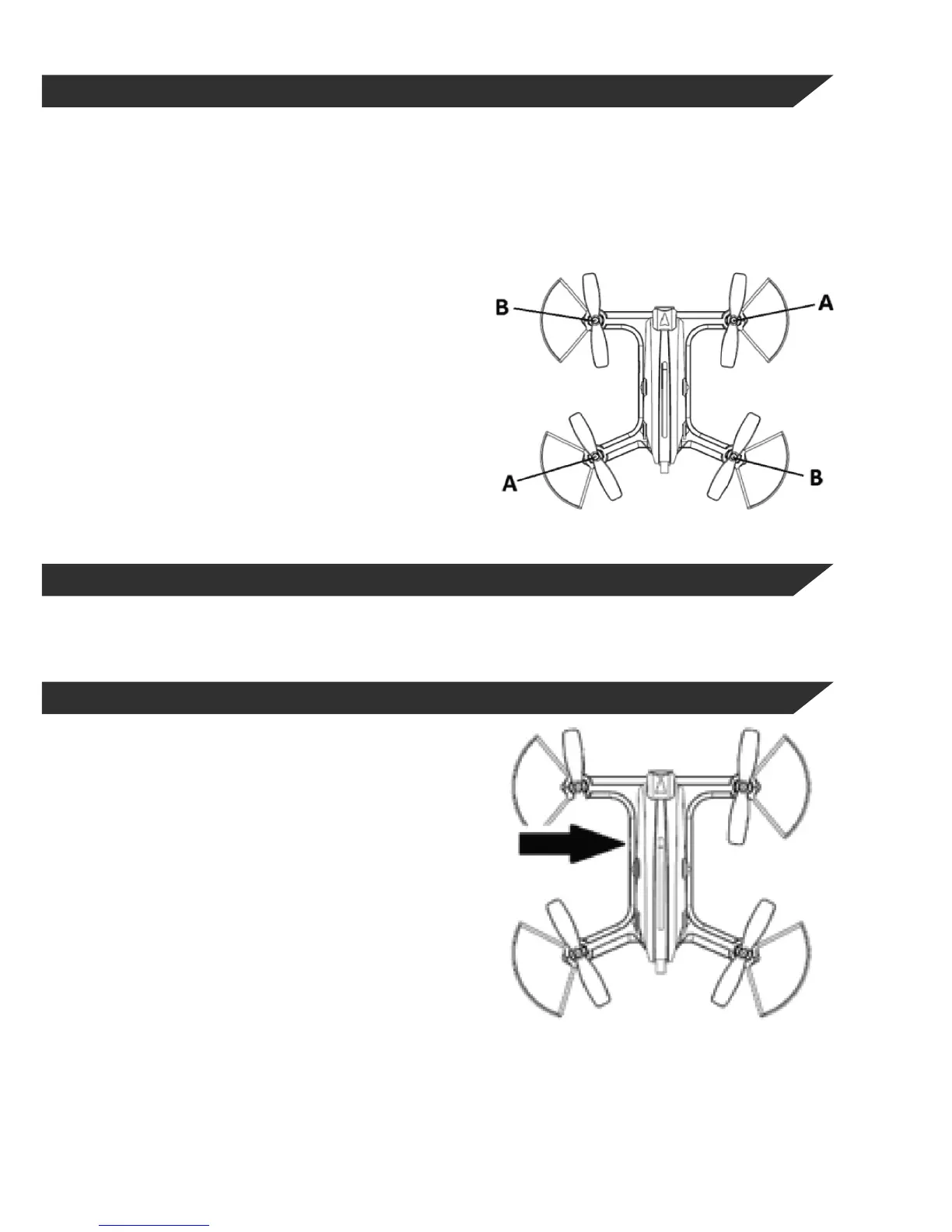
Your Skyash has 4 rotors, 2 of which turn clockwise (A) and the other two anti-clockwise (B).
These two types of rotors use blades of opposite types since each of the two pairs of blades is designed
to work in a dierent direction of turn.
The kit includes in its original packaging 4 replacement blades, two type (A) and two type (B).
If one of the blades is damaged following an
impact, you must replace it by removing the
damaged blade and replacing it with a new
blade of the same type, otherwise your
drone will not be able to y properly.
If you need spare blades for your Skyash,
please contact your nearest dealer.
6.9HOW TO USE THE CAMERA
Depending on the model of FTX drone purchased this will come equipped with camera or not.
If you have purchased one of the versions with built-in camera, here you will learn how to use it.
6.9.1HOW TO SWITCH ON / OFF THE CAMERA
The Skyash has a specic switch that you can turn
on and of the camera, regardless of the model you
have purchased.
With this function you can disable the camera when
you don’t want to take pictures or record videos in
order to increase the ight time of your Skyash.
The following image shows where the switch is
located.
By moving the switch forward you will cut the power
of the camera and to switch on you must move it
back.
You will know if the camera is switched on if the
LED camera is blinking, if not, you must change the
position of the switch.


 To Next Page