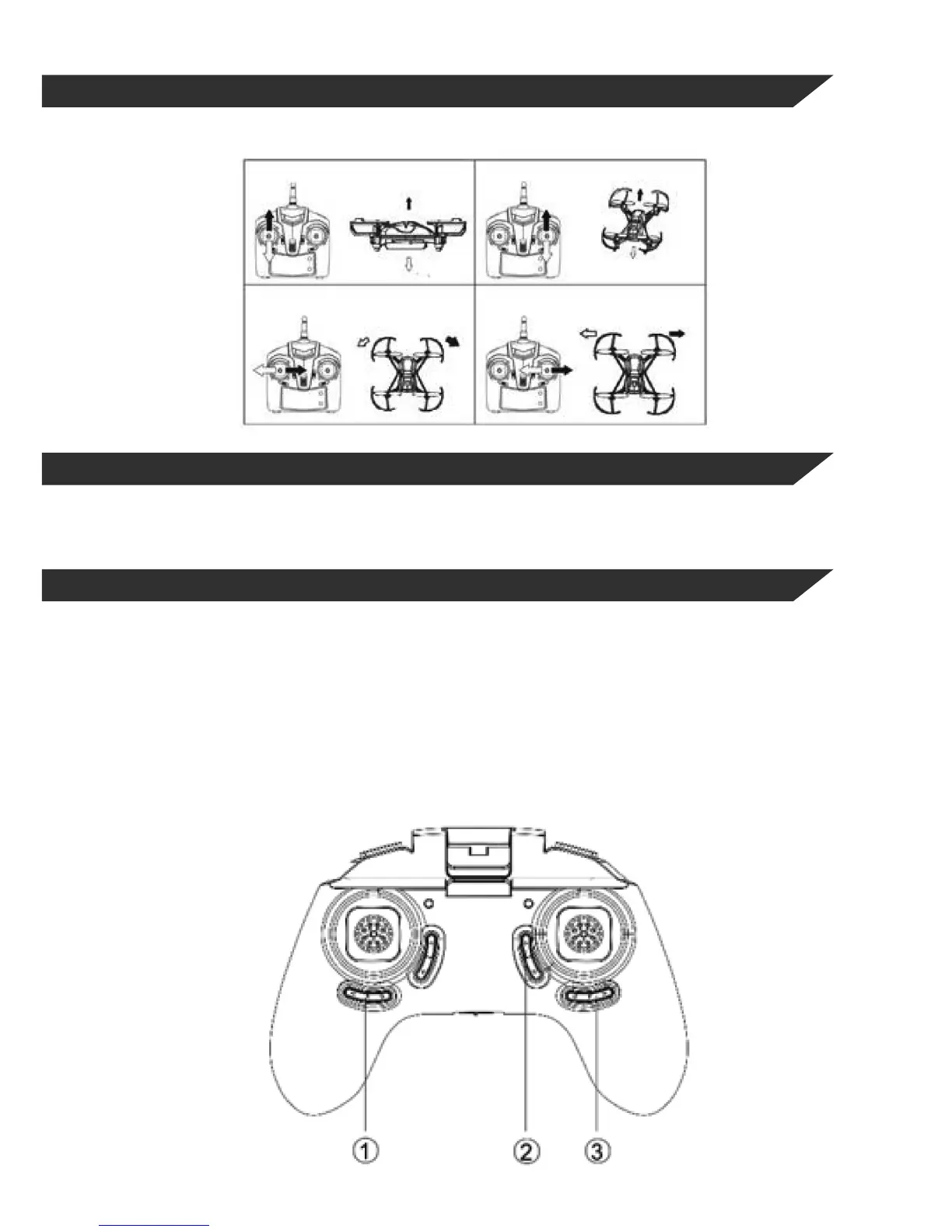
5.4FLIGHT CONTROLS
The left stick controls the ascent/descent and the rotation in both directions.
The right stick controls the forward/backward and left/right movement in both directions.
To ensure that your Skyash can y straight and level, you need to trim the aircraft. This can be done
either manually or automatically.
5.5TRIM / REGULATING
5.5.1MANUAL TRIM
The manual trim allows calibration of the movement channels of the Skyash so that both takeo and
in-ight characteristics remain stable.
(1) Trim: these buttons will correct the rotation, where the Skyash turns on it’s axis, press the
Trim A in the opposite direction to the rotation of the drone until it stops.
(2) Trim C: these buttons will correct involuntary forward/backward movement of the Skyash,
again by pressing button C Trim in the opposite direction to the movement until the model remains still.
(3) Trim D: these buttons will correct unintentional left/right movement of the Skyash by pressing
button D Trim in the opposite direction to the movement until the model remains still.


 To Next Page