EasyManua.ls Logo

FUDONI P1 - iOS Screen Mirroring; iOS Mirroring - Method C (USB Cable); Android Screen Mirroring; Android Mirroring - Wireless Connection

FUDONI P1
28 pages
Print Icon
To Next Page IconTo Next Page
To Previous Page IconTo Previous Page
Loading...
*Method
C
Lightning
to
USB
Cable
for
iPhone
1.Prepare
an
official
Apple
Lightning
to
USB
Cable.
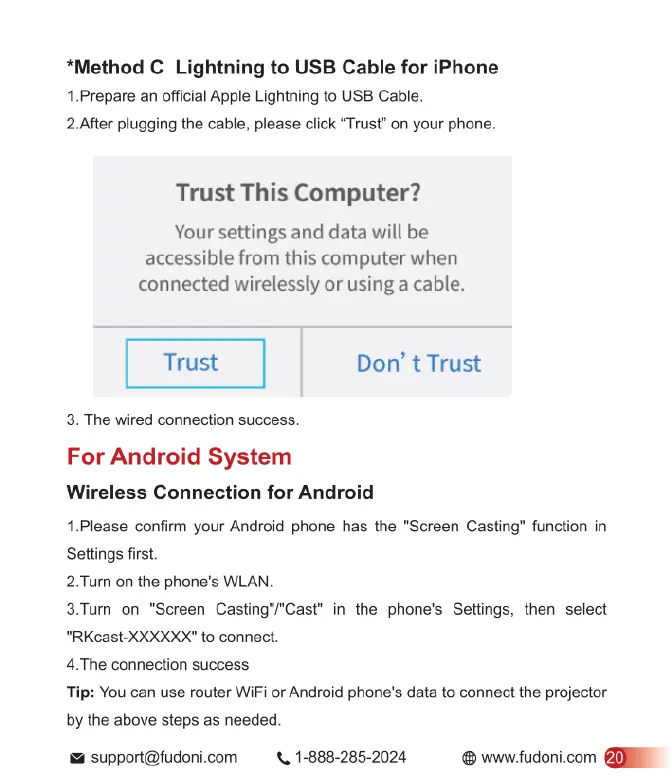
2.After
plugging
the
cable,
please
dlick
“Trust’
on
your
phone.
Trust
This
Computer?
Your
settings
and
data
will
be
accessible
from
this
computer
when
connected
wirelessly
or
using
a
cable.
Trust
Don’
t
Trust
3.
The
wired
connection
success.
For
Android
System
Wireless
Connection
for
Android
1.Please
confirm
your
Android
phone
has
the
"Screen
Casting”
function
in
Settings
first
2.Tumn
on
the
phone's
WLAN.
3.Tum
on
"Screen
Casting’/"Cast"
in
the
phone's
Settings,
then
select
"RKcast-XXXXXX"
to
connect
4.The
connection
success
Tip:
You
can
use
router
WiFi
or
Android
phone's
data
to
connect
the
projector
by
the
above
steps
as
needed.
&
support@fudoni.com
<,
1-888-285-2024
@
www.fudoni.com

Related product manuals