EasyManua.ls Logo

FUDONI P3 - MULTIMEDIA CONNECTION; USB Connection

FUDONI P3
28 pages
Print Icon
To Next Page IconTo Next Page
To Previous Page IconTo Previous Page
Loading...
MULTIMEDIA
CONNECTION
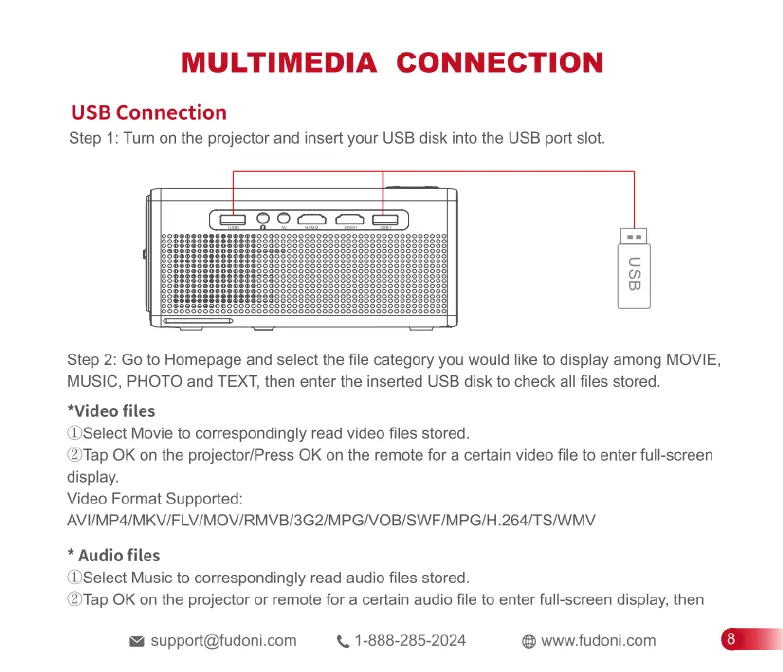
USB
Connection
Step
1:
Turn
on
the
projector
and
insert
your
USB
disk
into
the
USB
port
slot.
asn
[}
I's
|
=R
yanYany=—]
s
Step
2:
Go
to
Homepage
and
select
the
file
category
you
would
like
to
display
among
MOVIE,
MUSIC,
PHOTO
and
TEXT,
then
enter
the
inserted
USB
disk
to
check
all
files
stored
*Video
files
(DSelect
Movie
to
correspondingly
read
video
files
stored.
(2ITap
OK
on
the
projector/Press
OK
on
the
remote
for
a
certain
video
file
to
enter full-screen
display.
Video
Format
Supported:
AVI/MP4/MKV/FLV/MOV/RMVB/3G2/MPG/VOB/SWF/MPG/H.264/TS/WMV
*
Audio
files
(DSelect
Music
to
correspondingly
read
audio
files
stored.
(27Tap
OK
on
the
projector
or
remote
for
a
certain
audio
file
to
enter
full-screen
display,
then
support@fudoni.com
.
1-888-285-2024
@
www.fudoni.com

Related product manuals