EasyManua.ls Logo

FUDONI P3 - HD Connection

FUDONI P3
28 pages
Print Icon
To Next Page IconTo Next Page
To Previous Page IconTo Previous Page
Loading...
press (M)
on
the
remote
to
startpause
playing.
Audio
Format
Supported:
AAC/MP3/FLAC/OGG/APE/AMR/WAV/MP2
*
Photo
files
elect
Photo
to
correspondingly
read
photo
files
stored.
2/Tap
OK
on
the
projector
or
remote
for
a
certain
photo
file
to
enter full-screen
display.
Image
Format
Supported:
JPEG/BMP/PNG
*
Document
files
(DSelect
Office
Suite
to
correspondingly
read
document
files
stored
(2Tap
OK
on
the
projector
or
remote
to
view
contents
of
a
certain
file.
Text
Format
Supported:
TXT
Step
3:
Tap (D)
on
the
projector
or
press
on
the
remote
to
go
back
to
Homepage.
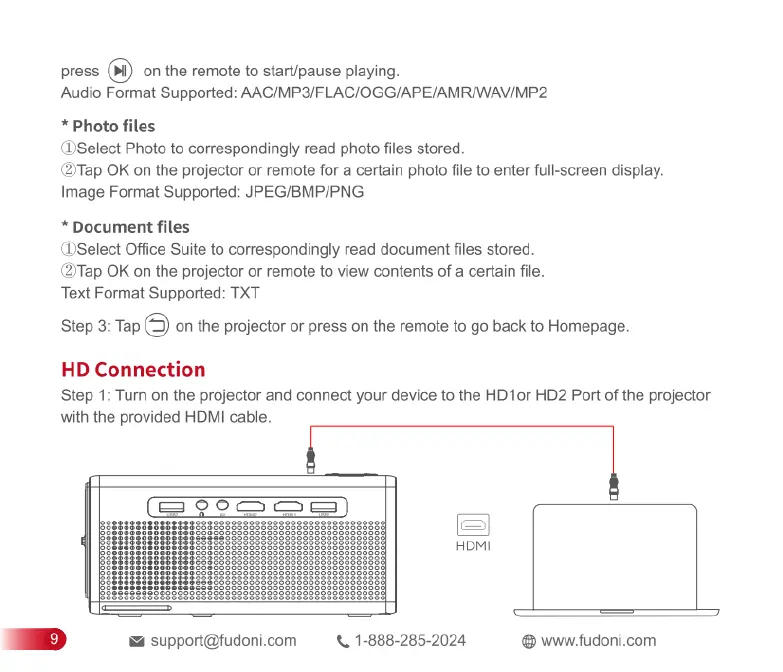
HD
Connection
Step
1:
Tum
on
the
projector
and
connect
your
device
to
the
HD1or
HD2
Port
of
the
projector
with
the
provided
HDMI
cable.
[eRcXanyam)
if
B
FoMI
|
L
|
i
£
support@fudoni.com
X,
1-888-285-2024
www.fudoni.com

Related product manuals