EasyManua.ls Logo

FUDONI P3 - Page 13

FUDONI P3
28 pages
Print Icon
To Next Page IconTo Next Page
To Previous Page IconTo Previous Page
Loading...
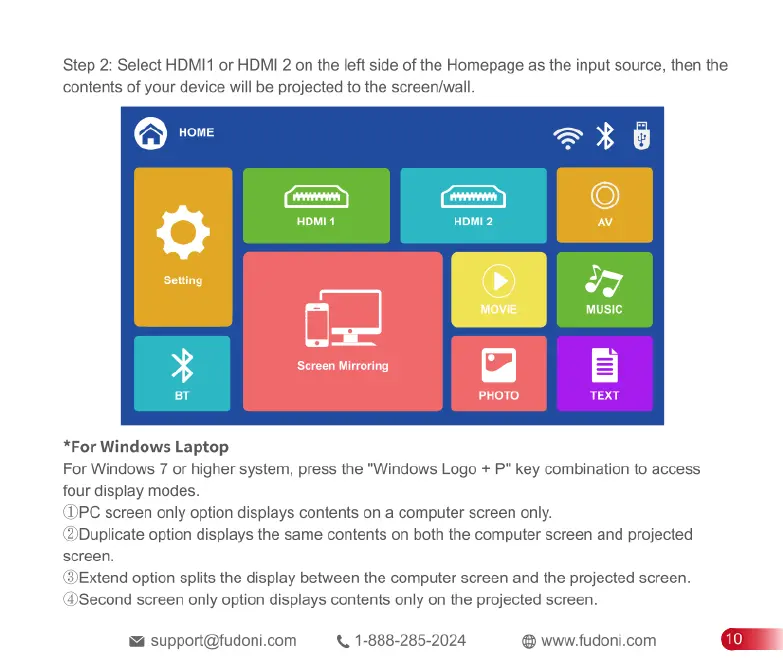
Step
2:
Select
HDMI1
or
HDMI
2
on
the
left
side
of
the
Homepage
as
the
input
source,
then
the
contents
of
your
device
will
be
projected
to
the
screen/wall
*For
Windows
Laptop
For
Windows
7
or
higher
system,
press
the
"Windows
Logo
+
P"
key
combination
to
access
four
display
modes
DPC
screen
only
option
displays
contents
on
a
computer
screen
only.
ZDuplicate
option
displays
the
same
contents
on
both
the
computer
screen
and
projected
screen.
3Extend
option
splits
the
display
between
the
computer
screen
and
the
projected
screen.
1Second
screen
only
option
displays
contents
only
on
the
projected
screen.
support@fudonicom
.
1-888-285-2024
www.fudoni.com

Related product manuals